GraphRAG Python 패키지는 비정형 데이터에서 Knowledge Graph 생성, Knowledge Graph 검색, 그리고 전체 GraphRAG 파이프라인을 한 곳에 모아 제공하는 end-to-end 워크플로우를 제공해요. Python을 사용해서 지식 도우미, 검색 API, 챗봇, 또는 보고서 생성기를 구축하고 있다면, 이 패키지를 통해 Knowledge Graph를 쉽게 통합해서 Retrieval-Augmented Generation (RAG)의 관련성, 정확성, 설명 가능성을 개선할 수 있어요.
이번 포스팅에서는 GraphRAG Python 패키지를 사용해서 0에서 GraphRAG로 가는 방법과 다양한 Knowledge Graph 검색 패턴을 사용해서 GenAI 앱에서 다양한 동작을 얻는 방법을 보여드릴게요.
GraphRAG: GenAI에 지식 추가
Knowledge Graph와 RAG를 결합한 GraphRAG는 환각과 같은 Large Language Model (LLM)의 일반적인 문제를 해결하는 동시에 기존 RAG 접근 방식보다 향상된 품질과 효율성을 위해 도메인별 컨텍스트를 추가하는 데 도움이 돼요. Knowledge Graph는 LLM이 질문에 안정적으로 답변하고 복잡한 워크플로에서 신뢰할 수 있는 에이전트 역할을 하는 데 필요한 상황별 데이터를 제공하죠. 텍스트 데이터의 단편에만 액세스를 제공하는 대부분의 RAG 솔루션과 달리 GraphRAG는 구조화된 정보와 반구조화된 정보를 모두 검색 프로세스에 통합할 수 있다는 장점이 있어요.
GraphRAG Python 패키지는 Knowledge Graph를 생성하고 그래프 순회, text2Cypher를 사용한 쿼리 생성, 벡터 및 전체 텍스트 검색의 조합을 사용하는 Knowledge Graph 데이터 검색 패턴을 쉽게 구현하도록 도와줘요. 전체 RAG 파이프라인을 지원하는 추가 도구와 결합된 이 패키지를 사용하면 GenAI 애플리케이션 및 워크플로에서 GraphRAG를 원활하게 구현할 수 있어요.
빠른 개요: 몇 줄의 코드로 구성된 GraphRAG
다음은 전체 end-to-end 워크플로우를 위한 몇 줄의 코드인데요. 다음 섹션에서는 이 예제의 더 자세한 버전을 살펴보고 다음 GenAI 혁신을 시작하기 위한 추가 리소스를 제공할게요. 복제할 모든 코드는 이 GitHub 저장소에서 찾을 수 있어요.
import neo4j
from neo4j_graphrag.llm import OpenAILLM as LLM
from neo4j_graphrag.embeddings.openai import OpenAIEmbeddings as Embeddings
from neo4j_graphrag.experimental.pipeline.kg_builder import SimpleKGPipeline
from neo4j_graphrag.retrievers import VectorRetriever
from neo4j_graphrag.generation.graphrag import GraphRAG

neo4j_driver = neo4j.GraphDatabase.driver(NEO4J_URI,
                                          auth=(NEO4J_USERNAME, NEO4J_PASSWORD))

ex_llm=LLM(
   model_name="gpt-4o-mini",
   model_params={
       "response_format": {"type": "json_object"},
       "temperature": 0
   })

embedder = Embeddings()

# 1. Build KG and Store in Neo4j Database
kg_builder_pdf = SimpleKGPipeline(
   llm=ex_llm,
   driver=neo4j_driver,
   embedder=embedder,
   from_pdf=True
)
await kg_builder_pdf.run_async(file_path='precision-med-for-lupus.pdf')

# 2. KG Retriever
vector_retriever = VectorRetriever(
   neo4j_driver,
   index_name="text_embeddings",
   embedder=embedder
)

# 3. GraphRAG Class
llm = LLM(model_name="gpt-4o")
rag = GraphRAG(llm=llm, retriever=vector_retriever)

# 4. Run
response = rag.search( "How is precision medicine applied to Lupus?")
print(response.answer)

#output
Precision medicine in systemic lupus erythematosus (SLE) is an evolving approach that aims to tailor treatment based on individual genetic, epigenetic, and pathophysiological characteristics…
0. Neo4j 데이터베이스 생성
RAG 예제를 시작하려면 검색에 사용할 데이터베이스를 만들어야 해요. Neo4j를 사용하면 무료 Neo4j Graph Database를 빠르게 시작할 수 있는데, AuraDB를 사용하면 돼요. 더 높은 수집 및 검색 성능을 위해 AuraDB Free를 사용하거나 AuraDB Professional(Pro) 무료 평가판을 시작할 수도 있고요. Pro 인스턴스에는 RAM이 조금 더 많아서 최고의 사용자 경험을 위해 권장된답니다.
인스턴스를 생성한 후에는 다음 코드에서 사용할 자격 증명을 다운로드하고 저장할 수 있어요.
1. Knowledge Graph 구축
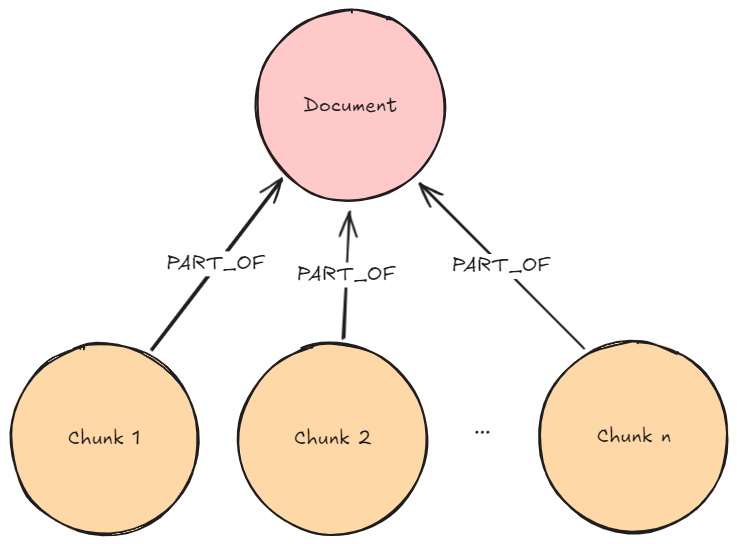
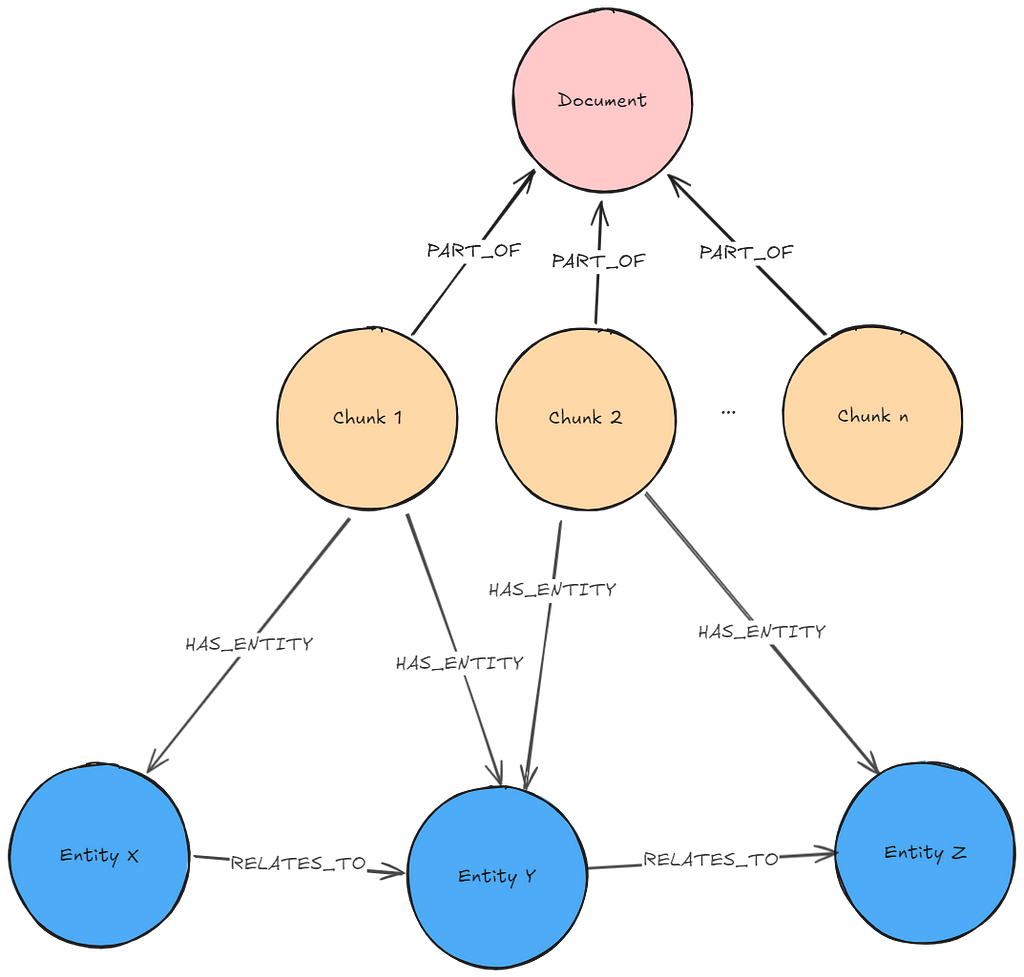
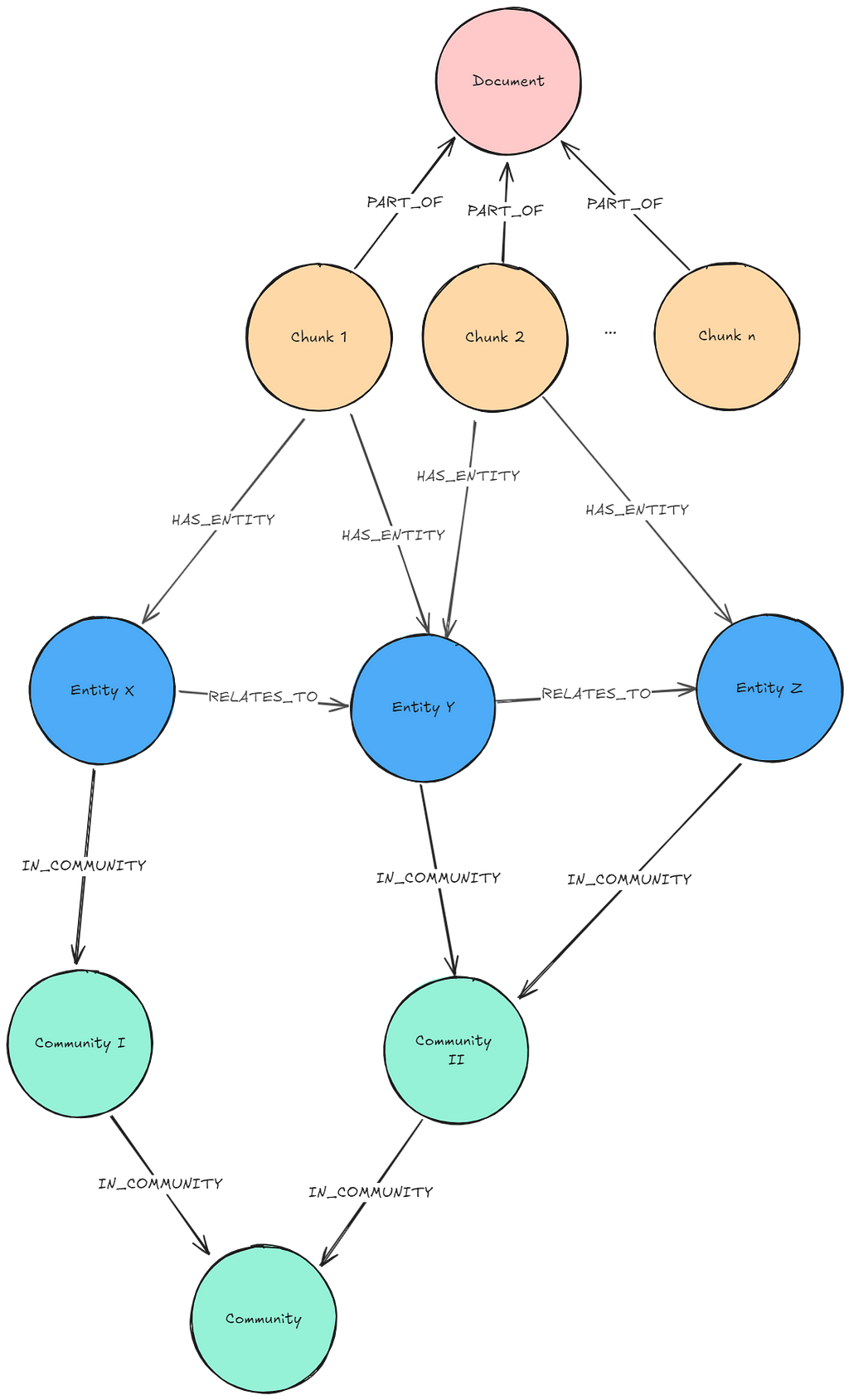
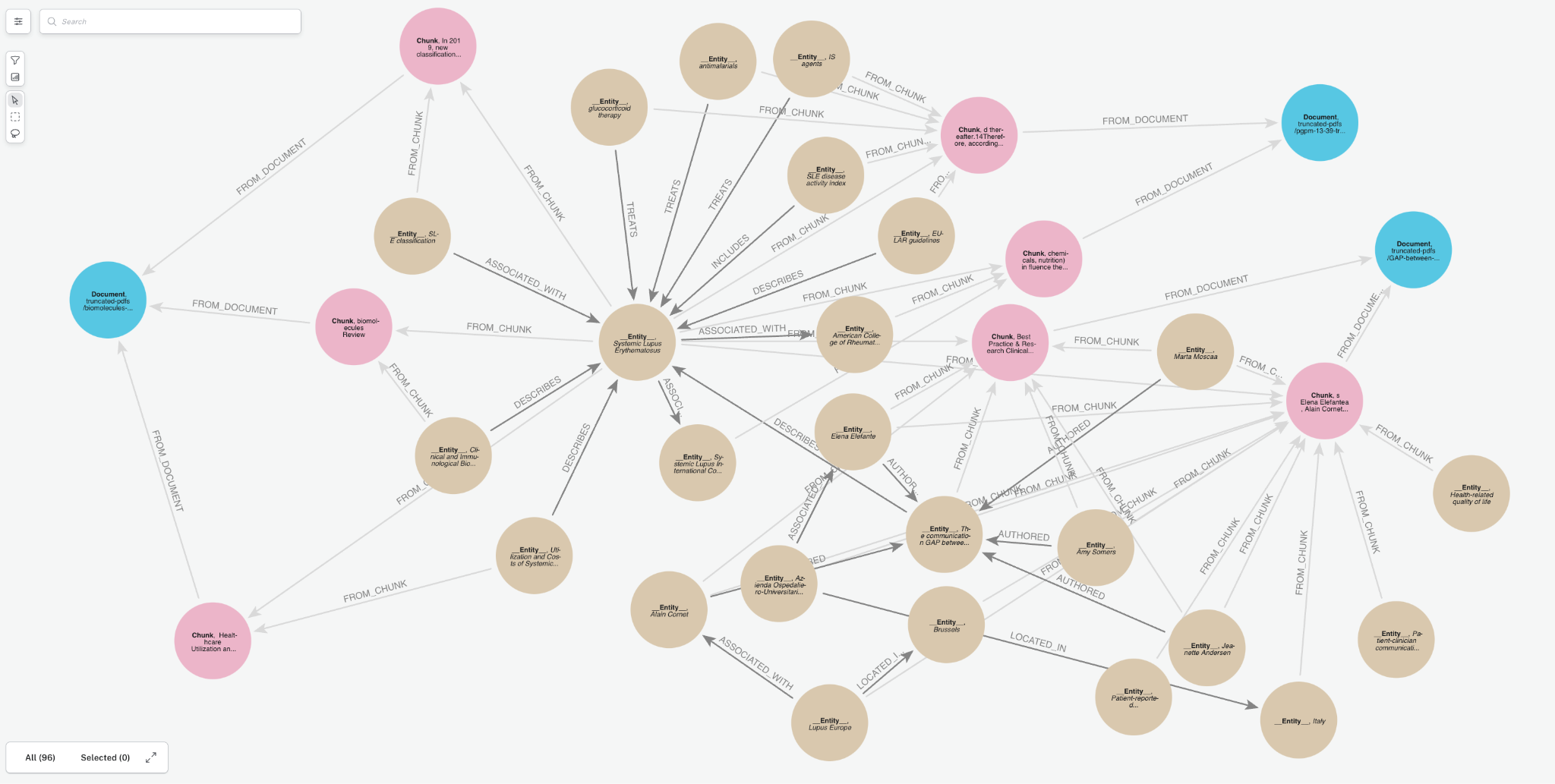
문서를 Knowledge Graph로 변환해서 Neo4j 데이터베이스에 저장해볼게요. 루푸스에 관한 의학 연구 논문이 포함된 몇 가지 PDF 문서를 통해 보여드릴게요. 이런 문서에는 전문적인 정보가 많이 들어있는데, Knowledge Graph는 이 복잡한 임상 데이터를 더 효과적으로 구성해서 AI 사용 사례를 향상시킬 수 있어요. 아래는 우리가 만들 그래프의 샘플이에요. 여기에는 몇 가지 주요 Node 유형(Node Label이라고도 함)이 포함되어 있죠.
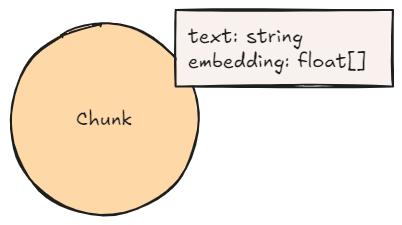
Document: 문서 소스에 대한 메타데이터Chunk: 강력한 Vector Embedding을 위한 임베딩이 포함된 문서의 텍스트 Chunk__Entity__: 텍스트 Chunk에서 추출된 Entity
Entity 간의 Relationship과 Entity가 Chunk와 문서 간의 연결 경로를 생성하는 방법을 확인해보세요. 이게 바로 GraphRAG의 장점이고, 나중에 이게 얼마나 중요한지 살펴보게 될 거예요.
GraphRAG Python 패키지를 사용해서 Knowledge Graph를 만드는 건 Neo4j 전문가가 아니더라도 정말 간단해요.
The SimpleKGPipeline 클래스를 사용하면 다음과 같은 몇 가지 주요 입력으로 Knowledge Graph를 자동으로 구축할 수 있어요.
- Neo4j에 연결하기 위한 Driver,
- Entity 추출을 위한 LLM, 그리고
- 유사성 검색을 위해 텍스트 Chunk에 Vector를 생성하는 임베딩 모델이에요.
Neo4j Driver
Neo4j Driver를 사용하면 데이터베이스에 연결해서 읽기 및 쓰기 트랜잭션을 수행할 수 있어요. 데이터베이스를 생성할 때부터 URI, 사용자 이름 및 비밀번호 변수를 얻을 수 있는데, AuraDB에서 데이터베이스를 생성했다면 다운로드한 파일에 있을 거예요.
import neo4j

neo4j_driver = neo4j.GraphDatabase.driver(NEO4J_URI,
                                         auth=(NEO4J_USERNAME, NEO4J_PASSWORD))
LLM 및 임베딩 모델
이번에는 OpenAI의 GPT-4o-mini를 사용해볼게요. 빠르고 저렴한 모델이거든요. GraphRAG Python 패키지는 모든 LLM 모델을 지원하는데, OpenAI, Google VertexAI, Anthropic, Cohere, Azure OpenAI, 로컬 Ollama 모델 및 LangChain과 작동하는 모든 채팅 모델의 모델을 포함해요. 다른 LLM에 대한 사용자 정의 인터페이스를 구현할 수도 있고요.
마찬가지로 OpenAI의 기본값인 text-embedding-ada-002를 임베딩 모델로 사용할 건데요, 다른 임베더도 다른 공급자로부터 사용할 수 있어요.
import neo4j
from neo4j_graphrag.llm import OpenAILLM
from neo4j_graphrag.embeddings.openai import OpenAIEmbeddings

llm=OpenAILLM(
   model_name="gpt-4o-mini",
   model_params={
       "response_format": {"type": "json_object"}, # use json_object formatting for best results
       "temperature": 0 # turning temperature down for more deterministic results
   }
)

#create text embedder
embedder = OpenAIEmbeddings()
선택 입력: 스키마 & Prompt Template
필수 사항은 아니지만, Knowledge Graph의 품질을 높이고 싶다면 그래프 스키마를 추가하는 걸 추천해요. 엔티티 추출 중에 생성할 Node와 Relationship 유형에 대한 가이드라인을 제공하거든요.
전문가 팁: 어떤 스키마를 사용해야 할지 고민된다면, 먼저 스키마 없이 그래프를 만들어보고 가장 흔하게 생성되는 Node와 Relationship 유형을 살펴보는 것도 좋은 시작점이 될 수 있어요.
그래프 스키마는 추출하려는 엔티티(즉, Node Label)와 Relationship을 정의해요. 이 간단한 예시에서는 사용하지 않겠지만, potential_schema를 통해 어떤 Relationship이 어떤 Node에 연결되어야 하는지 안내할 수도 있답니다. 자세한 내용은 여기에서 확인해 보세요.
basic_node_labels = ["Object", "Entity", "Group", "Person", "Organization", "Place"]

academic_node_labels = ["ArticleOrPaper", "PublicationOrJournal"]

medical_node_labels = ["Anatomy", "BiologicalProcess", "Cell", "CellularComponent",
                      "CellType", "Condition", "Disease", "Drug",
                      "EffectOrPhenotype", "Exposure", "GeneOrProtein", "Molecule",
                      "MolecularFunction", "Pathway"]

node_labels = basic_node_labels + academic_node_labels + medical_node_labels

# define relationship types
rel_types = ["ACTIVATES", "AFFECTS", "ASSESSES", "ASSOCIATED_WITH", "AUTHORED",
   "BIOMARKER_FOR", …]
엔티티 추출을 위한 커스텀 Prompt도 추가할 수 있어요. GraphRAG Python 패키지에는 기본 Prompt가 내장되어 있지만, 사용 사례에 더 적합한 Prompt Engineering을 통해 더욱 유용한 Knowledge Graph를 만들 수 있는 경우가 많답니다. 아래 Prompt는 약간의 실험을 거쳐 만들어졌어요. 기본 Prompt와 동일한 일반 형식을 따라야 한다는 점, 잊지 마세요! 기본 Prompt를 참고하세요.
prompt_template = '''
You are a medical researcher tasks with extracting information from papers
and structuring it in a property graph to inform further medical and research Q&A.

Extract the entities (nodes) and specify their type from the following Input text.
Also extract the relationships between these nodes. the relationship direction goes from the start node to the end node.


Return result as JSON using the following format:
{{"nodes": [ {{"id": "0", "label": "the type of entity", "properties": {{"name": "name of entity" }} }}],
  "relationships": [{{"type": "TYPE_OF_RELATIONSHIP", "start_node_id": "0", "end_node_id": "1", "properties": {{"details": "Description of the relationship"}} }}] }}

- Use only the information from the Input text. Do not add any additional information.
- If the input text is empty, return empty Json.
- Make sure to create as many nodes and relationships as needed to offer rich medical context for further research.
- An AI knowledge assistant must be able to read this graph and immediately understand the context to inform detailed research questions.
- Multiple documents will be ingested from different sources and we are using this property graph to connect information, so make sure entity types are fairly general.

Use only fhe following nodes and relationships (if provided):
{schema}

Assign a unique ID (string) to each node, and reuse it to define relationships.
Do respect the source and target node types for relationship and
the relationship direction.

Do not return any additional information other than the JSON in it.

Examples:
{examples}

Input text:

{text}
'''
`SimpleKGPipeline` 생성
SimpleKGPipeline은 아래 생성자를 사용해서 만들 수 있어요.
from neo4j_graphrag.experimental.components.text_splitters.fixed_size_splitter import FixedSizeSplitter
from neo4j_graphrag.experimental.pipeline.kg_builder import SimpleKGPipeline

kg_builder_pdf = SimpleKGPipeline(
   llm=ex_llm,
   driver=driver,
   text_splitter=FixedSizeSplitter(chunk_size=500, chunk_overlap=100),
   embedder=embedder,
   entities=node_labels,
   relations=rel_types,
   prompt_template=prompt_template,
   from_pdf=True
)SimpleKGPipeline의 다른 선택적 입력으로는 문서 로더와 Knowledge Graph 빌더 컴포넌트가 있어요. 전체 문서는 여기에서 확인할 수 있습니다.
Knowledge Graph 빌더 실행
Knowledge Graph 빌더는 run_async 메서드를 사용해서 실행할 수 있어요. 아래에서는 3개의 PDF를 반복해서 처리할 거예요.
pdf_file_paths = ['truncated-pdfs/biomolecules-11-00928-v2-trunc.pdf',
            'truncated-pdfs/GAP-between-patients-and-clinicians_2023_Best-Practice-trunc.pdf',
            'truncated-pdfs/pgpm-13-39-trunc.pdf']

for path in pdf_file_paths:
    print(f"Processing : {path}")
    pdf_result = await kg_builder_pdf.run_async(file_path=path)
    print(f"Result: {pdf_result}")
완료되면 통합 콘솔에서 결과 Knowledge Graph를 탐색할 수 있어요. 콘솔은 아주 훌륭한 인터페이스를 제공하죠.
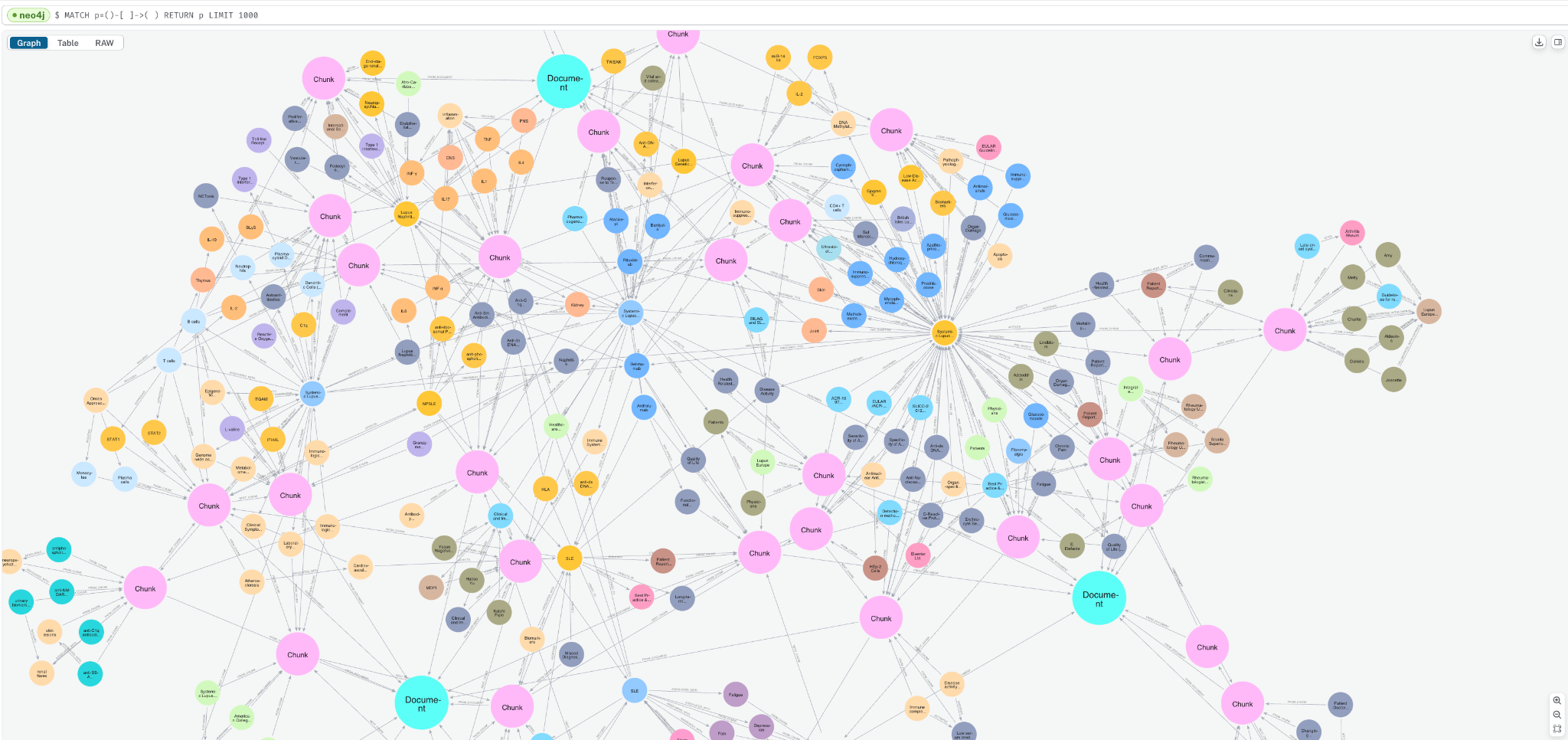
쿼리 탭으로 이동해서 아래 쿼리를 입력하면 그래프 샘플을 볼 수 있습니다.
MATCH p=()-->() RETURN p LIMIT 1000;Document, Chunk, 그리고 __Entity__ 노드들이 어떻게 연결되어 있는지 확인할 수 있을 거예요.
“어휘적” 그래프 부분을 보려면, 다음을 포함하는 Document 와 Chunk node에서 다음을 실행해 보세요.
일치 p=(:Chunk)--(:!__Entity__) RETURN p;이 쿼리는 우리가 수집한 각 문서에 대해 하나씩 연결이 끊긴 컴포넌트들을 보여줘요. 각 Chunk에 추가된 Vector Embedding도 확인할 수 있죠.
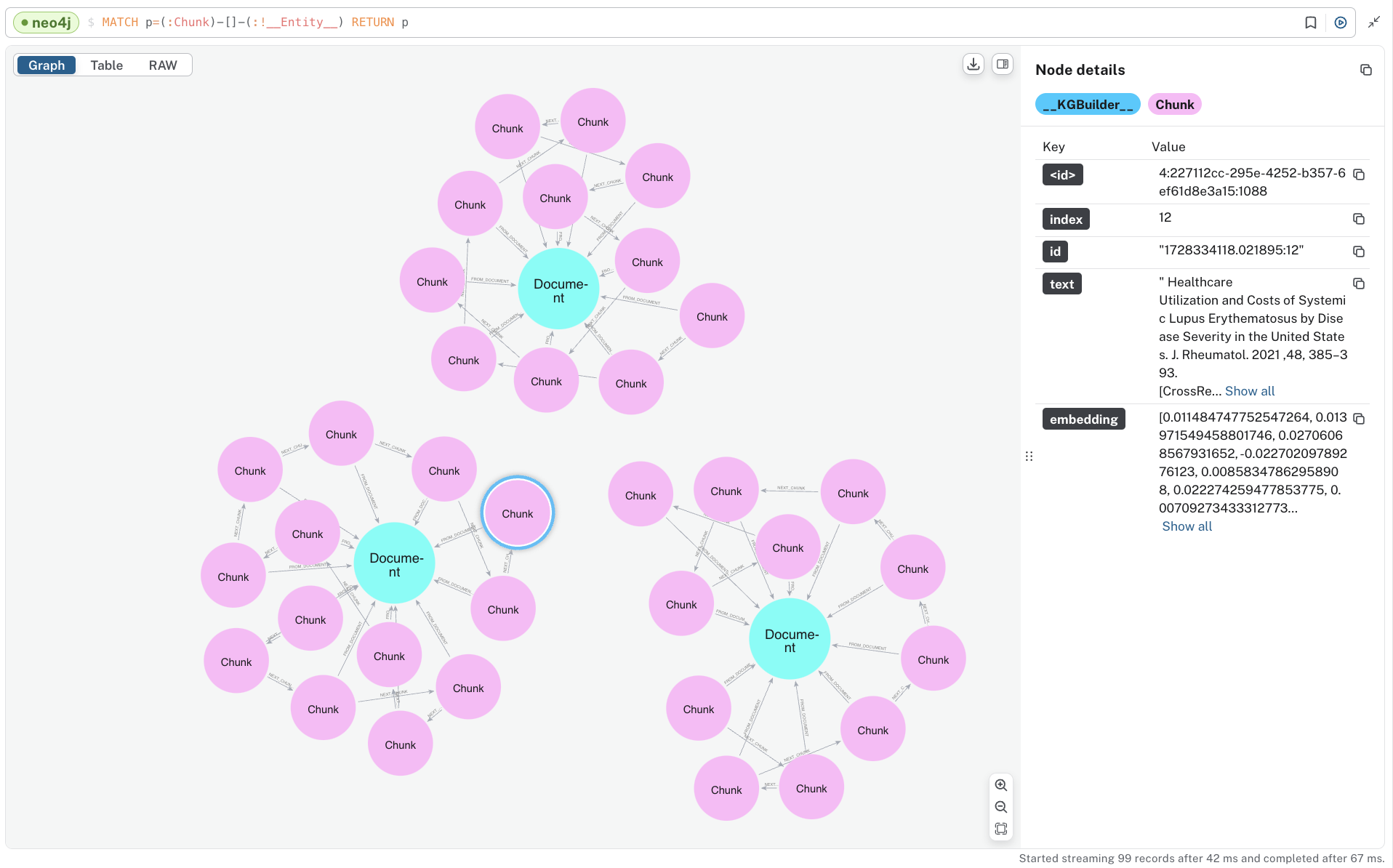
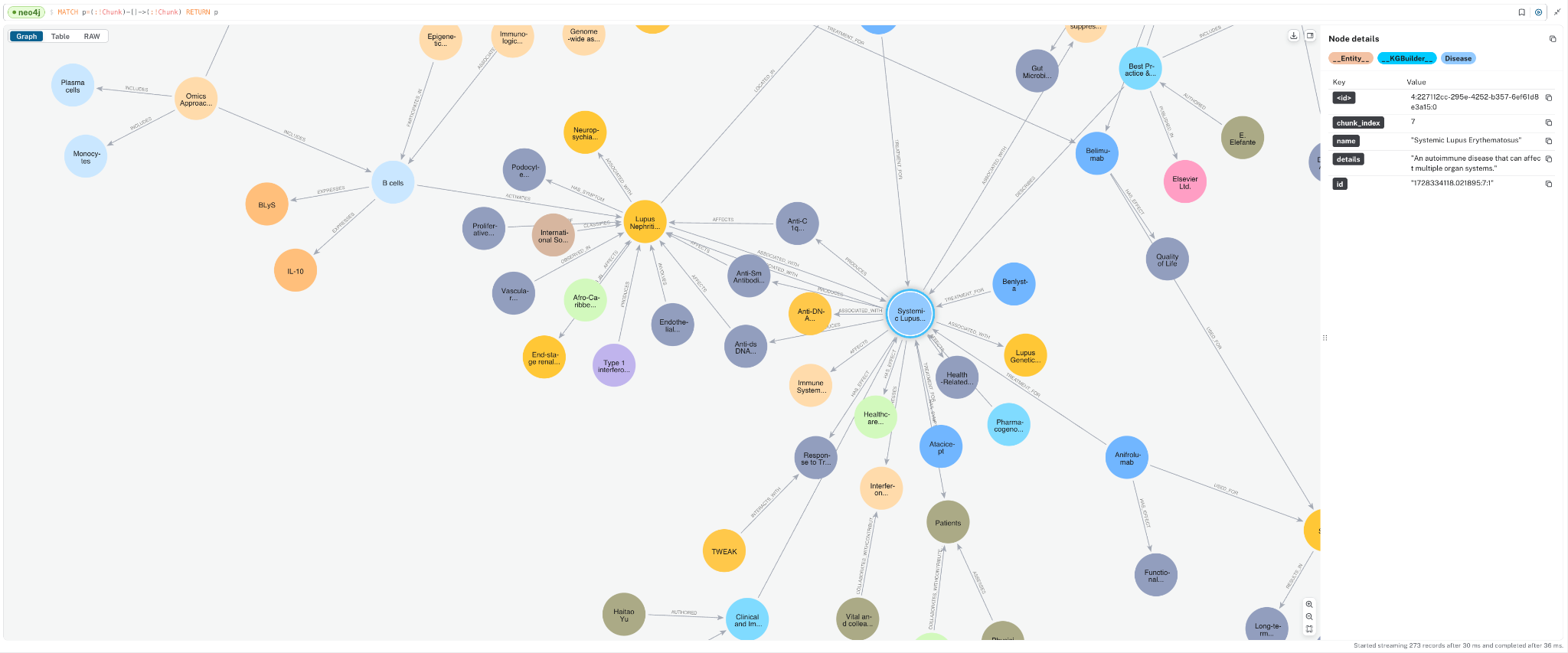
이번에는 그래프를 살펴볼까요? __Entity__ node에서 다음 쿼리를 실행해 보세요.
일치 p=(:!Chunk)-->(:!Chunk) RETURN p; 다양한 개념들이 어떻게 추출되었고, 서로 어떻게 연결되는지 확인할 수 있을 거예요. 이 도메인 그래프는 문서들 사이의 정보를 연결해 준답니다.
맞춤형 및 상세 Knowledge Graph 구축에 대한 참고사항
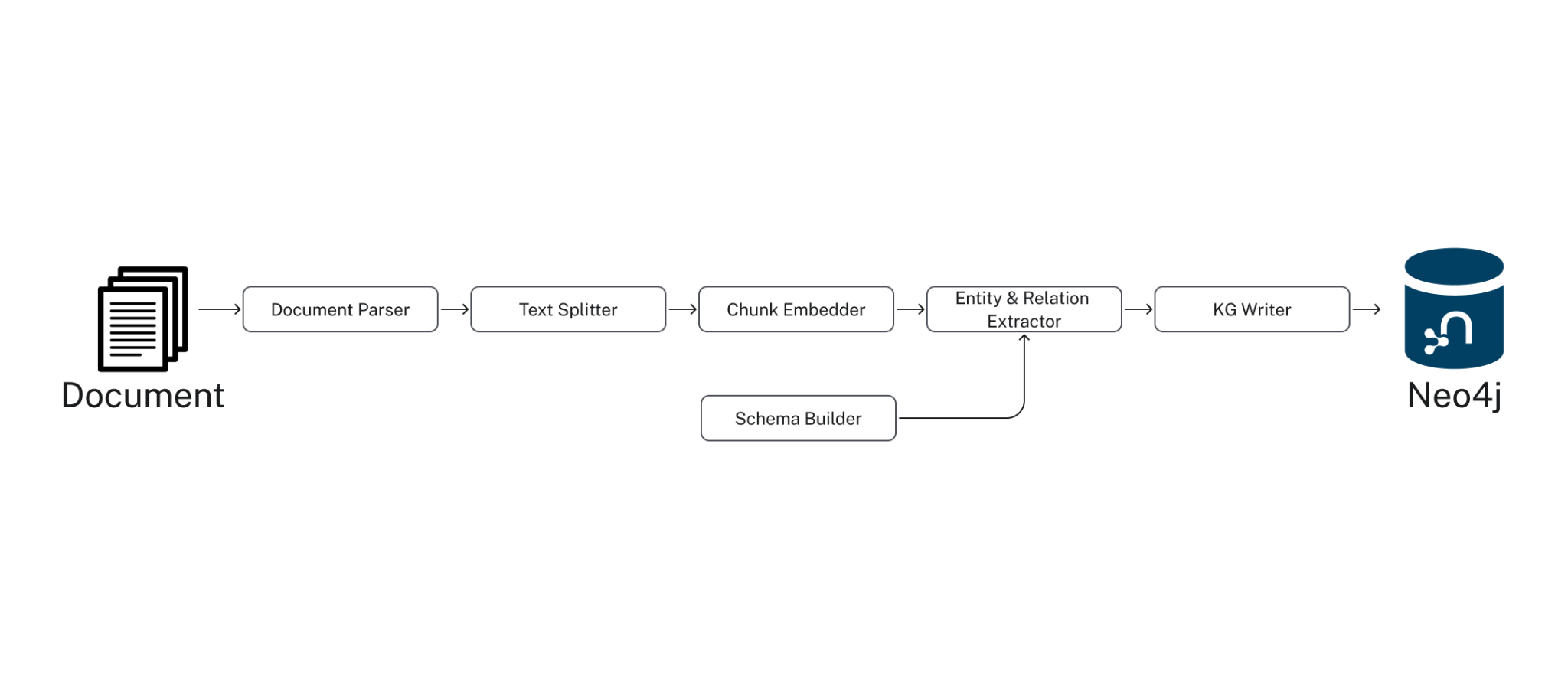
후드 아래에서 SimpleKGPipeline은 아래 나열된 구성 요소를 실행해요. GraphRAG 패키지는 낮은 수준의 파이프라인 API를 제공해서, Knowledge Graph 구축 프로세스를 꽤 많이 커스터마이징할 수 있다는 점! 자세한 내용은 선적 서류 비치를 참고하세요.
- 문서 파서: PDF 같은 문서에서 텍스트를 추출해요.
- 텍스트 분할기: LLM 컨텍스트 창에서 관리하기 쉽도록 텍스트를 작은 조각으로 분할하죠 (토큰 제한).
- 청크 임베더: 각 청크에 대한 텍스트 Vector Embedding을 계산해요.
- 스키마 빌더: 정확하고 쉽게 탐색할 수 있는 Knowledge Graph를 위해 LLM 엔터티 추출을 기반으로 하는 스키마를 제공합니다.
- 엔터티 및 관계 추출기: 텍스트에서 관련 엔터티 및 관계를 추출해요.
- 지식 정보 작성자: 식별된 엔터티 및 관계를 KG에 저장해요.
2. Knowledge Graph에서 데이터 검색
GraphRAG Python 패키지는 Knowledge Graph에서 데이터를 검색하기 위한 여러 클래스를 제공하는데요, 한번 살펴볼까요?
- 벡터 리트리버: Vector Embedding을 사용해서 유사성 검색을 수행해요.
- 벡터 사이퍼 리트리버: Neo4j의 그래프 쿼리 언어인 Cypher의 검색 쿼리와 벡터 검색을 결합해서 그래프를 탐색하고 추가 `Node`와 `Relationship`을 통합합니다.
- 하이브리드 리트리버: 벡터 검색과 전체 텍스트 검색을 결합합니다.
- 하이브리드 사이퍼 리트리버: 추가 그래프 탐색을 위해 벡터 및 전체 텍스트 검색을 Cypher 검색 쿼리와 결합합니다.
- Text2Cypher: Neo4j에 대해 실행하기 위해 Natural Language 쿼리를 Cypher 쿼리로 변환합니다.
- Weaviate 및 Pinecone Neo4j 리트리버: Weaviate 또는 Pinecone에 저장된 벡터를 검색하고 외부 ID 속성을 사용하여 Neo4j의 `Node`에 연결할 수 있어요.
- : 특정 요구 사항에 따라 맞춤형 검색 방법을 허용합니다.
이러한 검색기를 사용하면 다양한 데이터 검색 패턴을 구현해서 RAG 파이프라인의 관련성과 정확성을 높일 수 있어요.
방금 만든 그래프에서 몇 가지를 살펴볼게요.
벡터 리트리버
벡터 리트리버는 ANN(Approximate Nearest Neighbor) 벡터 검색을 사용해서 Knowledge Graph에서 데이터를 검색합니다.
이 검색기가 청크 `Node`에서 정보를 가져올 수 있도록 Neo4j에서 벡터 `Index`를 생성할 수 있어요.
from neo4j_graphrag.indexes import create_vector_index

create_vector_index(driver, name="text_embeddings", label="Chunk",
                   embedding_property="embedding", dimensions=1536, similarity_fn="cosine")
그런 다음 아래 코드를 사용해서 벡터 검색기를 인스턴스화할 수 있어요.
from neo4j_graphrag.retrievers import VectorRetriever

vector_retriever = VectorRetriever(
   driver,
   index_name="text_embeddings",
   embedder=embedder,
   return_properties=["text"],
)
이제 간단한 프롬프트로 이 검색기를 실행해 볼게요. 검색기는 텍스트 청크와 벡터 유사성 점수를 다시 가져와서 RAG의 질문에 답변하는 데 유용한 컨텍스트를 제공할 수 있답니다.
import json

vector_res = vector_retriever.get_search_results(query_text = "How is precision medicine applied to Lupus?",
             top_k=3)
for i in vector_res.records: print("====n" + json.dumps(i.data(), indent=4))


# output text chunks
====
{
    "node": {
        "text": "precise and systematic fashion as suggested here.nFuture care will involve molecular diagnostics throughoutnthe patient timecourse to drive the least toxic combinationnof therapies. Recent evidence suggests a paradigm shift isnon the way but it is hard to predict how fast it will come.nDisclosurenThe authors report no con ufb02icts of interest in this work.nReferencesn1. Lisnevskaia L, Murphy G, Isenberg DA. Systemic lupusnerythematosus. Lancet .2014 ;384:1878 u20131888. doi:10.1016/S0140-n6736(14)60128"
    },
    "score": 0.9368438720703125
}
====
{
    "node": {
        "text": "d IS agents.nPrecision medicine consists of a tailored approach toneach patient, based on genetic and epigenetic singularities,nwhich in ufb02uence disease pathophysiology and drugnresponse. Precision medicine in SLE is trying to addressnthe need to assess SLE patients optimally, predict diseasencourse and treatment response at diagnosis. Ideally everynpatient would undergo an initial evaluation that wouldnproufb01le his/her disease, assessing the main pathophysiolo-ngic pathway through biomarkers, ther"
    },
    "score": 0.935699462890625
}
====
{
    "node": {
        "text": "REVIEWnT owards Precision Medicine in Systemic LupusnErythematosusnThis article was published in the following Dove Press journal:nPharmacogenomics and Personalized MedicinenElliott Lever1nMarta R Alves2nDavid A Isenberg1n1Centre for Rheumatology, Division ofnMedicine, University College HospitalnLondon, London, UK;2Internal Medicine,nDepartment of Medicine, CentronHospitalar do Porto, Porto, PortugalAbstract: Systemic lupus erythematosus (SLE) is a remarkable condition characterised byndiversit"
    },
    "score": 0.9312744140625
}
Vector Cypher Retriever
탐색해볼 만한 또 다른 유용한 검색기는 Vector Cypher Retriever에요. 이걸 사용하면 Neo4j의 그래프 쿼리 언어인 Cypher를 사용해서 Vector Search로 초기 Node 세트를 검색한 다음, 그래프 순회 로직을 통합할 수 있어요. 아래에서는 Vector Search를 통해 청크 Node를 얻은 다음, 최대 3홉 아웃까지 엔터티를 탐색하는 검색기를 만들어볼게요.
from neo4j_graphrag.retrievers import VectorCypherRetriever

vc_retriever = VectorCypherRetriever(
   driver,
   index_name="text_embeddings",
   embedder=embedder,
   retrieval_query="""
//1) Go out 2-3 hops in the entity graph and get relationships
WITH node AS chunk
MATCH (chunk)<-[:FROM_CHUNK]-()-[relList:!FROM_CHUNK]-{1,2}()
UNWIND relList AS rel

//2) collect relationships and text chunks
WITH collect(DISTINCT chunk) AS chunks,
 collect(DISTINCT rel) AS rels

//3) format and return context
RETURN '=== text ===n' + apoc.text.join([c in chunks | c.text], 'n---n') + 'nn=== kg_rels ===n' +
 apoc.text.join([r in rels | startNode(r).name + ' - ' + type(r) + '(' + coalesce(r.details, '') + ')' +  ' -> ' + endNode(r).name ], 'n---n') AS info
"""
)
동일한 프롬프트를 제출하면 다음과 같은 컨텍스트가 반환될 거예요.
vc_res = vc_retriever.get_search_results(query_text = "How is precision medicine applied to Lupus?", top_k=3)

# print output
kg_rel_pos = vc_res.records[0]['info'].find('nn=== kg_rels ===n')
print("# Text Chunk Context:")
print(vc_res.records[0]['info'][:kg_rel_pos])
print("# KG Context From Relationships:")
print(vc_res.records[0]['info'][kg_rel_pos:])


# output
# Text Chunk Context:
=== text ===
precise and systematic fashion as suggested here.
Future care will involve molecular diagnostics throughout
the patient timecourse to drive the least toxic combination
of therapies. Recent evidence suggests a paradigm shift is
on the way but it is hard to predict how fast it will come.
Disclosure
The authors report no con flicts of interest in this work.
References
1. Lisnevskaia L, Murphy G, Isenberg DA. Systemic lupus
erythematosus. Lancet .2014 ;384:1878 –1888. doi:10.1016/S0140-
6736(14)60128
---
d IS agents.
Precision medicine consists of a tailored approach to
each patient, based on genetic and epigenetic singularities,
which in fluence disease pathophysiology and drug
response. Precision medicine in SLE is trying to address
the need to assess SLE patients optimally, predict disease
course and treatment response at diagnosis. Ideally every
patient would undergo an initial evaluation that would
profile his/her disease, assessing the main pathophysiolo-
gic pathway through biomarkers, ther
---
REVIEW
T owards Precision Medicine in Systemic Lupus
Erythematosus…


=== kg_rels ===
Systemic lupus erythematosus - AUTHORED(Published in) -> N. Engl. J. Med.
---
Lisnevskaia L - AUTHORED() -> Systemic lupus erythematosus
---
Murphy G - AUTHORED() -> Systemic lupus erythematosus
---
Isenberg DA - AUTHORED() -> Systemic lupus erythematosus
---
Systemic lupus erythematosus - CITES(Published in) -> Lancet
---
Systemic lupus erythematosus - CITES(Systemic lupus erythematosus is discussed in the Lancet publication.) -> Lancet
---
Systemic lupus erythematosus - ASSOCIATED_WITH(SLE is characterized by aberrant activity of the immune system) -> Aberrant activity of the immune system
---
Immunological biomarkers - USED_FOR(Immunological biomarkers could diagnose and monitor disease activity in SLE) -> Systemic lupus erythematosus
---
Novel SLE biomarkers - DESCRIBES(Novel SLE biomarkers have been discovered through omics research) -> Systemic lupus erythematosus
—
콘솔에 시각화하면 벡터 검색의 텍스트 청크와 엔터티, 그리고 연결된 Knowledge Graph 관계의 조합인 아래 하위 그래프가 반환되는 것을 확인할 수 있어요.
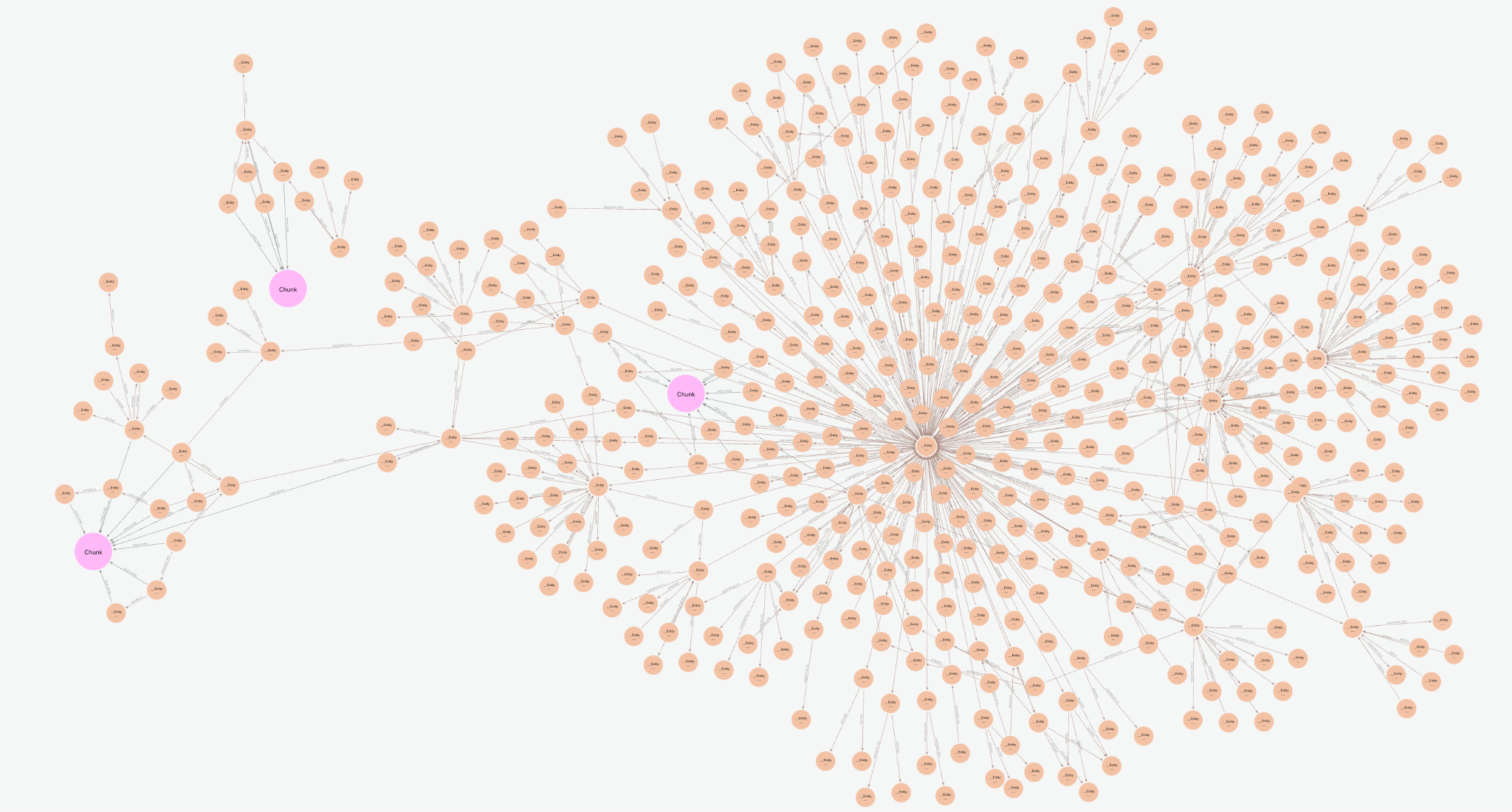
Vector Cypher Retriever는 관계 집합을 (Node)-[RELATION]->(Node) 형식으로 반환해서 엔티티 그래프를 텍스트화해요. 이는 데이터베이스의 다양한 부분에서 얻은 인사이트를 결합해서 여러 청크와 잠재적으로 여러 문서를 연결하죠. 개별 텍스트 덩어리를 보는 대신 엔티티 간의 관계를 통해 더 광범위하고 상호 연결된 정보를 공개할 수 있어서 나중에 더 복잡한 쿼리에 답할 수 있게 돼요. 관계의 명시적인 특성은 사실이 어떻게 도출되는지 정확하게 볼 수 있게 해주므로 설명 가능성을 높여줘요. 위에서 다룬 Knowledge Graph 구성을 조정해서 사용 사례에 더 잘 맞도록 이러한 관계의 품질을 반복할 수도 있고요.
다음 섹션에서는 다양한 검색기가 어떻게 작동하는지 확인하기 위해 호출할 수 있는 GraphRAG 객체를 만들어 볼 거예요.
3. GraphRAG 인스턴스화 및 실행
GraphRAG Python 패키지를 사용하면 GraphRAG 파이프라인을 쉽게 인스턴스화하고 실행할 수 있어요. 전용 GraphRAG 클래스를 사용할 수 있는데, 최소한 생성자에 LLM과 Retriever를 전달해야 해요. 선택적으로 사용자 정의 Prompt Template도 넣을 수 있죠. 여기서는 LLM이 데이터 소스의 정보를 잘 따르도록 좀 더 자세한 지침을 제공하기 위해 그렇게 할 거예요.
아래에서는 벡터 및 벡터 Cypher 검색기 모두에 대한 GraphRAG 객체를 만들 거예요.
from neo4j_graphrag.llm import OpenAILLM as LLM
from neo4j_graphrag.generation import RagTemplate
from neo4j_graphrag.generation.graphrag import GraphRAG

llm = LLM(model_name="gpt-4o",  model_params={"temperature": 0.0})

rag_template = RagTemplate(template='''Answer the Question using the following Context. Only respond with information mentioned in the Context. Do not inject any speculative information not mentioned.

# Question:
{query_text}

# Context:
{context}

# Answer:
''', expected_inputs=['query_text', 'context'])

v_rag  = GraphRAG(llm=llm, retriever=vector_retriever, prompt_template=rag_template)
vc_rag = GraphRAG(llm=llm, retriever=vc_retriever, prompt_template=rag_template)
이제 간단한 질문을 던져보고 다양한 Knowledge Graph 검색 패턴이 어떻게 비교되는지 확인해 볼까요?
q = "How is precision medicine applied to Lupus? provide in list format."

print(f"Vector Response: n{v_rag.search(q, retriever_config={'top_k':5}).answer}")
print("n===========================n")
print(f"Vector + Cypher Response: n{vc_rag.search(q, retriever_config={'top_k':5}).answer}")| 벡터 RAG 응답 | 벡터 + Cypher RAG 응답 |
|---|---|
|
|
이와 같은 간단한 질문에 대한 답변은 다양한 Knowledge Graph 벡터 검색 접근 방식 간에 비슷할 수 있어요. 두 답변 모두 유사한 정보를 포함하고 있다는 걸 알 수 있죠. 다른 간단한 질문에 대해서는 응답이 약간 더 일반적이거나 더 광범위한 반면, 벡터 + Cypher 응답은 의학 연구를 위해 특별히 구성된 Knowledge Graph의 도메인/엔티티 부분을 가져오기 때문에 좀 더 도메인 특정적이거나 기술적이에요 (엔티티 추출 프롬프트 및 스키마를 다시 살펴보면 알 수 있어요).
물론 검색 방법을 조정하고 결합해서 이러한 응답을 더욱 향상시킬 수 있어요. 이건 단지 시작의 예일 뿐이에요. 여러 텍스트 덩어리에서 정보를 가져와야 하는 좀 더 복잡한 질문을 해볼게요.
q = "Can you summarize systemic lupus erythematosus (SLE)? including common effects, biomarkers, and treatments? Provide in detailed list format."

v_rag_result = v_rag.search(q, retriever_config={'top_k': 5}, return_context=True)
vc_rag_result = vc_rag.search(q, retriever_config={'top_k': 5}, return_context=True)

print(f"Vector Response: n{v_rag_result.answer}")
print("n===========================n")
print(f"Vector + Cypher Response: n{vc_rag_result.answer}")
산출:
| 벡터 RAG 응답 | 벡터 + Cypher RAG 응답 |
|---|---|
전신 홍반 루푸스 (Systemic Lupus Erythematosus, SLE) 개요:
|
전신홍반루푸스(SLE) 요약:일반적인 효과:
SLE는 치료할 수 없지만 증상을 조절할 수 있고 진행을 지연시킬 수 있대요. |
이러한 답변은 더 중요한 차이를 보여주는데요. 그만큼Vector + Cypher 응답은 특히 바이오마커와 치료에 대해 더 자세하고 구체적이어서, 해당 주제에 대한 깊이를 추구하는 전문가에게 더 유용할 거예요. Vector 응답은 합리적으로 잘 구조화되어 있고 일반적인 효과에 대한 좋은 개요를 제공하지만, 기술적인 세부 사항이 완벽하지는 않아요. 문서에는 도메인별 관련 정보가 많이 포함되어 있지 않거든요.
이 경우 Vector + Cypher 응답은 여러 문서와 텍스트 청크의 정보를 연결하는 Knowledge Graph의 entities와 relationships를 사용하므로, 여러 소스의 정보를 요구하는 질문에 더 효과적이에요.
반환된 context를 비교하면 Vector 전용 검색기가 특정 단어 "biomarker"를 포함하는 시스템적으로 유사한 텍스트 덩어리를 반환했다는 것을 알 수 있어요. 하지만 특정 바이오마커와 같은 특정 기술적 세부 정보는 포함되어 있지 않죠.
for i in v_rag_result.retriever_result.items: print(json.dumps(eval(i.content), indent=1))

#output
{
 "text": "ld be noted that nreproducibility and reliability may be affected by laboratory errors, specific techniques, nor changes in storage [13]. Because SLE can cause damage to various organs, has a complex pathogenesis, and displays heterogeneous clinical manifestations, one nparticular biomarker may only reflect one specific aspect of SLE but not be useful for nreflecting the state of the disease as a whole [14,15]. n nFigure 1. Common biomarkers for SLE and their measur ement sites in patients with "
}
{
 "text": "agnosed and classified based on a patientu2019s clinical symptoms, signs, and nlaboratory biomarkers that reflect immune reactivity and inflammation in various norgans. It is necessary to develop consistent cl assification criteria of SLE for research and nclinical diagnosis. The most widely used classification criteria for SLE was established by the American College of Rheumatology (ACR) and contains laboratory biomarkers, nFigure 1. Common biomarkers for SLE and their measurement sites in patient"
}
{
 "text": "s nElena Elefantea, Alain Cornetb, Jeanette Andersenb, Amy Somersb, Marta Moscaa,* naRheumatology Unit, Department of Clinical and Experimental Medicine, Azienda Ospedaliero-Universitaria Pisana, Italy nbLupus Europe, Brussels, Belgium   nARTICLE INFO  nKeywords: nSystemic Lupus Erythematosus nPatient-reported outcomes nPatient-clinician communication gap nHealth-related quality of life ABSTRACT  nSystemic Lupus Erythematosus (SLE) imposes a great burden on the lives of patients. Patients u2019 and "
}
{
 "text": "immunological biomarkers that could diagnose and monitor disease activity in SLE, with andnwithout organ-speciufb01c injury. In addition, novel SLE biomarkers that have been discovered throughnu201comicsu201d research are also reviewed.nKeywords: systemic lupus erythematosus; biomarkers; diagnosis; monitoring; omicsn1. IntroductionnSystemic lupus erythematosus (SLE) is a systemic autoimmune disease characterizednby aberrant activity of the immune system [ 1] and presents with a wide range of clinicalnmanife"
}
{
 "text": "nSystemic Lupus Erythematosus (SLE) imposes a great burden on the lives of patients. Patients u2019 and nphysicians u2019 concerns about the disease diverge considerably. Physicians focus on controlling ndisease activity to prevent damage accrual, while patients focus on symptoms that impact on nHealth-Related Quality of Life (HRQoL). We explored the physicians u2019 and patients u2019 perspective nand the potential role of Patient Reported Outcomes (PROs). Physicians are aware of the theo-nretical usefulness o"
}
반면에, 반환된 컨텍스트에서 바이오마커를 검색하면 Vector + Cypher를 통해 도메인별 컨텍스트를 다루는 관계를 볼 수 있을 거예요. 다음은 출력의 샘플입니다.
vc_ls = vc_rag_result.retriever_result.items[0].content.split('\n---\n')
for i in vc_ls:
   if "biomarker" in i: print(i)

#output (sample)

…
IP-10 - BIOMARKER_FOR(IP-10 is a biomarker for SLE) -> SLE
…
ANA - BIOMARKER_FOR(ANA is highly characteristic of SLE and can be used as a biomarker.) -> SLE
anti-Sm antibodies - BIOMARKER_FOR(Presence of anti-Sm antibodies serves as a biomarker for SLE classification) -> SLE
…
dysfunctional high-density lipoprotein - BIOMARKER_FOR(dysfunctional high-density lipoprotein is a key biomarker for SLE patients with CVD) -> SLE
Anti-dsDNA antibodies - ASSOCIATED_WITH(Anti-dsDNA antibodies are biomarkers associated with SLE.) -> SLE
…
치료법에 대해서도 똑같이 해보면 비슷한 패턴을 확인할 수 있어요.
궁극적으로 GraphRAG Python 패키지는 조정, 결합 및 사용자 정의할 수 있는 데이터 검색 방법과 여러 가지 다른 데이터 검색 방법을 제공해요. GenAI 애플리케이션에서 GraphRAG 파이프라인을 설계하기 위한 다양한 옵션이 있는 거죠.
초보자를 위한 GraphRAG
연결된 데이터를 기반으로 복잡한 질문에 답할 수 있는 GraphRAG 애플리케이션을 구축해 보세요. 세 가지 주요 검색 패턴을 알아볼까요?
GraphRAG 경험을 단순화하는 리소스
GraphRAG Python 패키지를 사용하면 문서에서 Knowledge Graph 생성 및 검색으로 전환하는 것이 훨씬 쉬워져요. Neo4j 전문가가 될 필요도 없고 많은 코드를 작성할 필요도 없죠. 또한 일반적인 GraphRAG 패턴을 특징으로 하고 개발 경험을 단순화하는 데 도움이 되는 가이드와 클래스를 준비했어요. 다음 리소스를 꼭 확인해 보세요.
- GraphRAG Python 패키지 문서
- 심층적인 블로그 게시물:
- 구조화된 Knowledge Graph 시작하기
- 그래프 탐색으로 Vector Search 강화(VectorCypherRetriever 기능)
- GraphRAG 애플리케이션을 위한 하이브리드 검색(하이브리드 벡터/텍스트 검색)
- Cypher 탐색을 통한 하이브리드 벡터/텍스트 검색
- Graph Academy 및 코딩된 예제를 포함한 GraphRAG 및 GenAI에 대한 기타 학습 리소스:
- GraphAcademy: Retrieval-Augmented Generation(RAG) 마스터링
- GenAI 리소스 살펴보기
- GraphRAG
- Python
- RAG
에이치시스템즈의 LogTree는 Neo4j 기반 GraphRAG 플랫폼으로, 데이터를 자동으로 지식그래프화하고 자연어 질의로 즉시 답을 제공합니다.
'GraphRAG' 카테고리의 다른 글
| 토끼도 이해하는 그래프: Neo4j와 GraphRAG 입문 (0) | 2026.05.18 |
|---|---|
| 그래프, 세상을 먹여 살리다: Neo4j와 GraphRAG의 힘 (0) | 2026.05.18 |
| 거의 순수 Cypher로 구현하는 GraphRAG (0) | 2026.05.14 |
| GraphRAG 선언문: GenAI에 지식 더하기 (1) | 2026.05.14 |
| LLM 지식 그래프 빌더: 5분 만에 Zero에서 GraphRAG까지 (0) | 2026.05.13 |