
Neo4j가 LangChain과의 통합을 발표한 이후로, Neo4j와 LLM을 사용해서 RAG(Retrieval-Augmented Generation)를 구축하는 다양한 사용 사례들이 나타났어요. 덕분에 최근 몇 달 동안 Knowledge Graph를 활용한 RAG에 대한 관심이 엄청나게 높아졌죠. Knowledge Graph 기반 RAG 시스템은 기존 RAG 방식보다 환각 현상(hallucination)을 더 잘 관리하는 경향이 있는 것 같아요. RAG 애플리케이션을 더욱 발전시키기 위해 에이전트 기반 시스템을 사용하는 경우도 늘고 있고요. 한 단계 더 나아가 LangChain 생태계에 LangGraph 프레임워크가 추가되면서 LLM 애플리케이션에 주기와 지속성을 더할 수 있게 되었답니다.
자, 그럼 LangChain과 LangGraph를 사용해서 Neo4j용 GraphRAG 워크플로우를 만드는 방법을 알아볼까요? 복잡한 작업 흐름을 만들기 위해 여러 단계에서 LLM을 활용하고, 동적인 프롬프트 쿼리 분해 기술도 사용할 거예요. 벡터 의미 검색과 그래프 QA 체인을 분리하기 위해 라우팅 기술도 활용할 거고요. LangGraph GraphState를 사용해서 이전 단계에서 얻은 컨텍스트로 프롬프트 템플릿을 풍부하게 만들어볼게요.
워크플로우의 대략적인 모습은 아래 이미지와 같아요.
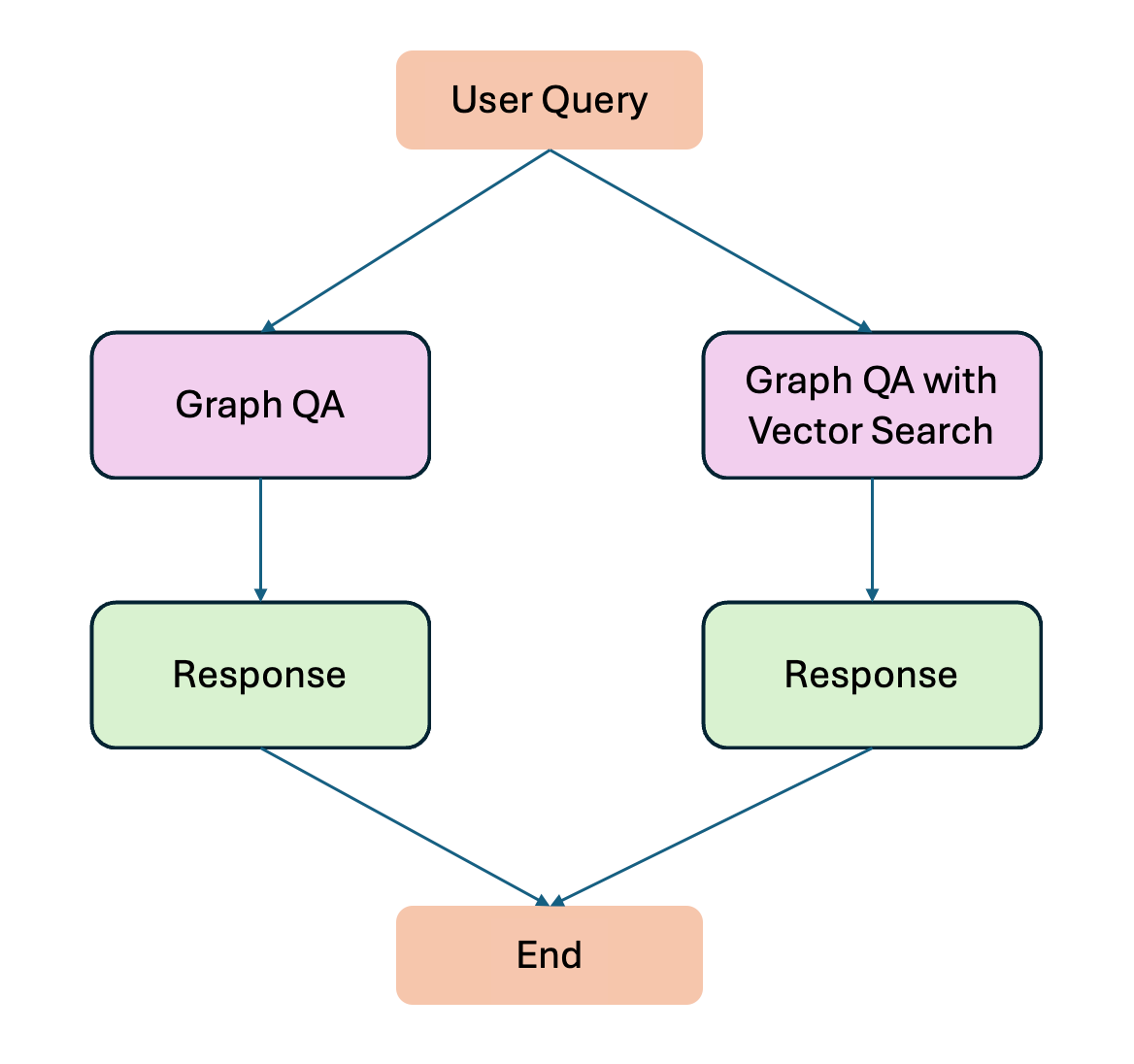
자세한 내용을 살펴보기 전에 LangChain 기반 GraphRAG 워크플로우를 간단하게 요약해 볼까요?
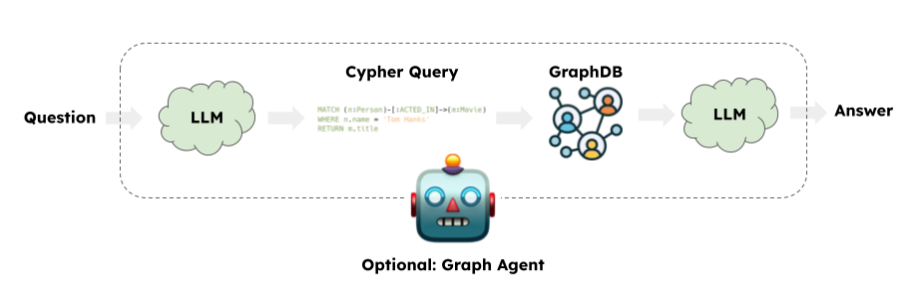
출처: LangChain
일반적인 GraphRAG 애플리케이션은 LLM을 사용해서 Cypher 쿼리 언어를 생성하는 작업을 포함해요. 그런 다음 LangChain GraphCypherQAChain은 생성된 Cypher 쿼리를 Graph Database(예: Neo4j)에 제출해서 쿼리 결과를 검색하죠. 마지막으로 LLM은 초기 쿼리 및 그래프 응답을 기반으로 응답을 반환해요. 이 시점에서 응답은 기존 그래프 쿼리에만 기반하는 거죠. Neo4j 벡터 인덱싱 기능이 도입된 이후에는 Semantic Search도 수행할 수 있게 되었어요. Property Graph를 다룰 때 Semantic Search와 그래프 쿼리를 결합하거나 둘을 분리하는 것이 유용한 경우가 있답니다.
그래프 쿼리 예시
기사, 저자, 저널, 기관 등과 같은 Node가 있는 학술 저널의 Graph Database가 있다고 가정해 볼게요.
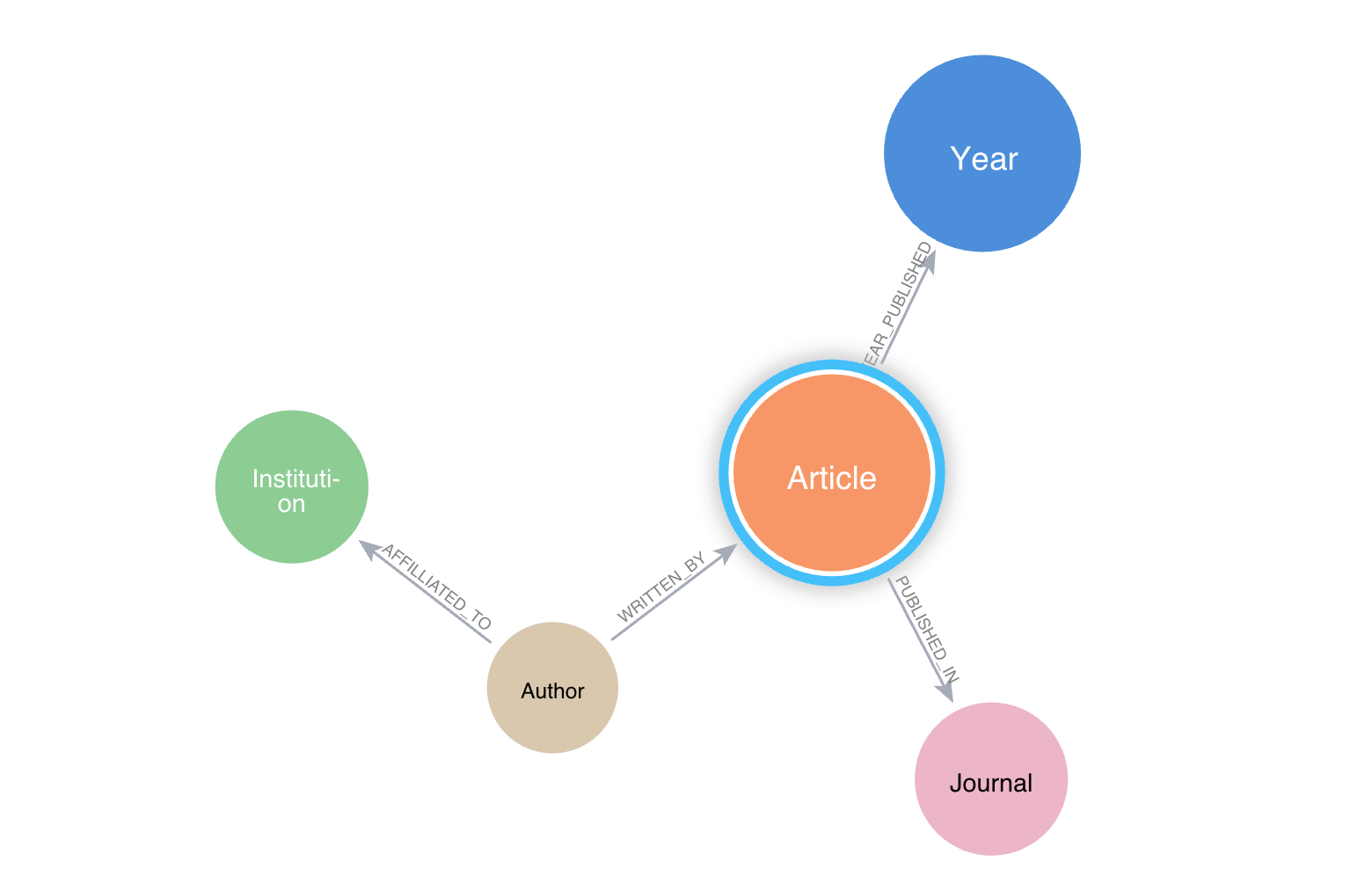
"가장 많이 인용된 상위 10개 기사 찾기"에 대한 일반적인 그래프 쿼리는 다음과 같아요.
MATCH(n:Article)
WHERE n.citation_count > 50
RETURN n.title, n.citation_count
Semantic Search 예시
“기후 변화에 관한 기사 찾기”는 다음과 같죠.
하이브리드 쿼리
하이브리드 쿼리는 먼저 Semantic Search를 수행한 후, 의미 검색 결과를 이용해서 그래프 쿼리를 수행할 수 있어요. 이는 학술 그래프와 같은 Property Graph를 사용하려는 경우에 주로 유용하답니다. 대표적인 질문은 “기후변화에 관한 기사를 찾아 그 저자와 기관을 돌려달라”는 것이죠.
이 상황에서는 질문을 필요한 작업을 수행하는 원하는 수의 하위 쿼리로 구문 분석해야 해요. 이 경우 Vector Search는 그래프 쿼리의 컨텍스트로 작동하는 거죠. 따라서 우리는 그러한 맥락을 수용하는 복잡한 Prompt 템플릿을 디자인할 수 있어야 해요. (자세한 내용은 다음을 확인하세요. 고급 프롬프트.)
LangGraph 작업 흐름
현재 워크플로에는 두 개의 분기가 있어요 (아래 그림을 참고해주세요). 하나는 그래프 스키마를 사용하는 간단한 그래프 쿼리 검색 QA이고, 다른 하나는 벡터 유사성 검색을 사용하는 분기예요. 이 워크플로를 따라해 보실 수 있도록, 이 실험의 모든 코드가 포함된 GitHub 저장소를 만들었어요. My_LangGraph_Demo를 확인해보세요! 이 실험의 데이터 세트는 학술 메타데이터를 제공하는 OpenAlex에서 얻었답니다 (참조: OpenAlex 데이터에서 자세한 내용을 확인하세요). 그리고 Neo4j AuraDB 인스턴스도 필요해요.
일반적인 작업 흐름은 다음과 같이 설계되었어요.
def route_question(state: GraphState):
    print("---ROUTE QUESTION---")
    question = state["question"]
    source = question_router.invoke({"question": question})
    if source.datasource == "vector search":
        print("---ROUTE QUESTION TO VECTOR SEARCH---")
        return "decomposer"
    elif source.datasource == "graph query":
        print("---ROUTE QUESTION TO GRAPH QA---")
        return "prompt_template"

workflow = StateGraph(GraphState)

# Nodes for graph qa
workflow.add_node(PROMPT_TEMPLATE, prompt_template)
workflow.add_node(GRAPH_QA, graph_qa)

# Nodes for graph qa with vector search
workflow.add_node(DECOMPOSER, decomposer)
workflow.add_node(VECTOR_SEARCH, vector_search)
workflow.add_node(PROMPT_TEMPLATE_WITH_CONTEXT, prompt_template_with_context)
workflow.add_node(GRAPH_QA_WITH_CONTEXT, graph_qa_with_context)

# Set conditional entry point for vector search or graph qa
workflow.set_conditional_entry_point(
    route_question,
    {
        'decomposer': DECOMPOSER, # vector search
        'prompt_template': PROMPT_TEMPLATE # for graph qa
    },
)

# Edges for graph qa with vector search
workflow.add_edge(DECOMPOSER, VECTOR_SEARCH)
workflow.add_edge(VECTOR_SEARCH, PROMPT_TEMPLATE_WITH_CONTEXT)
workflow.add_edge(PROMPT_TEMPLATE_WITH_CONTEXT, GRAPH_QA_WITH_CONTEXT)
workflow.add_edge(GRAPH_QA_WITH_CONTEXT, END)

# Edges for graph qa
workflow.add_edge(PROMPT_TEMPLATE, GRAPH_QA)
workflow.add_edge(GRAPH_QA, END)

app = workflow.compile()

app.get_graph().draw_mermaid_png(output_file_path="graph.png")
이 코드는 아래와 같은 워크플로를 생성해줘요.
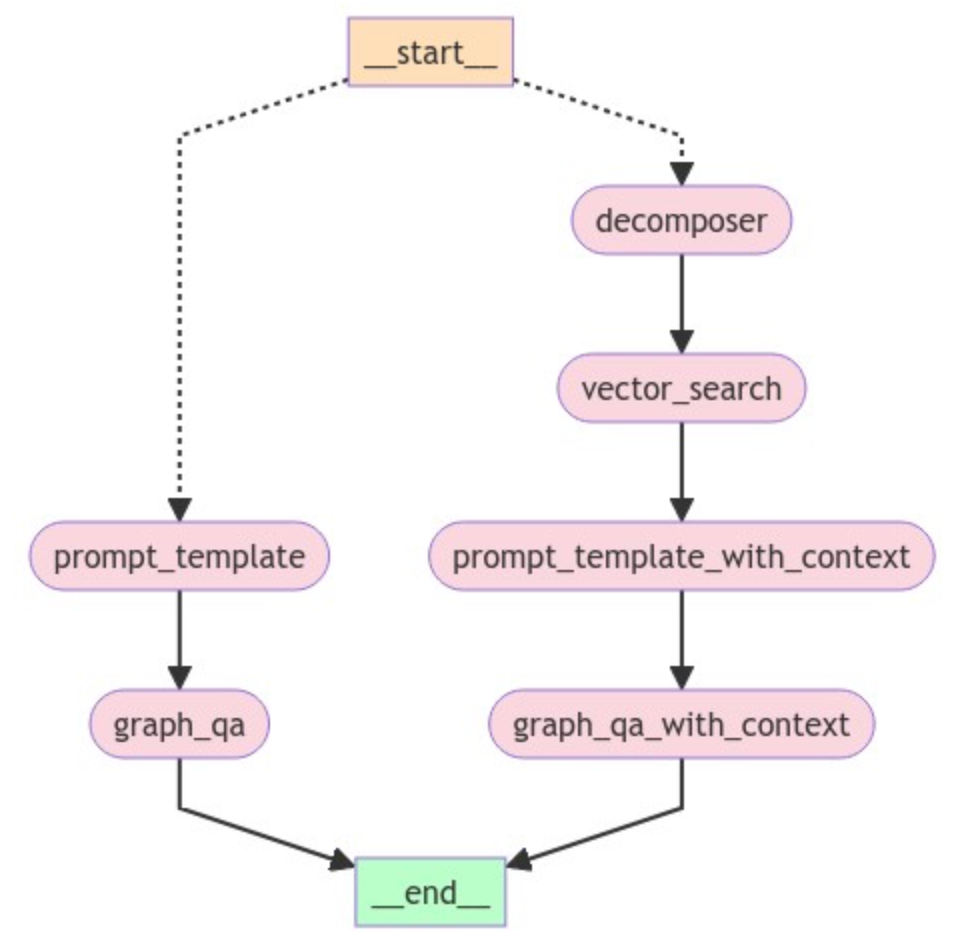
이 GraphRAG 흐름에서는 쿼리 흐름 경로를 결정할 수 있는 조건부 진입점으로 워크플로를 시작해요. 이 경우 __START__ node는 사용자 쿼리로 시작되죠. 쿼리에 따라 정보가 양쪽으로 흘러가는데요. 쿼리가 Vector Embedding을 조회해야 하는 경우 오른쪽으로 이동하고, 쿼리가 간단한 그래프 기반 쿼리인 경우 워크플로는 왼쪽 부분을 따라가요. 워크플로의 왼쪽 부분은 기본적으로 앞서 설명한 대로 LangChain을 사용하는 일반적인 그래프 쿼리 방식이에요. 유일한 차이점은 여기에서 LangGraph를 사용하고 있다는 점이죠.
위 워크플로의 오른쪽을 한번 살펴볼까요? DECOMPOSER node부터 시작하는데요. 이 node는 기본적으로 사용자 질문을 하위 쿼리로 분할해요. 예를 들어 "산화 스트레스에 관한 기사를 찾아보고, 가장 관련성이 높은 기사의 제목을 반환해줘"라고 묻는 사용자 질문이 있다고 가정해 볼게요.
하위 쿼리:
질문을 분해해야 하는 이유를 아시겠나요? 그래프 QA 체인은 전체 사용자 질문을 입력 쿼리로 전달할 때 어려움을 겪거든요. 분해는 GPT-3.5 Turbo 모델과 기본 Prompt Engineering 템플릿을 사용하는 query_analyzer 체인을 사용해서 간단하게 수행할 수 있어요.
class SubQuery(BaseModel):
    """Decompose a given question/query into sub-queries"""

    sub_query: str = Field(
        ...,
        description="A unique paraphrasing of the original questions.",
    )

system = """You are an expert at converting user questions into Neo4j Cypher queries.

Perform query decomposition. Given a user question, break it down into two distinct subqueries that
you need to answer in order to answer the original question.

For the given input question, create a query for similarity search and create a query to perform neo4j graph query.
Here is example:
Question: Find the articles about the photosynthesis and return their titles.
Answers:
sub_query1 : Find articles related to photosynthesis.
sub_query2 : Return titles of the articles
"""
prompt = ChatPromptTemplate.from_messages(
    [
        ("system", system),
        ("human", "{question}"),
    ]
)

llm_with_tools = llm.bind_tools([SubQuery])
parser = PydanticToolsParser(tools=[SubQuery])
query_analyzer = prompt | llm_with_tools | parser
Vector Search
오른쪽 분기의 또 다른 중요한 부분은 컨텍스트가 포함된 프롬프트 템플릿이에요. Property Graph에 대해 쿼리할 때 Cypher 생성 시 그래프 스키마를 사용하면 원하는 결과를 얻을 수 있죠. Vector Search로 컨텍스트를 생성하면 Vector Search가 제공하는 특정 Node에 Cypher 템플릿을 집중시켜서 더 정확한 결과를 얻을 수 있어요.
template = f"""
    Task:Generate Cypher statement to query a graph database.
    Instructions:
    Use only the provided relationship types and properties in the schema.
    Do not use any other relationship types or properties that are not provided.

    A context is provided from a vector search {context}

    Using the context, create cypher statements and use that to query with
    the graph.
    """
컨텍스트가 포함된 프롬프트 템플릿
저장된 Vector Embedding에서 유사성 검색을 사용해서 컨텍스트를 생성해요. Semantic Search 컨텍스트나 Node 자체를 컨텍스트로 생성할 수 있죠. 예를 들어 여기서는 사용자 쿼리와 가장 유사한 기사를 나타내는 Node ID를 검색해요. 이러한 Node ID는 프롬프트 템플릿에 컨텍스트로 전달되고요.
컨텍스트가 캡처되면 프롬프트 템플릿이 올바른 Cypher 예제를 얻도록 하고 싶을 거예요. Cypher 예제가 늘어남에 따라 정적 프롬프트 예제가 관련성이 없어지면서 LLM이 어려움을 겪을 거라고 예상할 수 있어요. 그래서 우리는 *동적 프롬프트* 메커니즘을 사용해서 유사성을 기반으로 가장 관련성이 높은 Cypher 예제를 선택할 거예요. 사용자 쿼리를 기반으로 k-샘플을 선택하기 위해 Chroma 벡터 저장소를 바로 사용할 수 있죠. 따라서 최종 프롬프트 템플릿은 다음과 같아요.
context = state["article_ids"]

    prefix = f"""
    Task:Generate Cypher statement to query a graph database.
    Instructions:
    Use only the provided relationship types and properties in the schema.
    Do not use any other relationship types or properties that are not provided.
    ...
    ...
    A context is provided from a vector search in a form of tuple ('a..', 'W..')
    Use the second element of the tuple as a node id, e.g 'W.....
    Here are the contexts: {context}

    Using node id from the context above, create cypher statements and use that to query with the graph.
    Examples: Here are a few examples of generated Cypher statements for some question examples:
    """

    FEW_SHOT_PROMPT = FewShotPromptTemplate(
        example_selector = example_selector,
        example_prompt = example_prompt,
        prefix=prefix,
        suffix="Question: {question}, nCypher Query: ",
        input_variables =["question", "query"],
    )
    return FEW_SHOT_PROMPT
동적으로 선택된 Cypher 예제는 *접미사* 인수를 통해 전달돼요. 마지막으로 그래프 QA 체인을 호출하는 Node에 템플릿을 전달하죠. 워크플로우의 왼쪽에서도 유사한 동적 프롬프트 템플릿을 사용했지만, 컨텍스트는 사용하지 않았어요.
일반적인 RAG 워크플로우와 달리 프롬프트 템플릿에 컨텍스트를 도입할 때 입력 변수를 생성하고 모델 체인(예: GraphCypherQAChain())을 호출할 때 변수를 전달해서 수행해요.
template = f"""
    Task:Generate Cypher statement to query a graph database.
    Instructions:
    Use only the provided relationship types and properties in the schema.
    Do not use any other relationship types or properties that are not provided.

    A context is provided from a vector search {context}

    Using the context, create cypher statements and use that to query with
    the graph.
    """

    PROMPT = PromptTemplate(
        input_variables =["question", "context"],
        template = template,
    )
가끔 LangChain 체인을 통해 여러 변수를 전달하는 게 더 까다로워질 때가 있어요.
chain = (
    {
     "question": RunnablePassthrough(),
     "context" : RetrievalQA.from_chain_type(),
    }
    | PROMPT
    | GraphCypherQAChain() # typically you have llm() here!
)
GraphCypherQAChain()에는 프롬프트 텍스트가 아니라 프롬프트 템플릿이 필요하기 때문에, 위 워크플로는 작동하지 않아요 (체인을 호출하면 프롬프트 템플릿 출력이 텍스트가 되거든요!). 이 때문에 제가 원하는 만큼 많은 컨텍스트를 전달하고 워크플로를 실행할 수 있는 LangGraph를 실험하게 되었답니다.
GraphQA 체인
컨텍스트가 포함된 프롬프트 템플릿 이후의 마지막 단계는 그래프 쿼리죠. 여기에서 일반적인 그래프 QA 체인을 사용해서 프롬프트를 Graph Database에 전달, 쿼리를 실행하고 LLM이 응답을 생성해요. 프롬프트 생성 후 워크플로 왼쪽에 있는 비슷한 경로를 확인해보세요. 또한 유사한 동적 프롬프트 접근 방식을 사용해서 양쪽에 프롬프트 템플릿을 생성합니다.
워크플로를 실행하기 전에 라우터 체인과 GraphState에 대해 몇 가지 생각해볼게요.
라우터 체인
언급했듯이 쿼리 흐름 경로를 결정할 수 있는 조건부 진입점으로 워크플로를 시작해요. 이는 간단한 프롬프트 템플릿과 LLM을 사용한 라우터 체인을 통해 달성되죠. Pydantic 모델은 이런 상황에서 유용하답니다.
class RouteQuery(BaseModel):
    """Route a user query to the most relevant datasource."""

    datasource: Literal["vector search", "graph query"] = Field(
        ...,
        description="Given a user question choose to route it to vectorstore or graphdb.",
    )

llm = ChatOpenAI(temperature=0)
structured_llm_router = llm.with_structured_output(RouteQuery)

system = """You are an expert at routing a user question to perform vector search or graph query.
The vector store contains documents related article title, abstracts and topics. Here are three routing situations:
If the user question is about similarity search, perform vector search. The user query may include term like similar, related, relvant, identitical, closest etc to suggest vector search. For all else, use graph query.

Example questions of Vector Search Case:
    Find articles about photosynthesis
    Find similar articles that is about oxidative stress

Example questions of Graph DB Query:
    MATCH (n:Article) RETURN COUNT(n)
    MATCH (n:Article) RETURN n.title

Example questions of Graph QA Chain:
    Find articles published in a specific year and return it's title, authors
    Find authors from the institutions who are located in a specific country, e.g Japan
"""

route_prompt = ChatPromptTemplate.from_messages(
    [
        ("system", system),
        ("human", "{question}")
    ]
)

question_router = route_prompt | structured_llm_router


def route_question(state: GraphState):
    print("---ROUTE QUESTION---")
    question = state["question"]
    source = question_router.invoke({"question": question})
    if source.datasource == "vector search":
        print("---ROUTE QUESTION TO VECTOR SEARCH---")
        return "decomposer"
    elif source.datasource == "graph query":
        print("---ROUTE QUESTION TO GRAPH QA---")
        return "prompt_template"
그래프 상태
LangGraph의 아름다운 측면 중 하나는 GraphState를 통한 정보의 흐름이에요. 노드가 모든 단계에서 액세스해야 할 수 있는 GraphState의 모든 잠재적 데이터를 정의해야 한답니다.
class GraphState(TypedDict):
    """
    Represents the state of our graph.

    Attributes:
        question: question
        documents: result of chain
        article_ids: list of article id from vector search
        prompt: prompt template object
        prompt_with_context: prompt template with context from vector search
        subqueries: decomposed queries
    """

    question: str
    documents: dict
    article_ids: List[str]
    prompt: object
    prompt_with_context: object
    subqueries: object
이 데이터에 접근하려면, `Node`나 함수를 정의할 때 `state`를 상속하기만 하면 돼요. 예를 들어:
def prompt_template_with_context(state: GraphState):

    question = state["question"]  # Access data through state
    queries = state["subqueries"] # Access data through state

    # Create a prompt template
    prompt_with_context = create_few_shot_prompt_with_context(state)

    return {"prompt_with_context": prompt_with_context, "question":question, "subqueries": queries}
이런 주요 주제에 대해 이야기했으니, 이제 Neo4j GraphRAG 앱을 실행해 볼까요?
그래프 품질 보증:
app.invoke({"question": "find top 5 cited articles and return their title"})

---ROUTE QUESTION---
---ROUTE QUESTION TO GRAPH QA---


> Entering new GraphCypherQAChain chain...
Generated Cypher:
MATCH (a:Article) WITH a ORDER BY a.citation_count DESC RETURN a.title LIMIT 5

> Finished chain.

# Examine the result
graph_qa_result['documents']

{'query': 'find top 5 cited articles and return their title',
 'result': [{'a.title': 'Humic Acids Isolated from Earthworm Compost Enhance Root Elongation, Lateral Root Emergence, and Plasma Membrane H+-ATPase Activity in Maize Roots'},
  {'a.title': 'Rapid Estimates of Relative Water Content'},
  {'a.title': 'ARAMEMNON, a Novel Database for Arabidopsis Integral Membrane Proteins'},
  {'a.title': 'Polyamines in plant physiology.'},
  {'a.title': 'Microarray Analysis of the Nitrate Response in Arabidopsis Roots and Shoots Reveals over 1,000 Rapidly Responding Genes and New Linkages to Glucose, Trehalose-6-Phosphate, Iron, and Sulfate Metabolism '}]}
벡터 검색을 통한 그래프 QA:
app.invoke({"question": "find articles about oxidative stress. Return the title of the most relevant article"})

---ROUTE QUESTION---
---ROUTE QUESTION TO VECTOR SEARCH---


> Entering new RetrievalQA chain...

> Finished chain.

# Examine the result
graph_qa_result['documents']

{'query': 'Return the title of the most relevant article.',
 'result': [{'a.title': 'Molecular Responses to Abscisic Acid and Stress Are Conserved between Moss and Cereals'}]}

# Examine output of GraphState
graph_qa_result.keys()
dict_keys(['question', 'documents', 'article_ids', 'prompt_with_context', 'subqueries'])

# Examine decomposer output
graph_qa_result['subqueries']

[SubQuery(sub_query='Find articles related to oxidative stress.'),
 SubQuery(sub_query='Return the title of the most relevant article.')]
보시다시피, 사용자 질문을 기반으로 질문을 올바른 분기로 성공적으로 라우팅하고 원하는 결과를 검색할 수 있었어요. 복잡성이 증가함에 따라 라우터 체인 자체에 대한 `Prompt`를 수정해야 하죠. 이와 같은 애플리케이션에서는 분해가 중요하지만, 쿼리 확장은 유용한 도구가 될 수 있는 LangChain의 또 다른 기능이에요. 특히 유사한 답변을 반환하기 위해 Cypher `Query`를 작성하는 여러 가지 방법이 있는 경우 더욱 그렇고요.
우리는 작업 흐름의 가장 중요한 부분을 다루었어요. 더 깊은 내용을 알아보고 싶다면 My_LangGraph_Demo 코드베이스를 한번 살펴보세요.
요약
이 워크플로는 여러 단계를 결합하므로, 여기서 모든 단계를 자세히 다루지는 않았어요. 하지만 LangChain을 사용하여 고급 GraphRAG 애플리케이션을 구축하는 데 어려움이 있었다는 점을 말씀드리고 싶어요. 이러한 어려움은 LangGraph를 사용하여 극복되었죠. 개인적으로 가장 아쉬웠던 점은 `Prompt` 템플릿에 필요한 만큼 많은 입력 변수를 도입하고, 해당 템플릿을 LangChain Expression Language를 통해 Graph QA 체인에 전달할 수 없다는 것이었어요.
처음에 LangGraph는 좀 복잡해 보였는데, 막상 사용해보니 훨씬 부드럽게 느껴지기 시작했어요. 앞으로는 에이전트를 워크플로에 통합하는 방법을 더 실험해볼 생각이에요. 혹시 좋은 아이디어가 있다면 언제든지 저에게 알려주세요! 여러분의 의견을 통해 더 많이 배우고 싶어요.
참고 자료:
이 글은 LangGraph의 다른 예제를 참고해서 작성되었어요.
- Mistral 및 LangChain을 사용한 고급 RAG 제어 흐름: Corrective RAG, Self-RAG, Adaptive RAG
- 메인의 langgaph-course/README.md · emarco177/langgaph-course
- 메인의 요리책/third_party/langchain · mistralai/cookbook
- LangChain 표현 언어를 사용한 동적 프롬프트
초보자를 위한 GraphRAG
연결된 데이터를 기반으로 복잡한 질문에 답할 수 있는 GraphRAG 애플리케이션을 구축하세요. 세 가지 주요 검색 패턴을 알아보세요.
- GraphRAG
- LangChain
- LangGraph
에이치시스템즈의 LogTree는 Neo4j 기반 GraphRAG 플랫폼으로, 데이터를 자동으로 지식그래프화하고 자연어 질의로 즉시 답을 제공합니다.
'GraphRAG' 카테고리의 다른 글
| 관찰 가능한 그래프: Neo4j로 GraphRAG 성능 극대화하기 (0) | 2026.05.27 |
|---|---|
| 노드도 사람이다: Neo4j와 GraphRAG으로 풀어보는 관계의 비밀 (0) | 2026.05.27 |
| Neo4j GraphRAG 검색기를 MCP 서버로 구현하기 (0) | 2026.05.26 |
| AWS와 Neo4j, LLM 환각 해결 및 GenAI 진화를 위해 손을 잡다 (0) | 2026.05.26 |
| Neo4j와 GraphRAG으로 NASA의 교훈 데이터베이스를 시각화하다 (feat. R/RStudio & Linkurious) (0) | 2026.05.26 |