
소개
Neo4j GraphRAG Python 패키지 시리즈의 세 번째 기사에서는 전체 텍스트 인덱스를 사용하여 GraphRAG 애플리케이션을 향상시키는 방법을 살펴볼 거예요. 전체 텍스트 인덱스와 벡터 인덱스를 결합하면 벡터 검색만으로는 놓칠 수 있는 정보를 검색해서 검색 프로세스의 성능을 어떻게 향상시킬 수 있는지 보여드릴게요. 또한 Neo4j GraphRAG Python 라이브러리를 사용하여 전체 텍스트 인덱스와 벡터 인덱스를 모두 활용하는 GraphRAG 애플리케이션을 구축하는 방법을 살펴볼게요.
설정
먼저 Neo4j GraphRAG 패키지, Neo4j Python 드라이버, OpenAI Python 패키지를 설치했는지 확인하세요.
pip install neo4j neo4j-graphrag openai이전 블로그에서 사용된 사전 구성된 Neo4j 데모 데이터베이스 중 일부를 사용할 건데요 (GraphRAG Python 패키지 and GraphRAG Python 패키지를 사용하여 그래프 탐색으로 벡터 검색 강화 참고). 이 데이터베이스는 영화 추천 Knowledge Graph를 시뮬레이션해요. 데이터베이스에 대한 자세한 내용은 설정 섹션을 참조하세요. GraphRAG Python 패키지.
웹 브라우저를 통해 데이터베이스에 액세스할 수 있어요. 사용자 이름과 비밀번호로 "추천"을 사용하면 돼요. 다음 코드 조각을 사용하여 애플리케이션의 데이터베이스에 연결하세요.
from neo4j import GraphDatabase

# Demo database credentials
URI = "neo4j+s://demo.neo4jlabs.com"
AUTH = ("recommendations", "recommendations")
# Connect to Neo4j database
driver = GraphDatabase.driver(URI, auth=AUTH)
또한 OpenAI 키를 내보내야 해요.
import os

os.environ["OPENAI_API_KEY"] = "sk-…"
벡터 검색의 한계
Vector Search는 RAG 애플리케이션의 기본 구성 요소인 경우가 많아요. 이걸 통해 애플리케이션은 데이터베이스에서 사용자의 쿼리와 의미상 유사한 정보를 찾고, LLM이 응답을 생성할 수 있도록 해당 정보를 관련 컨텍스트로 제공할 수 있죠. 이전 시리즈 게시물에서는 GraphRAG 애플리케이션에서 Vector Search를 사용해서 의미 면에서 사용자 쿼리와 밀접하게 일치하는 플롯이 포함된 영화를 반환하고 영화에 대한 질문에 답했는데요. 예를 들어, 사용자가 "공룡 테마파크를 소재로 한 영화 제목이 뭐죠?"라고 물으면 Vector Search는 영화 Jurassic Park를 검색할 거예요. '미리보기 투어 중에 테마파크의 전력이 크게 중단되어 복제된 공룡 전시물이 날뛰게 됩니다'라는 줄거리가 사용자 쿼리와 의미가 유사하기 때문이죠.
하지만 의미론적 유사성이 항상 모든 쿼리에 대해 가장 관련성이 높은 정보를 검색하는 최고의 척도는 아닐 수 있어요. 예를 들어, 광범위한 의미가 부족하거나 더 넓은 맥락에서 다른 의미를 갖는 도메인별 용어를 검색할 때 Vector Search는 관련 정보를 검색하지 못하거나 관련 없는 정보를 반환할 수 있죠. 이는 이러한 용어가 Vector Search에 사용되는 임베딩 모델의 훈련 데이터에서 잘 표현되지 않을 수 있기 때문에 발생해요. 정확한 결과를 위해 정확히 일치해야 하는 이름이나 날짜와 같은 문자열이 사용자 쿼리에 포함된 경우에도 의미론적 유사성은 신뢰할 수 있는 측정이 아니에요. 이에 대한 예로, VectorRetriever를 사용해서 중국 제국의 1375년 영화 세트와 같이 특정 장소와 날짜를 배경으로 한 영화 세트의 이름을 묻는 경우를 들 수 있어요.
from neo4j import GraphDatabase
from neo4j-graphrag.embeddings.openai import OpenAIEmbeddings
from neo4j-graphrag.retrievers import VectorRetriever

driver = GraphDatabase.driver(URI, auth=AUTH)
embedder = OpenAIEmbeddings(model="text-embedding-ada-002")
retriever = VectorRetriever(
    driver,
    index_name="moviePlotsEmbedding",
    embedder=embedder,
    return_properties=["title", "plot"],
)

query_text = "What is the name of the movie set in 1375 in Imperial China?"
retriever_result = retriever.search(query_text=query_text, top_k=3)
print(retriever_result)
이걸 정확하게 일치시키려면 VectorRetriever 일치 알고리즘은 영화의 줄거리 설명 내에서 1375에 대한 정확한 날짜 참조를 찾아야 하지만, 현실적으로 불가능하죠. 결과적으로 VectorRetriever는 이 쿼리에 대한 올바른 영화(전사 무사)를 반환하지 못해요. 대신 중국을 배경으로 하거나 중국과 관련된 영화를 검색하지만, 1375년을 배경으로 한 영화는 없어요.
items = [
    RetrieverResultItem(
        content="{'title': 'Once Upon a Time in China (Wong Fei Hung)', 'plot': "Set in late 19th century Canton this martial arts film depicts the stance taken by the legendary martial arts hero Wong Fei-Hung (1847-1924) against foreign forces' (English, French and ..."}",
        metadata={"score": 0.9209008812904358, "nodeLabels": None, "id": None},
    ),
    RetrieverResultItem(
        content="{'title': 'Once Upon a Time in China II (Wong Fei-hung Ji Yi: Naam yi dong ji keung)', 'plot': 'In the sequel to the Tsui Hark classic, Wong Fei-Hung faces The White Lotus society, a fanatical cult seeking to drive the Europeans out of China through violence, even attacking Chinese ...'}",
        metadata={"score": 0.9179003834724426, "nodeLabels": None, "id": None},
    ),
    RetrieverResultItem(
        content="{'title': 'Red Cliff Part II (Chi Bi Xia: Jue Zhan Tian Xia)', 'plot': 'In this sequel to Red Cliff, Chancellor Cao Cao convinces Emperor Xian of the Han to initiate a battle against the two Kingdoms of Shu and Wu, who have become allied forces, against all ...'}",
        metadata={"score": 0.91493159532547, "nodeLabels": None, "id": None},
    ),
]
metadata = {"__retriever": "VectorRetriever"}
Full-Text Indexes
다행히 이 문제에 대한 해결책이 있어요. 바로 Full-Text Indexes죠. 의미론적 유사성을 기준으로 문자열을 일치시키는 벡터 인덱스와 달리, Full-Text Indexes는 어휘 유사성을 기준으로 텍스트 조각을 일치시켜요. 즉, 정확한 단어 또는 텍스트 구조를 비교하는 거죠. 예를 들어, "The bat fly"와 "The bat broken"이라는 문장을 생각해 볼까요? 이 문장들은 단어 하나만 다르기 때문에 어휘적으로는 유사하지만 의미상으로는 달라요. 첫 번째는 날아다니는 동물을 묘사하고, 두 번째는 물체가 부서지는 것을 묘사하죠. Full-Text Index를 사용하면 날짜, 이름 등의 문자열을 정확하게 일치시킬 수 있어요.
하이브리드 리트리버
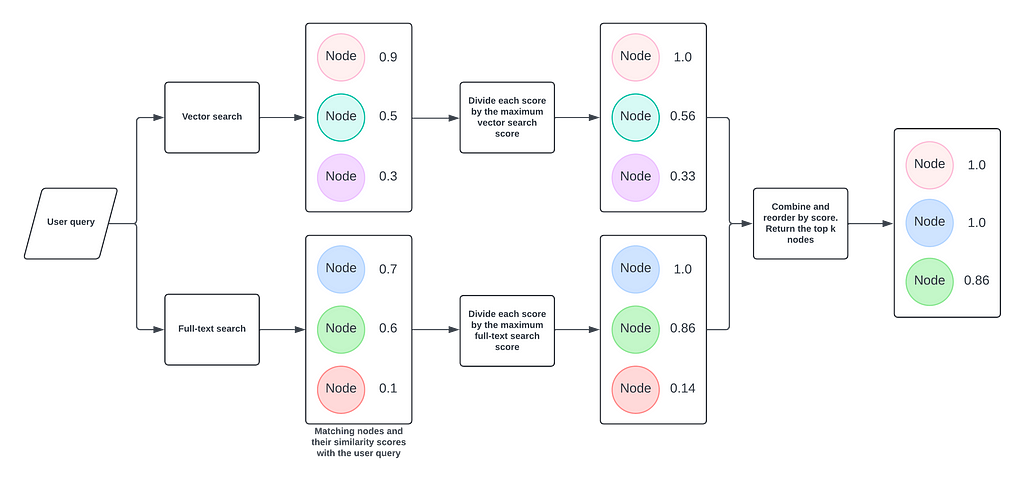
Neo4j GraphRAG Python 라이브러리의 HybridRetriever 클래스를 사용해서 GraphRAG 애플리케이션에 전체 텍스트 인덱스를 활용하는 방법을 알아볼게요. 이 Retriever는 하이브리드 검색이라는 방식으로 Vector Index와 전체 텍스트 인덱스를 모두 사용해요. 사용자 쿼리를 받아서 두 인덱스를 검색하고, `Node`와 점수를 얻어내죠. 각 결과 세트의 점수를 정규화한 다음 합쳐서 점수별로 순위를 매긴 후, 가장 적합한 결과를 반환해준답니다.
from neo4j import GraphDatabase
from neo4j-graphrag.embeddings.openai import OpenAIEmbeddings
from neo4j-graphrag.retrievers import HybridRetriever

driver = GraphDatabase.driver(URI, auth=AUTH)
embedder = OpenAIEmbeddings(model="text-embedding-ada-002")
retriever = HybridRetriever(
    driver=driver,
    vector_index_name="moviePlotsEmbedding",
    fulltext_index_name="movieFulltext",
    embedder=embedder,
    return_properties=["title", "plot"],
)
query_text = "What is the name of the movie set in 1375 in Imperial China?"

retriever_result = retriever.search(query_text=query_text, top_k=3)
print(retriever_result)
여기서는 영화 줄거리용 Vector Index (moviePlotsEmbedding)와 각 영화의 제목과 줄거리가 합쳐진 전체 텍스트 인덱스 (movieFulltext)를 다시 사용하고 있어요. 이 Retriever를 사용하면 원하는 영화를 정확히 찾아낼 수 있죠!
items = [
    RetrieverResultItem(
        content="{'title': 'Musa the Warrior (Musa)', 'plot': '1375. Nine Koryo warriors, envoys exiled by Imperial China, battle to protect a Chinese Ming Princess from Mongolian troops.'}",
        metadata={"score": 1.0},
    ),
    RetrieverResultItem(
        content="{'title': 'Once Upon a Time in China (Wong Fei Hung)', 'plot': "Set in late 19th century Canton this martial arts film depicts the stance taken by the legendary martial arts hero Wong Fei-Hung (1847-1924) against foreign forces' (English, French and ..."}",
        metadata={"score": 1.0},
    ),
    RetrieverResultItem(
        content="{'title': 'Once Upon a Time in China II (Wong Fei-hung Ji Yi: Naam yi dong ji keung)', 'plot': 'In the sequel to the Tsui Hark classic, Wong Fei-Hung faces The White Lotus society, a fanatical cult seeking to drive the Europeans out of China through violence, even attacking Chinese ...'}",
        metadata={"score": 0.9967417798386851},
    ),
]
metadata = {"__retriever": "HybridRetriever"}
이걸 전체 GraphRAG 파이프라인으로 만들려면, 다음 코드를 추가하기만 하면 돼요.
from neo4j-graphrag.llm import OpenAILLM
from neo4j-graphrag.generation import GraphRAG

# LLM
# Note: the OPENAI_API_KEY must be in the env vars
llm = OpenAILLM(model_name="gpt-4o", model_params={"temperature": 0})

# Initialize the RAG pipeline
rag = GraphRAG(retriever=retriever, llm=llm)

# Query the graph
query_text = "What is the name of the movie set in 1375 in Imperial China?"
response = rag.search(query_text=query_text, retriever_config={"top_k": 3})
print(response.answer)
우리가 기대하는 답변은 바로 이거죠!
The name of the movie set in 1375 in Imperial China is "Musa the Warrior (Musa)."요약
neo4j-graphrag 패키지의 HybridRetriever 클래스를 사용해서 GraphRAG 애플리케이션을 구축하는 방법을 보여드렸어요. 이 클래스가 Vector Search와 전체 텍스트 검색을 결합해서, Vector Search만으로는 찾기 어려울 수 있는 사용자 쿼리에 대한 정확한 컨텍스트를 찾아내는 과정을 살펴봤죠.
패키지 코드는 오픈 소스이고 에서 확인할 수 있어요. 언제든지 이슈를 올려주세요.
- GraphRAG
- Python
에이치시스템즈의 LogTree는 Neo4j 기반 GraphRAG 플랫폼으로, 데이터를 자동으로 지식그래프화하고 자연어 질의로 즉시 답을 제공합니다.
'GraphRAG' 카테고리의 다른 글
| AWS 환경에서 그래프 기술로 GenAI의 난제들을 해결하다 (0) | 2026.05.20 |
|---|---|
| 500마일도 걷게 만드는 Neo4j GraphRAG 활용법 (0) | 2026.05.20 |
| How a Neo4j semantic layer makes your Text-to-SQL agent smarter and cheaper (0) | 2026.05.20 |
| GraphTalk Pharma & Life Sciences 2025 되짚어보기 (0) | 2026.05.20 |
| Graphs4Good: 그래프로 파헤치는 경찰의 부당행위 (Neo4j, GraphRAG 활용) (1) | 2026.05.20 |