
저희의 지난 블로그 게시물에서는 Neo4j GraphRAG Python 패키지를 사용해서 기본적인 GraphRAG 애플리케이션을 구축하는 방법을 다뤘어요. 이번과 앞으로 이어질 게시물에서는 이 패키지의 기능들을 좀 더 자세히 알아보고, 포함된 다른 검색기들을 사용해서 애플리케이션을 추가로 커스터마이징하고 개선하는 방법을 보여드릴게요. 이번 글에서는 Cypher 쿼리를 사용해서 그래프 순회를 추가 단계로 통합하여, 이전 블로그에서 사용했던 Vector Search 접근 방식을 확장하는 방법을 보여드릴 거예요.
설정
이전 블로그에서 사용했던 것과 동일하게 사전 구성된 Neo4j 데모 데이터베이스를 사용할 거예요. 이 데이터베이스는 영화 추천 Knowledge Graph를 시뮬레이션한 것이죠. (데이터베이스에 대한 자세한 내용은 이전 블로그의 설정 섹션을 참조해주세요.)
브라우저를 통해서 데이터베이스에 접속할 수 있어요. 여기서 사용자 이름과 비밀번호로 "recommendations"를 사용하면 돼요. 다음 코드 조각을 사용해서 애플리케이션의 데이터베이스에 연결해 보세요.
from neo4j import GraphDatabase

# Demo database credentials
URI = "neo4j+s://demo.neo4jlabs.com"
AUTH = ("recommendations", "recommendations")
# Connect to Neo4j database
driver = GraphDatabase.driver(URI, auth=AUTH)
OpenAI API 키도 내보내야 해요.
import os

os.environ["OPENAI_API_KEY"] = "sk-…"
그래프의 다른 Nodes
Neo4j 웹 UI에서 다음 명령을 실행해서 영화 'Tom and Huck'과 다른 Nodes와의 즉각적인 Relationships를 시각화해 보세요.
MATCH (m:Movie {title: 'Tom and Huck'})-[r]-(n) RETURN *;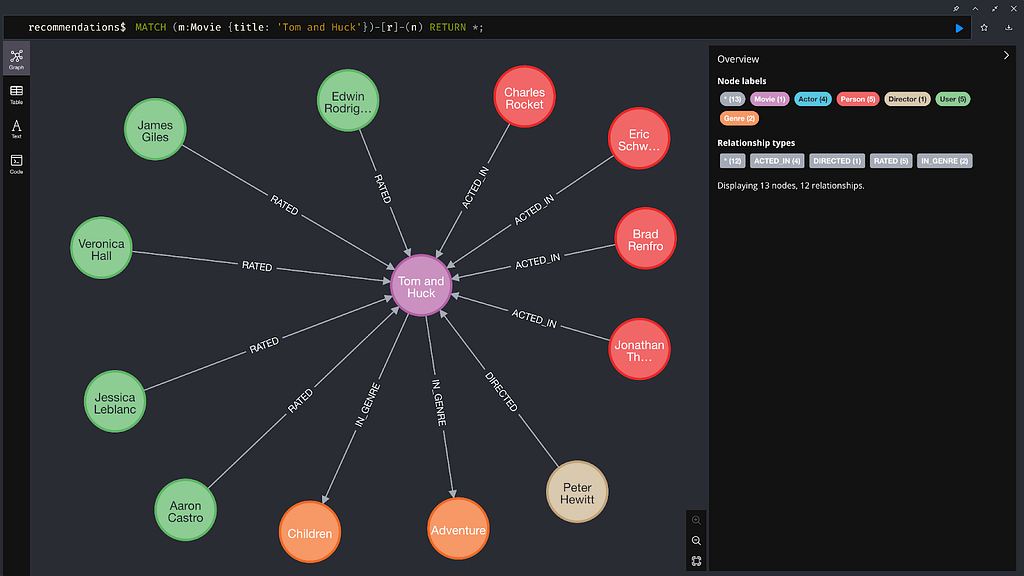
이제 배우가 출연한 영화 장르와 영화 Node 자체에 포함되지 않은 기타 유용한 정보를 볼 수 있죠.
이전 블로그에서는 영화 플롯 임베딩과 벡터 검색기를 사용해서 사용자의 쿼리와 가장 유사한 영화 `Node`를 검색했어요. 이러한 영화 `Node`는 LLM이 쿼리에 대한 답변을 생성하는 컨텍스트 역할을 했죠. 하지만 이 설정에서는 `Movie` `Node` 자체에 포함된 정보만 컨텍스트로 사용될 수 있고, 다른 `Node`에 포함된 추가 정보는 사용되지 않은 `Movie` `Node`에 연결돼요. 결과적으로, 예를 들어 사용자가 영화 장르나 영화에 출연한 배우에 대해 질문하는 경우 LLM은 이에 답할 수 있는 적절한 컨텍스트를 제공받지 못하는 거죠.
검색
다행히 `VectorCypherRetriever` 클래스를 사용해서 이 추가 정보를 검색할 수 있어요. 이 검색기는 먼저 벡터 검색을 사용해서 Knowledge Graph에서 일련의 초기 `Node`를 검색한 다음 `Cypher` `Query`를 사용해서 각 초기 `Node`의 그래프를 탐색하고 연결된 `Node`에서 추가 정보를 수집해요.
이 검색기를 사용하려면 먼저 벡터 검색을 통해 검색된 `Node`와 함께 가져올 추가 정보를 정확하게 지정하는 `Cypher` `Query`를 작성해야 해요. 예를 들어 `Movie` `Node`와 함께 배우 정보를 검색하려면 다음 `Query`를 사용할 수 있죠.
retrieval_query = """
MATCH
(actor:Actor)-[:ACTED_IN]->(node)
RETURN
node.title AS movie_title,
node.plot AS movie_plot,
collect(actor.name) AS actors;
"""
이 `Query`의 `node` 변수는 초기 벡터 검색 단계를 통해 검색된 `Node`(여기서는 `Movie` `Node`)에 대한 참조예요. 이 `Query`는 각 영화에 출연한 모든 배우를 찾아서 영화 제목 및 줄거리와 함께 이름을 반환하죠.
그런 다음 이전 블로그에서 `VectorRetriever`에 전달한 것과 동일한 정보(예: 벡터 `Index` 이름 및 포함된 정보)를 사용해서 이 `Query`를 `VectorCypherRetriever`에 전달해요.
from neo4j import GraphDatabase
from neo4j-graphrag.embeddings.openai import OpenAIEmbeddings
from neo4j-graphrag.retrievers import VectorCypherRetriever

driver = GraphDatabase.driver(URI, auth=AUTH)
embedder = OpenAIEmbeddings(model="text-embedding-ada-002")
vc_retriever = VectorCypherRetriever(
    driver,
    index_name="moviePlotsEmbedding",
    embedder=embedder,
    retrieval_query=retrieval_query,
)
이번에도 `text-embedding-ada-002` 모델을 원래 이를 사용해서 생성된 데모 데이터베이스의 영화 플롯 `Vector Embedding`으로 사용해요.
이제 검색기를 사용해서 데이터베이스에 있는 영화와 영화에 출연한 배우에 대한 정보를 검색할 수 있어요.
query_text = "Who were the actors in the movie about the magic jungle board game?"
retriever_result = retriever.search(query_text=query_text, top_k=3)

items=[
  RetrieverResultItem(content="<Record
    movie_title='Jumanji'
    movie_plot='When two kids find and play a magical board game, they release a man trapped for decades in it and a host of dangers that can only be stopped by finishing the game.'
    actors=['Robin Williams', 'Bradley Pierce', 'Kirsten Dunst', 'Jonathan Hyde']>",
    metadata=None),
  RetrieverResultItem(content="<Record
    movie_title='Welcome to the Jungle'
    movie_plot='A company retreat on a tropical island goes terribly awry.'
    actors=['Jean-Claude Van Damme', 'Adam Brody', 'Rob Huebel', 'Kristen Schaal']>",
    metadata=None),
  RetrieverResultItem(content='<Record
    movie_title='Last Mimzy, The'
    movie_plot='Two siblings begin to develop special talents after they find a mysterious box of toys. Soon the kids, their parents, and even their teacher are drawn into a strange new world and find a task ahead of them that is far more important than any of them could imagine!'
    actors=['Joely Richardson', 'Rhiannon Leigh Wryn', 'Timothy Hutton', "Chris O'Neil"]>',
    metadata=None)
]
metadata={'__retriever': 'VectorCypherRetriever'}
각 영화에 출연한 배우를 제목 및 줄거리와 함께 검색했어요. `VectorRetriever`를 사용하면 배우가 아닌 제목과 줄거리를 검색하는 것이 가능했을 거예요. 이러한 내용은 각 영화 `Node`에 연결된 배우 `Node`에 저장되어 있기 때문이죠.
GraphRAG
전체 GraphRAG 파이프라인을 구축하려면 이전 블로그에서 사용된 `VectorRetriever`를 `VectorCypherRetriever`로 교체하기만 하면 돼요.
from neo4j-graphrag.llm import OpenAILLM
from neo4j-graphrag.generation import GraphRAG

# LLM
# Note: the OPENAI_API_KEY must be in the env vars
llm = OpenAILLM(model_name="gpt-4o", model_params={"temperature": 0})

# Initialize the RAG pipeline
rag = GraphRAG(retriever=vc_retriever, llm=llm)

# Query the graph
query_text = "Who were the actors in the movie about the magic jungle board game?"
response = rag.search(query=query_text, retriever_config={"top_k": 3})
print(response.answer)
그러면 다음과 같은 응답이 나올 거예요.
The actors in the movie "Jumanji," which is about a magical board game, are Robin Williams, Bradley Pierce, Kirsten Dunst, and Jonathan Hyde.요약
이번 블로그에서는 `VectorCypherRetriever` 클래스를 어떻게 사용하는지 보여드렸어요. GraphRAG Python 패키지를 사용하면 간단한 GraphRAG 애플리케이션을 쉽게 구축할 수 있죠. 이 강력한 클래스는 초기 벡터 검색 단계 외에도 그래프 순회 단계를 통합해서, 벡터 검색만으로는 가져올 수 없는 정보를 그래프에서 가져오는 방법을 보여준답니다. `VectorRetriever` 클래스를 사용해서 Large Language Model이 답변할 수 없었던 영화 데이터베이스에 대한 특정 질문에 답변하는 모습도 확인해봤어요.
패키지 코드는 오픈 소스이고 에서 찾을 수 있어요. 언제든지 이슈를 올려주세요.
다음 읽을거리: Neo4j GraphRAG Python 패키지를 사용하는 GraphRAG 애플리케이션에 대한 하이브리드 검색
- Python
에이치시스템즈의 LogTree는 Neo4j 기반 GraphRAG 플랫폼으로, 데이터를 자동으로 지식그래프화하고 자연어 질의로 즉시 답을 제공합니다.
'GraphRAG' 카테고리의 다른 글
| 승자는 바로… (Neo4j, GraphRAG, Machine Learning API 활용 사례) (0) | 2026.05.10 |
|---|---|
| #GraphCast: 가짜 뉴스 판 - Neo4j와 GraphRAG로 진실을 밝히다 (0) | 2026.05.10 |
| 그래프 기술과 공급망 투명성이 만나 기업의 사회적 책임을 실현하는 곳: Neo4j와 GraphRAG 활용 (0) | 2026.05.09 |
| 테러 위협에 맞서는 그래프 기술: Neo4j와 GraphRAG의 힘 (1) | 2026.05.09 |
| 엔터프라이즈 MDM을 위한 그래프 기술: Neo4j와 GraphRAG의 활용 (1) | 2026.05.08 |