
이전 GenAI 블로그에서 우리는 Vector Embedding 및 벡터 검색 그리고 어떻게 GraphRAG에 적용했는지 살펴봤어요.
이번에는 에이전트를 사용해서 그래프와 상호 작용하는 방법을 좀 더 깊이 알아볼 거예요. 제목에서 짐작할 수 있듯이, Java를 사용할 거랍니다.
Python은 에이전트 작성을 위한 지원이 풍부하지만, 적어도 이 글을 쓰기 시작했을 때는 Java는 그렇지 못했어요 (*적어도 제가 찾기에는요!). "좋은 라이브러리가 없는데 왜 굳이 Java로 하려고 해?"라고 물어볼 수도 있겠죠. 제 대답은 "C에도 좋은 라이브러리가 없으니까요!"입니다.
*이 포스팅을 마치고 Embabel에게 지목을 받았습니다.Java/Kotlin 에이전트 라이브러리
이 블로그 포스트의 모든 코드와 라이브러리, 데모의 전체 구현은 에서 확인할 수 있어요.
자, 그럼 처음부터 시작해 볼까요?
Agentic AI란 무엇일까요?
AI 에이전트는 특정 작업을 위해 구성되고, 그 작업을 수행하기 위한 도구 세트가 제공되는 LLM 모델을 말해요. 예를 들어 ChatGPT에게 커피를 만들어 달라고 요청하면, ChatGPT는 여러분이 뭘 원하는지는 알지만 실제로 커피를 만들 수는 없죠. 하지만 커피 머신(또는 디지털 연결)을 제공하고 작동 방법을 알려주면 커피를 만들 수 있게 돼요. 핵심은 LLM이 정보를 얻거나 작업을 수행하기 위해 루프 안의 도구들을 사용해서 목표를 달성하도록 계획하는 데 있어요.
에이전트를 사용하면 프로그래밍부터 기차표 예약까지 다양한 작업을 수행할 수 있어요. 하지만 이 블로그에서는 우리가 이전에 다뤘던 GraphRAG와 비슷한 사례를 살펴볼게요 (예: 그래프에 있는 정보에 대해 LLM과 채팅하기).
전통적인 GraphRAG에서는 사용자로부터 질문을 받은 다음, Vector Embedding 검색과 그래프 순회를 조합해서 그래프의 어떤 부분이 사용자의 질문에 답하는 데 관련이 있는지 파악하고, 그 컨텍스트를 LLM에 제공하죠.
대신, 에이전트 GraphRAG를 사용하면 LLM에게 그래프 자체를 탐색하는 데 필요한 도구(수단)를 제공할 수 있어요. LLM은 전체 그래프에 접근해서 보고 싶은 내용을 결정하고, 질문과 이전에 사용한 도구의 결과를 기반으로 사용할 도구를 결정할 수 있게 되는 거죠.
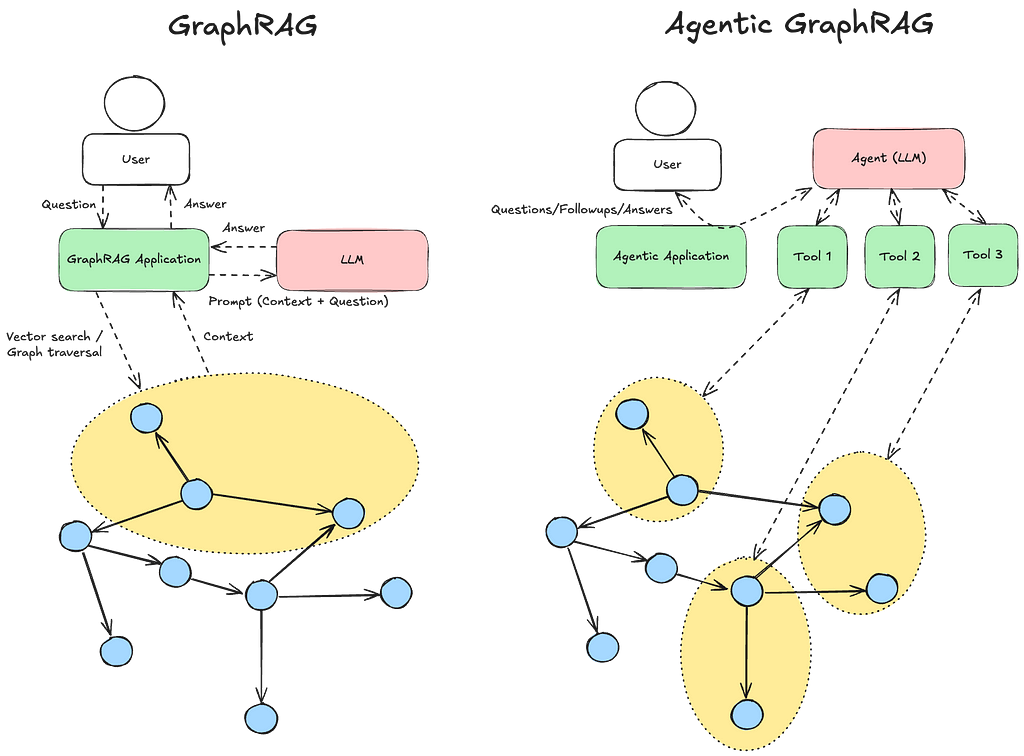
기존 GraphRAG의 문제점은 애플리케이션/데이터에 따라 관련 정보를 찾기 위해 그래프를 탐색하는 방법을 알기가 어려울 수 있다는 거예요. 질문 내용이나 사용자 환경에 따라 달라질 수 있거든요.
우리가 살펴본 예시인 (거의) 순수 Cypher의 GraphRAG에서는 질문이 Game of Thrones에 관한 것이었고, 질문이 TV 시리즈에 관한 것임을 알았기 때문에 EPISODE_OF Relationship을 순회해야 한다는 것을 알았어요.
하지만 질문이 제임스 본드에 관한 것이라면, 아마도 그 대신 작가(이안 플레밍)를 통해 탐색하고 싶을 거예요. 에이전트 GraphRAG를 사용하면 에이전트에게 합리적이라고 생각되는 다양한 방식으로 탐색하고 검색할 수 있는 도구를 제공하고, 대화의 질문과 사전 정보를 기반으로 어떻게 수행할지 결정하도록 할 수 있어요.
사용 사례
이 글에서 사용할 사례는 이전에 일반 GraphRAG를 사용해서 구현했던 간단한 예시예요.
Neo4j Aura 클라우드 서비스 팀의 일부 개발팀은 개발 환경에 대한 질문과 로컬 개발 환경 및 프로세스와 관련된 다른 프로그래밍 질문을 위한 포럼으로 Stack Overflow for Teams를 사용하고 있어요. 우리는 이 모든 지식을 JSON 파일(아래 참조)로 내보낸 다음, 다음과 같은 모델을 사용해서 Neo4j 그래프로 가져왔어요.
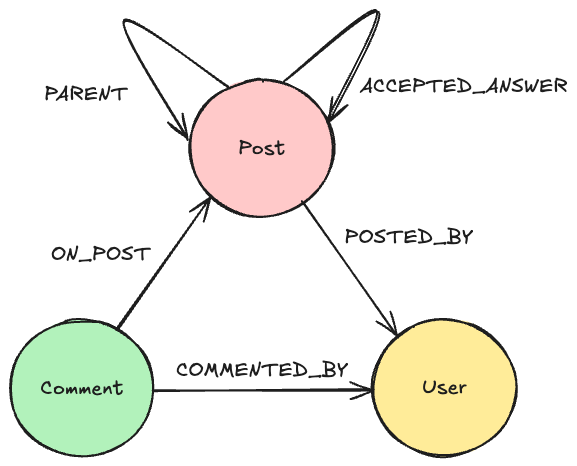
모든 게시물에는 body 속성이 있고, 원래 질문에는 이 있어요. 댓글에는 text 필드가 있죠. 우리는 과 body 게시물 모두에 Vector Embedding을 추가했지만, 댓글이나 사용자에게는 추가하지 않았어요.
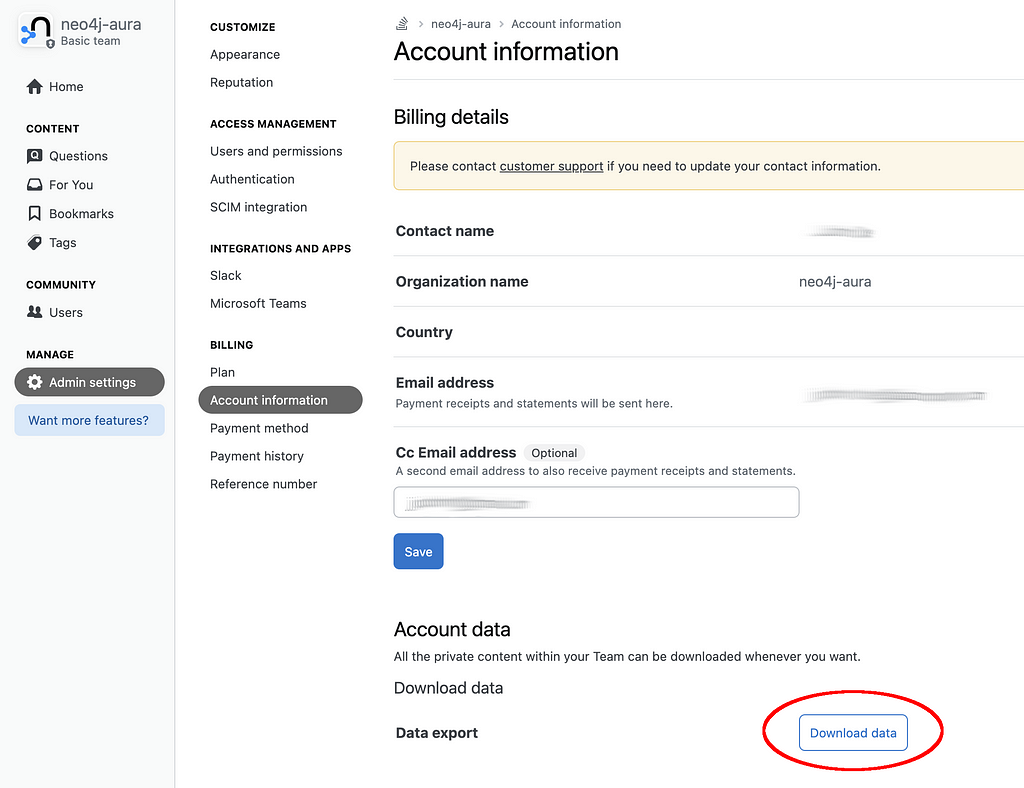
Teams용 Stack Overflow에서 데이터를 내보내려면 다음으로 이동하세요.관리 설정 > 계정 정보 그리고 클릭.
이건 Stack Overflow에서 내보낸 JSON 파일을 Neo4j 인스턴스로 가져오는 데 사용되는 Cypher 쿼리예요. 온프레미스와 Aura 모두에서 작동하는데, Aura의 경우 Aura에서 액세스할 수 있는 위치에 파일을 저장해야 해요.
// Clean up database
MATCH (n) DETACH DELETE n;

// Create indexes
CREATE INDEX post_id IF NOT EXISTS FOR (p:Post) ON (p.id);
CREATE INDEX comment_id IF NOT EXISTS FOR (c:Comment) ON (c.id);
CREATE INDEX user_id IF NOT EXISTS FOR (u:User) ON (u.id);
CREATE INDEX user_displayname IF NOT EXISTS FOR (u:User) ON (u.displayName);
CREATE VECTOR INDEX title_embeddings IF NOT EXISTS FOR (p:Post) ON (p.title_embedding);
CREATE VECTOR INDEX post_embeddings IF NOT EXISTS FOR (p:Post) ON (p.body_embedding);

// Import users
CALL apoc.load.json("users.json", null, {failOnError:false}) YIELD value
UNWIND value AS user
MERGE (u:User {id: toInteger(user['id'])})
SET u.created = datetime(user['creationDate']),
    u.goldBadges = toInteger(user['goldBadges']),
    u.silverBadges = toInteger(user['silverBadges']),
    u.bronzeBadges = toInteger(user['bronzeBadges']),
    u.reputation = toInteger(user['reputation']),
    u.accountId = toInteger(user['accountId']),
    u.userTypeId = user['userTypeId'],
    u.realName = user['realName'],
    u.displayName = user['displayName'];

// Import posts
CALL apoc.load.json("posts.json", null, {failOnError:false}) YIELD value
UNWIND value AS post
MERGE (p:Post {id: toInteger(post['id'])})
SET p.created = datetime(post['creationDate']),
    p.score = toInteger(post['score']),
    p.postType = post['postType'],
    p.title = post['title'],
    p.body = post['bodyMarkdown'],
    p.acceptedAnswerId = post['acceptedAnswerId']
WITH post, p
OPTIONAL MATCH (u:User)
WHERE (u.id = toInteger(post['ownerUserId']) OR u.displayName = toInteger(post['ownerDisplayName']))
FOREACH (_ IN CASE WHEN u IS NOT NULL THEN [1] ELSE [] END | CREATE (p)-[:POSTED_BY]->(u))
WITH post, p
MATCH (parent:Post {id: toInteger(post['parentId'])})
CREATE (p)-[:PARENT]->(parent);

// Connect accepted answers
MATCH (p:Post)
WHERE p.acceptedAnswerId IS NOT NULL
MATCH (a:Post {id: p.acceptedAnswerId})
MERGE (p)-[:ACCEPTED_ANSWER]->(a)
REMOVE p.acceptedAnswerId;

// Import comments
CALL apoc.load.json("comments.json", null, {failOnError:false}) YIELD value
UNWIND value AS comment
MERGE (c:Comment {id: toInteger(comment['id'])})
SET c.created = datetime(comment['creationDate']),
    c.text = comment['text']
WITH comment, c
OPTIONAL MATCH (u:User)
WHERE (u.id = toInteger(comment['userId']) OR u.displayName = toInteger(comment['userDisplayName']))
FOREACH (_ IN CASE WHEN u IS NOT NULL THEN [1] ELSE [] END | CREATE (c)-[:COMMENTED_BY]->(u))
WITH comment, c
MATCH (p:Post {id: toInteger(comment['postId'])})
CREATE (c)-[:ON_POST]->(p);
Vector Embedding을 생성하는 Cypher 쿼리는 다음과 같아요.
MATCH (p:Post)
WHERE p.title IS NOT NULL
WITH collect(p.title) AS titles, collect(p) AS posts
CALL genai.vector.encodeBatch(titles, "OpenAI", {token: $apiKey}) YIELD index, resource, vector
CALL db.create.setNodeVectorProperty(posts[index], "title_embedding", vector);

MATCH (p:Post)
WHERE p.body IS NOT NULL
WITH collect(p.body) AS body, collect(p) AS posts
CALL genai.vector.encodeBatch(body, "OpenAI", {token: $apiKey}) YIELD index, resource, vector
CALL db.create.setNodeVectorProperty(posts[index], "body_embedding", vector);
자, 이제 OpenAI가 이 그래프의 정보를 바탕으로 답변을 시도하는 간단한 GraphRAG 애플리케이션을 구축했어요. 프롬프트에 대한 컨텍스트를 가져와야 했던 단일 Cypher 쿼리는 다음과 같아요.
WITH genai.vector.encode($question, "OpenAI", {token: $apiKey}) AS embedding
CALL db.index.vector.queryNodes('post_embeddings', 2, embedding) YIELD node AS p, score AS pscore
MATCH (p)((:Post)-[:PARENT]->(:Post))*(parent)
WITH embedding, collect(parent) AS parents
CALL db.index.vector.queryNodes('title_embeddings', 2, embedding) YIELD node AS q, score AS qscore
WITH parents, collect(q) AS posts
WITH parents+posts AS questions

UNWIND questions AS question
MATCH path = (question)((:Post)<-[:PARENT]-(:Post))*
WITH question, nodes(path) AS posts

UNWIND posts AS post
OPTIONAL MATCH (post)<-[:ON_POST]-(comment:Comment)
WITH DISTINCT comment, post, question
WITH question, post, COLLECT(comment.text) AS comments

WITH
    CASE
        WHEN post = question THEN '***QUESTION***\nTitle: ' + post.title + '\nBody: ' + post.body
        ELSE '***ANSWER***\nBody: ' + post.body
    END
+
    CASE
        WHEN SIZE(comments) > 0 THEN '\n***COMMENT***\n' + apoc.text.join(comments, '\n***COMMENT***\n')
        ELSE ''
    END
AS postText


WITH DISTINCT postText
RETURN apoc.text.join(COLLECT(postText), '\n\n') AS context
프롬프트 질문은 다음과 같았죠.
Answer the following Question based on the Context only.
Only answer from the Context. If you don't know the answer,
say 'I don't know'. The context is a list of posts and comments,
separated by headers in the form of ***QUESTION***, ***ANSWER***
and ***COMMENT***.

Context: ${context}

Question: ${question}
이 방법은 꽤 효과적이었고, 봇은 우리가 제공하는 Knowledge Graph를 기반으로 관련 답변을 잘 제공했어요. 하지만 좀 더 개선할 수 있을 것 같았죠. 보시다시피, 우리는 ACCEPTED_ANSWER나 답변 점수를 사용하지 않아요. 그리고 사용자 객체가 답변에 대한 지침을 제공할 수도 있구요. 그럼 동일한 소스 데이터를 기반으로 에이전트 솔루션을 구축해 볼까요?
구현
Java의 에이전트 프레임워크
Java로 AI 에이전트를 위한 작은 라이브러리를 작성하는 것부터 시작해 볼게요. 여기서는 OpenAI에 집중하겠지만, 물론 다른 사용자에게도 확장할 수 있어요. 제 목표는 에이전트 작성/등록 및 도구 정의를 최대한 간단하게 만드는 것이었어요.
구현을 시작하기 전에 에이전트가 어떻게 작동하는지 한번 살펴볼까요? 앞서 말씀드렸듯이 지금은 OpenAI만 보고 있어요.
여러분은 에이전트를 수동으로 등록할 수 있어요. 에이전트를 등록할 때 이름을 지정하고 에이전트의 목적 (예: 프롬프트가 표시될 때 수행할 작업)을 알려주는 시스템 지침을 제공하죠. 예를 들어, "당신은 계산기이고 사용자가 요청한 대로 계산 작업을 수행해야 합니다." 와 같이요. 또한 제공할 도구도 등록하는데, 다음과 같은 JSON 형식으로 제공해요.
{
  "name": "sum_integers",
  "description": "Summarise two integer numbers",
  "parameters": {
    "type": "object",
    "properties": {
      "number1": {
        "type": "integer",
        "description": "The first number to sum"
      },
      "number2": {
        "type": "integer",
        "description": "The second number to sum"
      }
    },
    "required": ["number1", "number2"]
  }
}
반환 결과가 아니라 매개변수를 지정한다는 걸 알 수 있어요. 반환 결과는 원하는 형식의 JSON이지만 에이전트가 이를 해석하는 방법을 스스로 설명할 수 있어야 하고, 도구 설명에서 이에 대한 힌트를 제공해야 하죠.
에이전트를 등록하면 "asst_******************" 형식의 어시스턴트 ID를 받게 될 거예요. 이는 에이전트와 통신할 때 사용하게 되죠.
이제 에이전트와 통신하고 에이전트가 원할 때 도구를 실행하는 애플리케이션을 작성해야 해요. 애플리케이션이 가장 먼저 해야 할 일은 에이전트와 스레드를 시작하는 것이죠.
이를 병렬 처리(예: Java `Thread` 클래스)의 스레드와 혼동하면 안 되고, ChatGPT UI의 사이드바에 있는 토론 스레드와 혼동해서도 안 돼요.
스레드가 있으면 질문을 스레드에 보내고 상태를 폴링해서 도구를 실행할 것인지, 아니면 응답이 준비되었는지 확인해요. 답변을 받은 후 원하시면 후속 질문을 진행할 수 있죠.
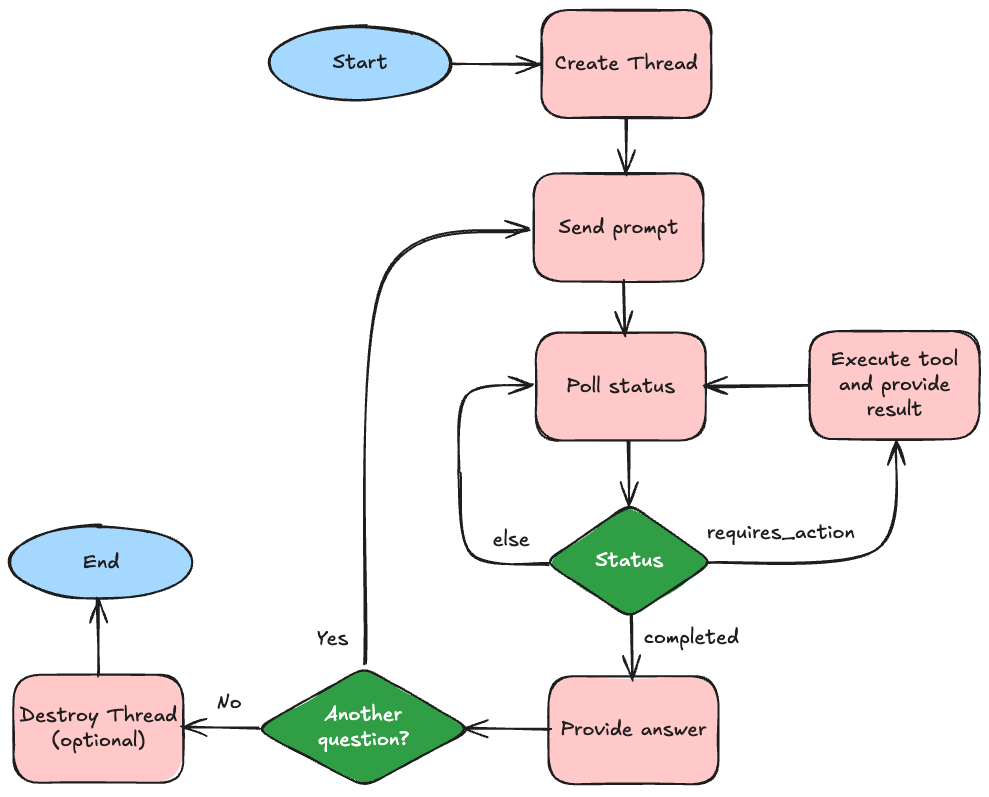
도구를 실행하려고 하면 어떤 도구와 매개변수 값을 알려주는 JSON 구조가 제공되고, 작업을 수행하고 결과를 다시 제공해야 해요.
프레임워크의 첫 번째 과제는 다음과 같아요. 에이전트로부터 요청을 받을 때 프레임워크가 무엇을 호출할지 알 수 있도록 애플리케이션에서 도구 메서드를 어떻게 정의해야 할까요?
제 첫 번째 생각은 도구 이름을 검색하는 메서드와 `JsonObject`를 가져와 반환하는 실행 메서드가 있는 `Tool`이라는 인터페이스를 갖는 것이었어요. 하지만 그건 우아해 보이지 않네요. 그리고 에이전트에 수동으로 등록한 것과 구현을 너무 단절시키는 것은 옳지 않은 것 같아요.
대신에 도구를 일반 Java 메소드로 정의하고 리플렉션을 사용해서 무엇을 실행할지 파악하고, 리플렉션(일부 주석과 함께)을 사용해서 에이전트를 등록하도록 했어요. 따라서 위의 URL을 사용해서 수동으로 등록하는 대신 애플리케이션 구현이 실제로 어떻게 보이는지에 따라 프로그래밍 방식으로 에이전트를 등록하는 거죠. 도움을 주기 위해 두 가지 구성 요소가 있어요. `AbstractAgent`와 다음과 같은 주석이 있죠. `@description`. 따라서 에이전트를 만들려면 `AbstractAgent`에 하위 클래스를 만들고 클래스(에이전트의 시스템 지침이 됨), 메서드(도구 설명이 됨) 및 도구에 필요한 모든 매개변수에 대해 `@description` 주석을 추가해요.
이 리플렉션이 작동하려면 Java 프로젝트를 다음과 같이 컴파일해야 해요. `-parameters` 컴파일러 옵션.
@description("You are a calculator and should perform computational operations as asked by the user")
public class MyAgent extends AbstractAgent {
  public MyAgent() {
    super("sk-proj-.......", "asst_.......", 60000, false);
  }

  @description("Summarise two integer numbers")
  public int sum(@description("The first number to sum")int a, @description("The second number to sum")int b) {
    return a + b;
  }

  @description("Multiply two integer numbers")
  public int mult(@description("The first number to multiply")int a, @description("The second number to multiply")int b) {
    return a * b;
  }
}
`AbstractAgent`에는 이를 등록하기 위한 정적 메소드가 있으며 다음과 같이 호출할 수 있어요.
System.out.println(AbstractAgent.registerAgent(MyAgent.class,
  "sk-proj-......."));
인쇄되는 내용은 어시스턴트의 ID가 될 거예요. 회원가입 후, 홈페이지에서 확인할 수 있어요 OpenAI 도우미 페이지. 두 번째 인수는 에이전트와의 모든 통신에 필요한 OpenAI API 키에요. 이 등록은 한 번만 수행해야 하고, 그런 다음 애플리케이션에 어시스턴트 ID를 하드 코딩하고 다시 호출하지 마세요(도구 서명을 변경하지 않는 한).
기본 클래스에 대한 매개변수는 동일한 OpenAI API 키, 위 명령의 어시스턴트 ID, 에이전트 호출에 사용할 제한 시간(ms), 디버그 출력(예: 호출된 도구의 인쇄) 여부예요.
OpenAI와의 통신은 REST API를 통해 이루어지며 이를 위해 Apache `HttpClient`를 사용해요. 그런 다음 JSON 부분에 Google `Gson`을 사용하죠. 모든 REST 호출은 유사해요. 예를 들어 스레드를 생성하면 다음과 같아요.
private static final String BASE_URL = "https://api.openai.com/v1";

private static final HttpClientResponseHandler<String> stringResponseHandler = response -> {
  int status = response.getCode();
  if (status >= 200 && status < 300) {
    return new String(response.getEntity().getContent().readAllBytes());
  } else {
    throw new IOException("Unexpected response status: " + status);
  }
};

private final CloseableHttpClient client = HttpClients.createDefault();

private final String apiKey;
private final String assistantId;
private final long timeoutMs;
private final boolean debug;

protected AbstractAgent(String apiKey, String assistantId, long timeoutMs, boolean debug) {
  this.apiKey = apiKey;
  this.assistantId = assistantId;
  this.timeoutMs = timeoutMs;
  this.debug = debug;
}

public AgentThread createThread() throws AgentException {
  try {
    HttpPost post = new HttpPost(BASE_URL + "/threads");
    post.setHeader("Authorization", "Bearer " + apiKey);
    post.setHeader("OpenAI-Beta", "assistants=v2");

    String json = client.execute(post, stringResponseHandler);
    return new AgentThread(JsonParser.parseString(json).getAsJsonObject().get("id").getAsString());
  }
  catch (Throwable t) {
    throw new AgentException(t);
  }
}
맞아요. 오류 처리는 현재 구현에서 꽤 기본적인 수준이에요. 모든 오류는 `AgentException`으로 발생하는데, 아마 원인을 나타내는 정보도 함께 포함될 거예요.
이제 기본적인 메시지 루프의 로직 (예: 위 흐름도 구현)을 한번 살펴볼까요?
private String promptAgent(String threadId, String prompt) throws AgentException {
  try {
    postUserMessage(threadId, prompt);
    String runId = runAssistant(threadId);

    long startTime = System.currentTimeMillis();

    JsonObject runStatus;
    do {
      if (System.currentTimeMillis() - startTime > timeoutMs) {
        throw new TimeoutException("Timed out waiting for run to complete");
      }

      Thread.sleep(1500);
      runStatus = getRunStatus(threadId, runId);

      if ("requires_action".equals(runStatus.get("status").getAsString())) {
        JsonArray toolCalls = runStatus.getAsJsonObject("required_action")
            .getAsJsonObject("submit_tool_outputs")
            .getAsJsonArray("tool_calls");

        JsonArray toolOutputs = new JsonArray();

        for (JsonElement toolCallElem : toolCalls) {
          JsonObject toolCall = toolCallElem.getAsJsonObject();
          String functionName = toolCall.getAsJsonObject("function").get("name").getAsString();
          JsonObject arguments = JsonParser
              .parseString(toolCall.getAsJsonObject("function").get("arguments").getAsString())
              .getAsJsonObject();

          if (debug) {
            System.out.println(" ... calling tool: " +
                functionName + " - " +
                toolCall.getAsJsonObject("function").get("arguments").getAsString()
                .replace("\n", "").replace("\r", ""));
          }

          // This will be overwritten if a matching tool was found
          Object toolResult = createUnknownToolReply(functionName);

          // Use a reflection to find a method in the subclass that matches the tool name
          // and that has the description annotation (which indicates that it was reported as a tool)
          Method[] methods = this.getClass().getDeclaredMethods();
          for (Method method : methods) {
            try {
              if (method.getName().equals(functionName) &&
                  method.isAnnotationPresent(description.class) &&
                  method.getReturnType() != void.class) {
                Object[] params = Arrays.stream(method.getParameters())
                    .map(param -> GSON.fromJson(arguments.get(param.getName()), param.getType()))
                    .toArray();
                method.setAccessible(true);
                toolResult = method.invoke(this, params);
                break;
              }
            }
            catch (Throwable t) {
              t.printStackTrace();
            }
          }

          JsonObject output = new JsonObject();
          output.addProperty("tool_call_id", toolCall.get("id").getAsString());
          output.addProperty("output", GSON.toJson(toolResult));

          toolOutputs.add(output);
        }

        submitToolOutputs(threadId, runId, toolOutputs);
      }
    } while (!"completed".equals(runStatus.get("status").getAsString()));

    return getLastAssistantMessage(threadId);
  }
  catch (Throwable t) {
    throw new AgentException(t);
  }
}
도우미 메서드인 getRunStatus()는 예를 들어 createThread()와 비슷하게 간단한 REST 호출이에요.
라이브러리의 전체 소스 코드(AbstractAgent 클래스 및 description 주석)는 GitHub 저장소에서 확인할 수 있어요. 거기에서 정적 registerAgent() 메서드 및 모든 도우미 메서드도 찾을 수 있죠.
MyAgent에서 앞의 예제 에이전트 구현을 사용하는 것은 다음과 같이 간단해요.
MyAgent agent = new MyAgent();
try (AbstractAgent.AgentThread thread = agent.createThread()) {
  System.out.println(thread.promptAgent("What is 5 times 7?"));
}
같은 스레드에서 계속 질문하는 루프를 만들 수도 있어요. 아래 Stack Overflow 예시에서 확인해 보세요.
Stack Overflow 에이전트
작은 Java 라이브러리가 준비되면 Stack Overflow 에이전트를 만들어 볼 수 있어요. 제일 먼저 필요한 건 Neo4j 연결과 필요한 Cypher 쿼리 구현이겠죠? 처음에 보여드린 GraphRAG 버전에서는 Vector Embedding 검색으로 후보 게시물을 찾은 다음, 게시물과 댓글을 쭉 훑어봤어요.
여기서는 에이전트가 관련 게시물을 찾을 수 있도록 Vector Embedding 검색 옵션을 첫 번째 항목으로 제공할 거예요. 그런 다음 스레드 가져오기, 댓글 가져오기, 사용자 탐색, 승인된 답변 찾기 등 다양한 방법으로 탐색할 수 있도록 할 거고요. 아래에는 클래스의 일부(처음 세 개의 가져오기 도구)가 나와 있어요. 전체 구현은 에서 확인하실 수 있습니다.
package org.bergman.agentic.demo;

import java.util.Collection;
import java.util.Map;

import org.neo4j.driver.AuthTokens;
import org.neo4j.driver.Config;
import org.neo4j.driver.Driver;
import org.neo4j.driver.GraphDatabase;
import org.neo4j.driver.Query;
import org.neo4j.driver.SessionConfig;

public class Neo4jConnection implements AutoCloseable, OpenAIConnection {
  private static final String DB_URI = "neo4j+s://********.databases.neo4j.io";
  private static final String DB_USER = "neo4j";
  private static final String DB_PWD = "***********";
  private static final String DB_NAME = "neo4j";

  private final Driver driver;

  public Neo4jConnection() {
    driver = GraphDatabase.driver(DB_URI, AuthTokens.basic(DB_USER, DB_PWD), Config.defaultConfig());
  }

  @Override
  public void close() throws Exception {
    driver.close();
  }

  public Collection<Map<String, Object>> getRelevantQuestions(String userQuestion) {
    var query = new Query(
        """
        WITH genai.vector.encode($question, "OpenAI", {token: $apiKey}) AS embedding
        CALL db.index.vector.queryNodes('post_embeddings', 2, embedding) YIELD node AS p, score AS pscore
        MATCH (p)((:Post)-[:PARENT]->(:Post))*(parent)
        WITH embedding, collect(parent) AS parents
        CALL db.index.vector.queryNodes('title_embeddings', 2, embedding) YIELD node AS q, score AS qscore
        WITH parents, collect(q) AS posts
        UNWIND parents+posts AS question
        RETURN DISTINCT question {.score, .title, .body, id: elementId(question), created: toString(question.created)}
        """,
        Map.of("question", userQuestion, "apiKey", API_KEY));

    try (var session = driver.session(SessionConfig.forDatabase(DB_NAME))) {
      var record = session.executeRead(tx -> tx.run(query).list());
      return record.stream().map(r -> r.get("question").asMap()).toList();
    }
  }

  public Collection<Map<String, Object>> getThread(String questionId) {
    var query = new Query(
        """
        MATCH (q:Post) WHERE elementId(q) = $question
        MATCH path = (q)((:Post)<-[:PARENT]-(:Post))*
        UNWIND nodes(path) AS post
        RETURN post {.score, .body, .postType, id: elementId(post), created: toString(post.created)}
        """,
        Map.of("question", questionId));

    try (var session = driver.session(SessionConfig.forDatabase(DB_NAME))) {
      var record = session.executeRead(tx -> tx.run(query).list());
      return record.stream().map(r -> r.get("post").asMap()).toList();
    }
  }

  public Map<String, Object> getAcceptedAnswer(String questionId) {
    var query = new Query(
        """
        MATCH (q:Post) WHERE elementId(q) = $question
        OPTIONAL MATCH (q)-[:ACCEPTED_ANSWER]->(post:Post)
        RETURN post {.score, .body, .postType, id: elementId(post), created: toString(post.created)}
        """,
        Map.of("question", questionId));

    try (var session = driver.session(SessionConfig.forDatabase(DB_NAME))) {
      var record = session.executeRead(tx -> tx.run(query).single());
      return record.get("post").isNull() ? null : record.get("post").asMap();
    }
  }

  ...
}
이 모든 메서드가 어떻게 Map과 Map의 Collection을 반환하는지 확인해보세요. 그 이유는 모든 에이전트 도구 메서드가 객체를 반환하고, GSON.toJson(toolResult)를 통해 JSON 구조로 변환되기 때문이에요. Map은 JSON에 잘 맞거든요. 또한, Cypher 쿼리가 `Node`를 있는 그대로 반환하지 않는다는 점에 유의하세요. `Map` 투영을 사용해서 반환할 속성과 형식을 선택하는데요. 이는 우리가 원하지 않는 속성(예: 각각 6KB인 `Vector Embedding`)을 피하고, GSON에서 허용하는 형식(예: LocalDateTime 대신 문자열)으로 변환하기 위해서랍니다.
이제 Neo4j 루틴을 사용해서 에이전트 구현을 수행할 수 있어요.
package org.bergman.agentic.demo;

import java.util.Scanner;

import org.bergman.agentic.openai.description;
import org.bergman.agentic.openai.AbstractAgent;

@description(
    """
    You are assisting a development team with questions on their specific development environment.
    For this you have a graph which is an export from Stack Overflow for teams. It has posts and comments on those posts.
    The original post is usually a question, and the other posts are answers on that question.
    All posts and comments has a link to the user that posted them.
    """)
public class SOChatAgent extends AbstractAgent implements OpenAIConnection {
  private static final String ASSISTANT_ID = "asst_***********";
  private static final long TIMEOUT_MS = 60000;
  private static final boolean DEBUG = true;

  private final Neo4jConnection neo4j;

  protected SOChatAgent(Neo4jConnection neo4j) {
    super(API_KEY, ASSISTANT_ID, TIMEOUT_MS, DEBUG);

    this.neo4j = neo4j;
  }

  @description(
      """
      Find relevant questions (topics) in the graph based on vector search on the question the user asked (the prompt)
      """)
  public Object findRelevantQuestions(
      @description("The question as asked by the user") String userQuestion
      ) throws Exception {
    return neo4j.getRelevantQuestions(userQuestion);
  }

  @description(
      """
      For a specific question (topic), get all posts in that thread (the question itself and all answers).
      The result is unsorted, but there is a created field with when it was posted.
      """)
  public Object retrieveThread(
      @description("The id of the question/topic to get the thread for") String questionId
      ) throws Exception {
    return neo4j.getThread(questionId);
  }

  @description(
      """
      For a specific question (topic), get the answer that has been indicated as the accepted answer
      (if there is one, otherwise it returns a string that says 'No accepted answer')
      """)
  public Object retrieveAcceptedAnswer(
      @description("The id of the question/topic to get the accepted answer for") String questionId
      ) throws Exception {
    var result = neo4j.getAcceptedAnswer(questionId);
    if (result == null) {
      return "No accepted answer";
    }
    return result;
  }

  @description(
      """
      Fetch all comments for a specific post (question or answer).
      This may be an empty list if there are no comments.
      """)
  public Object retrieveComments(
      @description("The id of the post to get the comments for") String postId
      ) throws Exception {
    return neo4j.getComments(postId);
  }

  @description(
      """
      Get the user that posted a question, an answer or a comment.
      """)
  public Object getUser(
      @description("The id of the post (question or answer) or comment for which to get the user who posted.") String entityId
      ) throws Exception {
    return neo4j.getUser(entityId);
  }

  @description(
      """
      Get all posts (questions and answers) posted by a specific user.
      """)
  public Object getUserPosts(
      @description("The user id to get the posted posts for.") String userId
      ) throws Exception {
    return neo4j.getUserPosts(userId);
  }

  @description(
      """
      Get all comments posted by a specific user.
      """)
  public Object getUserComments(
      @description("The user id to get the posted comments for.") String userId
      ) throws Exception {
    return neo4j.getUserComments(userId);
  }

  @description(
      """
      Get the post that an answer or a comment was posted on.
      If there is no parent (i.e. the post was a question) it return the string 'No parent'
      """)
  public Object getParentPost(
      @description("The id of the post (answer) or comment") String entityId
      ) throws Exception {
    var result = neo4j.getParentPost(entityId);
    if (result == null) {
      return "No parent";
    }
    return result;
  }
}
OpenAIConnection 인터페이스에는 API_KEY 상수만 있고 그게 전부예요.
마지막으로 루프를 중지하기 위해 'exit'라고 쓸 때까지 사용자에게 질문을 계속 요청하는 프롬프트 루프를 실행할 수 있어요.
public static void main(String[] args) throws Exception {
  try(Neo4jConnection neo4j = new Neo4jConnection()) {
    SOChatAgent agent = new SOChatAgent(neo4j);
    try(Scanner scanner = new Scanner(System.in);
      AbstractAgent.AgentThread thread = agent.createThread()) {
      while (true) {
        String input = scanner.nextLine();
        if (input.trim().equalsIgnoreCase("exit")) {
          break;
        }
        System.out.println(thread.promptAgent(input));
      }
    }
  }
}
모든 데모 코드는 에 공개되어 있어요.
테스트
이제 새로운 챗봇을 사용해 볼까요? (디버그를 활성화해서 요청하는 도구가 무엇인지 확인해 보세요.)
> I am getting started with Aura development on Windows. What are the three most important things for me to do?

 ... calling tool: findRelevantQuestions - {"userQuestion":"getting started with Aura development on Windows"}
 ... calling tool: retrieveAcceptedAnswer - {"questionId": "4:1ad7b1b4-413f-49bd-aa14-24a8f5f75f28:405"}
 ... calling tool: retrieveAcceptedAnswer - {"questionId": "4:1ad7b1b4-413f-49bd-aa14-24a8f5f75f28:659"}
 ... calling tool: retrieveAcceptedAnswer - {"questionId": "4:1ad7b1b4-413f-49bd-aa14-24a8f5f75f28:256"}

- Install WSL, Docker
- Configure SSH Keys
- Install Visual Studio Code

> Are there any pitfalls reported in the threads on any of those steps?

 ... calling tool: retrieveComments - {"postId": "4:1ad7b1b4-413f-49bd-aa14-24a8f5f75f28:406"}
 ... calling tool: retrieveComments - {"postId": "4:1ad7b1b4-413f-49bd-aa14-24a8f5f75f28:660"}

No reported pitfalls in the threads.

> exit

Thread deleted: thread_UwrncnmVUSplDhaO5YNU64q9
이게 전부예요! 이제 Aura 엔지니어로서 개발을 시작하는 데 도움을 주는 자체 에이전트를 갖게 되었네요.
최종 의견
여기 제시된 라이브러리는 프로덕션 등급이라기보다는 에이전트 AI가 어떻게 작동하는지 보여주는 예시로 보는 게 좋을 것 같아요. 프로덕션 환경에서 사용하려면 몇 가지 추가 작업이 필요할 거예요.
- 단일 AgentException 대신 오류 처리를 개선해야 해요.
- 모든 호출에 대해 리플렉션을 사용하는 대신 메서드 핸들 맵을 만드는 게 좋겠죠.
- 도구 결과를 보려면 DTO 및 Java 레코드를 사용하세요. 앞서 언급했듯이 도구의 반환 유형에 관해 에이전트와의 계약은 없지만, 적어도 우리 코드에서는 각 도구에 대해 더 깔끔하고 명확한 계약을 통해 이를 만들 거예요.
- 도구 맞춤화를 위한 추가 어노테이션
하지만 이런 모든 작업을 하는 대신, 저는 아마도 로드 존슨의 라이브러리를 사용할 것 같아요.
- Agentic AI
- GraphRAG
- java
에이치시스템즈의 LogTree는 Neo4j 기반 GraphRAG 플랫폼으로, 데이터를 자동으로 지식그래프화하고 자연어 질의로 즉시 답을 제공합니다.
'Agent AI' 카테고리의 다른 글
| 실제 프로덕션에서 효과적인 AI 에이전트 활용 사례 연구 (0) | 2026.04.03 |
|---|---|
| Neo4j 에이전트 기반 멀티 유저 던전 만들기 (0) | 2026.04.03 |
| 외부 MCP 제공업체와 Neo4j를 활용한 에이전트 기반 그래프 분석 (0) | 2026.04.03 |
| 에이전트 기반 AI 아키텍처란 무엇일까요? 일반적인 패턴과 활용 시점 (1) | 2026.04.02 |
| 에이전트 AI vs. 생성 AI: 에이전트에게 기억, 맥락, 그리고 안전장치가 필요한 이유 (0) | 2026.04.02 |