
Google의 Genkit 프레임워크를 사용하여 그래프 기반 벡터 저장, 의미 체계 검색, 고급 지식 그래프 애플리케이션을 활용하는 방법에 대한 종합 가이드
Genkit x Neo4j: AI 데이터 검색 발전
AI 에이전트가 더욱 복잡해짐에 따라 기존 벡터 데이터베이스는 다중 홉 추론 및 구조화된 관계로 어려움을 겪는 경우가 많습니다.그래프RAG(Graph Retrieval-Augmented Generation)은 LLM의 의미론적 이해와 지식 그래프의 연결된 특성을 병합하여 이러한 제한 사항을 해결합니다. 보다자세한 내용은
구글 젠킷확장 가능한 플러그인 생태계를 통해 AI 애플리케이션 개발을 단순화하는 오픈 소스 프레임워크입니다. Neo4j 플러그인은 기본 벡터 검색을 Genkit과 통합하여 순회 가능한 관계를 유지하면서 문서를 노드로 저장할 수 있습니다. 이는 의미론적 유사성과 구조적 컨텍스트가 모두 필요한 GraphRAG 파이프라인에 이상적입니다.
이 가이드에서는 기본 의미 검색부터 고급 GraphRAG 토폴로지 및 영구 채팅 메모리까지 이동하는 전체 통합 프로세스를 다룹니다.
1. 설치 및 전제조건
시작하려면 먼저 Node.js 또는 TypeScript 환경을 설정해야 합니다. 통합은 Genkit의 핵심 라이브러리, 특정 Neo4j 플러그인, 임베딩 제공자(이 예에서는 Google AI를 사용함) 및 공식 Neo4j JavaScript 드라이버에 의존합니다.
필요한 종속성을 설치합니다.
npm install genkit genkitx-neo4j @genkit-ai/google-genai neo4j-driver또한 실행 중인 Neo4j 인스턴스도 필요합니다. 이는 로컬 Docker 컨테이너, Neo4j Desktop 인스턴스 또는 클라우드 호스팅 Neo4j AuraDB 인스턴스일 수 있습니다. Neo4j 버전이 벡터 검색을 지원하는지 확인하세요(버전 5.26+가 권장되지만 나중에 살펴보겠지만 버전 2026.01+는 훨씬 더 강력한 기본 필터링 기능을 잠금 해제합니다).
2. 플러그인 및 연결 구성 초기화
Genkit 인스턴스를 생성할 때 플러그인을 초기화하세요. 적어도 indexId와 embedder를 제공해야 합니다. 플러그인은 Genkit의 추상화 레이어와 그래프에 대해 실행되는 기본 Cypher 쿼리 사이의 브리지 역할을 합니다.
import { genkit } from 'genkit';
import { neo4j } from 'genkitx-neo4j';
import { googleAI } from '@genkit-ai/google-genai';

const ai = genkit({
  plugins: [
    googleAI(),
    neo4j([
      {
        indexId: 'my-vector-index',
        embedder: googleAI.embedder('gemini-embedding-001'),
      },
    ]),
  ],
});
Neo4j 색인과 사용하려는 임베딩 모델을 지정해야 합니다.
연결 자격 증명 관리
다음 두 가지 방법으로 Neo4j 연결을 구성할 수 있습니다.
1. 환경 변수 사용:매개변수가 명시적으로 전달되지 않으면 플러그인은 시스템에서 다음 환경 변수를 찾습니다.
NEO4J_URI=bolt://localhost:7687  # Neo4j's binary protocol
NEO4J_USERNAME=neo4j
NEO4J_PASSWORD=password
NEO4J_DATABASE=neo4j  # Optional: specify database name

# ..And other additional keys, like GOOGLE_GENAI_API_KEY=<apiKey>
2. 사용하기clientParams 옵션:초기화 중에 코드에서 직접 연결 구성을 전달할 수 있습니다.
neo4j([
  {
    indexId: 'my-vector-index',
    // define embedder
    embedder: googleAI.embedder('gemini-embedding-001'),
    clientParams: {
      url: '<connection URI>',
      username: '<username>',
      password: '<password>',
      database: 'neo4j', // Optional, default 'neo4j'
    },
  },
]),
구성 옵션 이해
플러그인은 고도로 사용자 정의 가능합니다. Neo4jParams 객체를 사용하면 Genkit 추상화를 특정 그래프 스키마에 완벽하게 매핑할 수 있습니다.
- 색인 ID: (필수의)벡터 인덱스의 고유 식별자입니다. 색인이 없으면 플러그인이 색인을 생성합니다.
- : (필수의)벡터를 생성하는 데 사용되는 Genkit 임베더(예: Gemini, OpenAI 등)
- clientParams: (선택 과목)연결 세부정보. 생략된 경우 환경 변수로 대체됩니다.
- : (선택 과목)Neo4j의 노드 라벨. 기본값은 indexId입니다.
- : (선택 과목)텍스트 콘텐츠의 속성 이름입니다. 기본값은 텍스트입니다.
- embedding속성: (선택 과목)벡터의 속성 이름입니다. 기본값은 삽입입니다.
- id속성: (선택 과목)고유한 문서 ID에 대한 속성입니다. 기본값은 ID입니다.
- : (선택 과목)검색된 결과를 강화하기 위한 사용자 정의 Cypher RETURN 절.
- : (선택 과목)벡터 검색과 전체 텍스트 검색을 결합하려면 '하이브리드'를 사용하세요.
- fullTextIndexName: (선택 과목)하이브리드 검색에 사용되는 전체 텍스트 색인의 맞춤 이름입니다.
- : (선택 과목)전략 인스턴스. 예를 들어 기본 인덱스 내 필터링을 위한 새로운 MatchSearchClauseStrategy()(Neo4j 2026.01+).
- 필터메타데이터: (선택 과목)빠른 인덱스 내 필터링을 위해 최적화할 메타데이터 필드입니다.
- : (선택 과목)HyDE 및 기타 GraphRAG 전략에 사용되는 LLM입니다.
- customGraphRagConfigs: (선택 과목)사용자 정의 다중 홉 GraphRAG 토폴로지에 대한 정의입니다.
3. 인덱싱 및 검색
기본적으로 벡터 저장소는 문서를 수집(텍스트를 임베딩으로 변환 및 저장)하고 사용자의 프롬프트에 따라 검색할 수 있어야 합니다.
다음과 같이 검색기 및 색인 생성기 참조를 가져옵니다.
import { neo4jRetrieverRef } from 'genkitx-neo4j';
import { neo4jIndexerRef } from 'genkitx-neo4j';
ai.index()와 함께 인덱서 참조를 사용하여 문서와 해당 임베딩을 Neo4j 데이터베이스에 저장합니다.
import { Document } from 'genkit';

async function indexCompanyDocuments(ai: any): Promise<void> {
  // Use the indexer reference
  const INDEXER_REF = neo4jIndexerRef({
    indexId: 'my-vector-index',
    displayName: 'Company Documents Indexer'
  });
  const doc1 = new Document({
    content: [{ text: 'Neo4j integrates natively with Genkit.' }],
    metadata: { category: 'technology', uniqueId: 'doc-101' },
  });
  const doc2 = new Document({
    content: [{ text: 'Vector search allows semantic similarity matching.' }],
    metadata: { category: 'technology', uniqueId: 'doc-102' },
  });
  // Execute the indexing process
  await ai.index({
    indexer: INDEXER_REF,
    documents: [doc1, doc2]
  });
  console.log('Documents indexed successfully.');
}
내부적으로 Genkit은 지정된 임베더(예: Gemini)를 호출하여 텍스트에 대한 벡터를 생성합니다. 그런 다음 Neo4j 플러그인은 Cypher 쿼리를 실행하여 이러한 문서를 그래프의 노드로 병합하고 필요한 벡터 인덱스가 아직 없는 경우 자동으로 생성합니다.
색인 작성기는 다음 2개의 노드를 반환합니다. 여기서 라벨 이름이 색인 이름에 해당함을 알 수 있습니다.
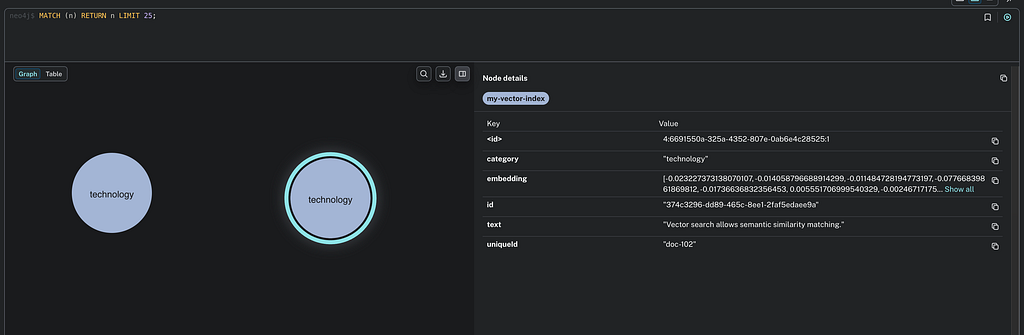
ai.retrieve()와 함께 검색기 참조를 사용하여 의미상 유사한 문서를 가져옵니다.
async function searchCompanyDocuments(ai: any, userQuery: string): Promise<Document[]> { {
  // Use the retriever reference
  const RETRIEVER_REF = neo4jRetrieverRef({
    indexId: 'my-vector-index',
    displayName: 'Company Documents Retriever'
  });

  const docs = await ai.retrieve({
    retriever: RETRIEVER_REF,
    query: userQuery,
    // Optional: limit number of results
    options: { k: 5 },
  });
  return docs;
}

async function main() {
    try {
        console.log('--- Start indexing ---');
        await indexCompanyDocuments(ai);

        console.log('--- Start search ---');
        const docs = await searchCompanyDocuments(ai, 'What is vector search?');
        console.log('Search results (content):', docs.map(d => d.content));
    } catch (error) {
        console.error('Error during execution:', error);
    }
}
main();

/*
The main() prints this a result like this:

--- Start indexing ---
Documents indexed successfully.
--- Start search ---
Search results (content): [
  [ { text: 'Vector search allows semantic similarity matching.' } ],
  [ { text: 'Neo4j integrates natively with Genkit.' } ]
]
Search results (metadata): [
  { category: 'technology', uniqueId: 'doc-102' },
  { category: 'technology', uniqueId: 'doc-101' }
]
*/
3.1 맞춤 엔터티 및 스키마 매핑
그래프 데이터베이스를 벡터 저장소로 사용하는 주요 이점은 의미론적 검색과 구조적 그래프 기능을 결합한다는 것입니다. 실제 애플리케이션에서는 빈 데이터베이스로 시작하는 경우가 거의 없습니다. :Product, :Employee 또는 :Article과 같은 노드가 있는 기존 스키마가 있을 수 있습니다.
사전 정의된 스키마로 제한되는 대신 사용자 정의 노드 레이블, ID 필드, 텍스트 및 임베딩에 대한 속성을 사용하도록 플러그인을 구성할 수 있습니다. 이를 통해 기존 Neo4j 도메인 모델에 임베딩을 원활하게 통합할 수 있습니다.
예를 들어 다음과 같은 수집을 수행할 수 있습니다.
import { genkit, Document } from 'genkit';
import { neo4j, neo4jIndexerRef, neo4jRetrieverRef } from 'genkitx-neo4j';
import { googleAI } from '@genkit-ai/google-genai';

// 1. Initialization with custom mappings
const ai = genkit({
  plugins: [
    googleAI(),
    neo4j([
      {
        indexId: 'custom-entities-idx',
        embedder: googleAI.embedder('gemini-embedding-001'),
        // clientParams can be omitted if environment variables are set

        // Define your domain-specific schema mapping here:
        label: 'Article',
        textProperty: 'bodyContent',
        embeddingProperty: 'semanticVector',
        idProperty: 'articleId',
      },
    ]),
  ],
});

// 2. Ingestion over custom schema
async function ingestCustomArticles(ai: any) {
  const INDEXER_REF = neo4jIndexerRef({ indexId: 'custom-entities-idx' });

  const doc = new Document({
    content: [{ text: 'The integration of Genkit and Neo4j enables advanced GraphRAG.' }],
    // metadata keys must match the idProperty defined in the config (articleId)
    metadata: {
      articleId: 'art-001',
      author: 'Giuseppe Villani'
    },
  });

  await ai.index({
    indexer: INDEXER_REF,
    documents: [doc],
  });
  console.log('Article indexed successfully using custom schema.');
}
결과는 다음과 같습니다.
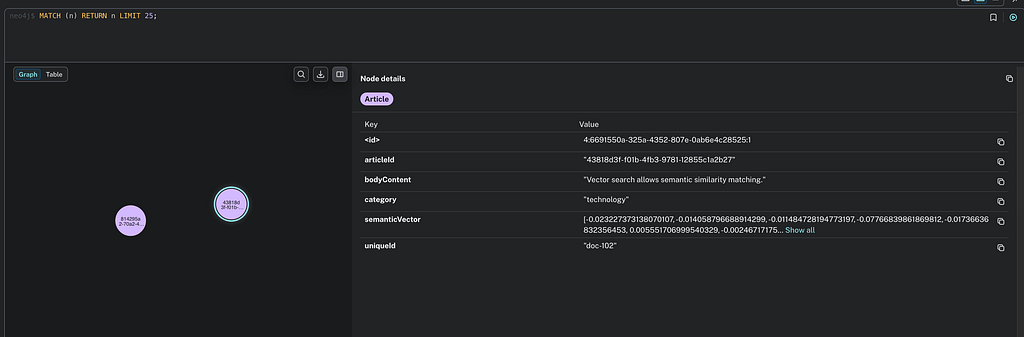
이 구성을 사용하여 문서의 색인을 생성하면 플러그인은 병합을 위해 기사 ID를 사용하고 bodyContent에 텍스트를 저장하는 :Article 라벨을 대상으로 하는 Cypher 쿼리를 실행합니다.
// 3. Retrieval over custom schema
async function retrieveArticles(ai: any, query: string) {
  const RETRIEVER_REF = neo4jRetrieverRef({ indexId: 'custom-entities-idx' });
  const docs = await ai.retrieve({
    retriever: RETRIEVER_REF,
    query: query,
    options: { k: 5 },
  });
  return docs;
}

// 4. Execution Main
async function main() {
  try {
    console.log('--- Starting Custom Schema Workflow ---');

    // Perform ingestion
    await ingestCustomArticles(ai);

    // Perform retrieval
    const query = 'How do Genkit and Neo4j work together?';
    console.log(`Searching for: "${query}"`);

    const results = await retrieveArticles(ai, query);

    // Print results
    console.log('Search results (content):', results.map(d => d.text));
    console.log('Search results (metadata):', results.map(d => d.metadata));

  } catch (error) {
    console.error('Error during execution:', error);
  }
}

main();
4. 고급 검색: 메타데이터 필터링 및 하이브리드 검색
의미론적 검색은 만능이 아닙니다. 때로는 정확한 키워드 일치가 필요하거나(예: 벡터 거리가 거짓 긍정을 생성할 수 있는 "TX-9000"과 같은 특정 제품 ID 검색) 엄격한 기준에 따라 결과를 필터링해야 합니다(예: 상태 = 'ACTIVE'인 문서만 반환).
4.1 메타데이터 필터링(Neo4j 2026.01+ 구문)
플러그인은 고급 메타데이터 필터링을 지원하므로 검색 쿼리에 의미론적 유사성과 함께 구조화된 제약 조건을 포함할 수 있습니다.
MatchSearchClauseStrategy를 사용하여 플러그인은 Neo4j 2026.01에 도입된 새로운 벡터 검색 구문(MATCH (n) SEARCH n IN VECTOR INDEX)을 활용합니다. 이를 통해 기본 인덱스 내 필터링이 가능해 쿼리 속도가 훨씬 빨라집니다. 사후 필터링(상위 K 벡터를 검색하고then필터링하여 잠재적으로 0개의 결과를 반환함), 인덱스 내 필터링은 메타데이터 조건을 평가합니다.~ 동안벡터 순회.
See 이 기사자세한 내용은
성능을 최적화하려면 filterMetadata를 전달하여 Neo4j에 해당 필드에 대해 특별히 인덱스 구조를 구축하도록 명시적으로 지시할 수 있습니다.
import { MatchSearchClauseStrategy, neo4j, neo4jRetrieverRef, neo4jIndexerRef } from 'genkitx-neo4j';
import { Document, genkit } from 'genkit';
import { googleAI } from '@genkit-ai/google-genai';

const customIdx = 'my-filtered-index';
const uniqueId = `doc-${Date.now()}`;

const ai = genkit({
  plugins: [
    googleAI(),
    neo4j([
      {
        indexId: customIdx,
        embedder: googleAI.embedder('gemini-embedding-001'),
        clientParams: "<clientParams>",
        searchStrategy: new MatchSearchClauseStrategy(),
        filterMetadata: ['department', 'status'],
      },
    ]),
  ],
});

const newDocument = new Document({
  content: [{ text: 'Document without filter metadata configuration.' }],
  metadata: { department: 'IT', status: 'active' },
});

const indexerRef = neo4jIndexerRef({ indexId: customIdx });
const retrieverRef = neo4jRetrieverRef({ indexId: customIdx });

await ai.index({ indexer: indexerRef, documents: [newDocument] });

const docs = await ai.retrieve({
  retriever: retrieverRef,
  query: 'test query',
  options: {
    k: 10,
    filter: { department: 'IT', status: 'active' }
  }
});

console.log('docs', docs.map(d => d.content[0].text))
/*
Result:

docs [ 'Document without filter metadata configuration.' ]
*/
4.2 하이브리드 검색(벡터 + 전체 텍스트)
하이브리드 검색은 정확한 전체 텍스트 키워드 일치와 벡터 검색의 의미 순위를 혼합합니다. 이는 전체 순위에 대한 의미론적 추론을 활용하면서 쿼리에 정확하게 일치해야 하는 도메인별 전문 용어, 부품 번호 또는 정확한 이름이 포함된 경우 특히 유용합니다.
// 1. Initialization with Hybrid Search enabled
neo4j([
  {
    indexId: 'hybrid-search-idx',
    embedder: googleAI.embedder('gemini-embedding-001'),
    searchType: 'hybrid', // Enables both vector and full-text keyword retrieval
    fullTextIndexName: 'custom-fulltext-index', // Optional
    // A static keyword appended to every full-text search query.
    // Useful to scope results to a specific domain by default.
    fullTextQuery: 'documentation',
  },
])

// .. embedding operations

// 2. Retrieval using Hybrid Search
const RETRIEVER_REF = neo4jRetrieverRef({ indexId: 'hybrid-search-idx' });
const docs = await ai.retrieve({
  retriever: RETRIEVER_REF,
  query: query,
  options: { k: 5 },
});
return docs;
참고: 메타데이터 필터링은 아직 하이브리드 검색 접근 방식과 함께 사용할 수 없습니다. 통과를 시도 중필터: {…} 동안searchType: '하이브리드'가 활성화되면 오류가 발생합니다.
// !! This will throw at runtime:
// "Metadata filtering can't be use in combination with a hybrid search approach."
const docs = await ai.retrieve({
  retriever: RETRIEVER_REF,
  query: 'some query',
  options: {
    k: 10,
    filter: { status: 'active' }, // ← NOT allowed with hybrid search
  },
});
4.3 사용자 정의 검색 쿼리 및 그래프 순회
표준 벡터 유사성은 복잡한 추론에 필요한 구조적 맥락을 포착하지 못하는 경우가 많습니다. retrievalQuery 매개변수를 사용하면 벡터 검색과 그래프 순회 및 집계를 결합하는 맞춤 Cypher 쿼리로 기본 검색 논리를 재정의할 수 있습니다.
이 접근 방식은 관련 노드를 포함하도록 컨텍스트 창을 확장하는 데 매우 효과적입니다. 예를 들어 단순히 문서의 텍스트를 검색하는 대신 그래프를 탐색하여 작성자의 약력 및 작성자가 작성한 기타 관련 기사를 포함하여 LLM에 소스에 대한 보다 포괄적인 배경을 제공할 수 있습니다.
// 1. Initialization with Advanced Graph Traversal Retrieval
neo4j([
  {
    indexId: 'custom-query-idx',
    embedder: googleAI.embedder('gemini-embedding-001'),
    // We navigate from the retrieved 'node' to its Author
    // and collect other documents written by the same person.
    retrievalQuery: `
      MATCH (node)-[:AUTHORED_BY]->(author:Author)
      OPTIONAL MATCH (author)<-[:AUTHORED_BY]-(other:Document)
      WHERE other <> node
      RETURN node.text AS text,
             {
               authorName: author.name,
               authorBio: author.bio,
               otherWorks: collect(other.title)[0..3]
             } AS metadata
    `
  },
])

// ... embedding and retrieval
5. GraphRAG 기능: 컨텍스트 확장
플러그인은 기본적으로 고급 번들을 번들로 제공합니다.그래프RAG전략. 이러한 전략은 그래프의 연결된 특성을 활용하여 단순한 벡터 유사성에 비해 LLM에 훨씬 더 풍부한 컨텍스트를 제공합니다.
부모-자식 리트리버
상위-하위 전략은 조밀하고 정확한 벡터 일치를 위해 문서를 더 작은 하위 청크로 분할하지만 더 넓은 컨텍스트('상위' 문서 또는 청크)를 검색하여 LLM에 제공합니다.
이것이 왜 중요합니까? 작은 응집력 있는 텍스트 덩어리는 정확한 검색을 위한 최상의 벡터 임베딩을 생성하지만 LLM에 아주 작은 문장만 제공하면 주변 컨텍스트가 부족하여 환각을 일으키는 경우가 많습니다. 이 전략으로 문제가 해결되었습니다. 플러그인은 이 토폴로지에 따른 데이터를 자동으로 수집하기 위한 특정 도구(parentChildIngestor)를 제공합니다.
import { neo4jParentChildRetrieverRef } from 'genkitx-neo4j';

async function useParentChildGraphRag(ai: any, userQuery: string) {
  const INDEX_ID = 'graphrag-index';
  // 1. Ingest Data using the bundled Genkit Tool
  // NOTE: Ensure 'llm-chunk' is installed in your project for this tool to work
  const ingestorTool = ai.tool(`neo4j/${INDEX_ID}/parentChildIngestor`);
  await ingestorTool({
    documents: [{ text: "Massive corporate document text...", metadata: { source: "internal" } }]
  });
  // 2. Retrieve using Parent-Child strategy
  const PC_RETRIEVER_REF = neo4jParentChildRetrieverRef({ indexId: INDEX_ID });
  const parentDocs = await ai.retrieve({
    retriever: PC_RETRIEVER_REF,
    query: userQuery,
    options: { k: 3 }
  });
  return parentDocs;
}

// .. useParentChildGraphRag(..) execution
5.1 가설 질문 검색기(HyDE)
HyDE는 LLM을 사용하여 먼저 사용자 쿼리에 대한 가상의 이상적인 답변을 생성한 다음 생성된 텍스트를 사용하여 벡터 공간을 쿼리합니다. 이는 사용자의 잠재적으로 모호한 질문을 대상 문서에서 사용되는 정확한 어휘로 매핑합니다.
import { neo4jHyDERetrieverRef } from 'genkitx-neo4j';

// 1. Configuration requires the 'ragModel' parameter
neo4j([
  {
    indexId: 'hyde-index',
    embedder: googleAI.embedder('gemini-embedding-001'),
    ragModel: 'googleai/gemini-2.5-flash' // Required to generate the hypothetical answer
  },
])
async function useHydeGraphRag(ai: any, userQuery: string) {
  const INDEX_ID = 'hyde-index';
  // 2. Ingest Data
  const ingestorTool = ai.tool(`neo4j/${INDEX_ID}/hydeIngestor`);
  await ingestorTool({
    documents: [{ text: "Information about Planet Zeta.", metadata: {} }]
  });
  // 3. Retrieve using HyDE strategy
  const HYDE_RETRIEVER_REF = neo4jHyDERetrieverRef({ indexId: INDEX_ID });

  const hydeDocs = await ai.retrieve({
    retriever: HYDE_RETRIEVER_REF,
    query: userQuery,
    options: { k: 3 }
  });
  return hydeDocs;
}

// .. useHydeGraphRag(..) execution
5.2 맞춤/일반 GraphRAG
완전히 사용자 정의된 다중 홉 그래프 검색 전략(예: 노드 찾기 및 모든 "형제" 반환)을 정의할 수 있습니다.
import { neo4jCustomRetrieverRef } from 'genkitx-neo4j';

// 1. Define custom Cypher traversal during initialization
neo4j([
  {
    indexId: 'custom-rag-index',
    embedder: googleAI.embedder('gemini-embedding-001'),
    customGraphRagConfigs: {
      'sibling-search': {
        systemPrompt: "Use the sibling documents to answer the question.",
        idMetadataKey: "docId",
        cypherIdParamName: "startIds",
        cypherQuery: `
          MATCH (start:Document)-[:SIBLING_OF]->(sibling:Document)
          WHERE start.id IN $startIds
          RETURN sibling.text AS siblingText
        `,
        cypherReturnTextField: "siblingText"
      }
    }
  },
])
// 2. Execute retrieval
async function useCustomGraphRag(ai: any, userQuery: string) {
  const CUSTOM_RAG_REF = neo4jCustomRetrieverRef({
    indexId: 'custom-rag-index',
    name: 'sibling-search'
  });
  const customRagDocs = await ai.retrieve({
    retriever: CUSTOM_RAG_REF,
    query: userQuery,
    options: { k: 3 }
  });
  return customRagDocs;
}

// .. useCustomGraphRag(..) execution
5.3 내부적으로: 프로그래밍 방식의 GraphRAG API
Genkit 도구(ai.tool) 또는 플러그인 구성에 의존하는 것이 표준 애플리케이션에 권장되는 경로이지만, 특히 사용자 정의 ETL 파이프라인을 구축하거나 외부 오케스트레이션 시스템과 통합할 때 더욱 세부적인 제어가 필요할 수 있습니다.
플러그인은 기본 유틸리티 클래스인 ParentChildRetriever, HypotheticalQuestionRetriever 및 GenericGraphRagRetriever를 노출하여 이를 동적으로 인스턴스화하고 표준 Genkit 검색기 추상화를 우회하여 프로그래밍 방식으로 수집 또는 검색을 트리거할 수 있습니다.
GenericGraphRagRetriever는 기본 Neo4j 드라이버를 반환하는 getNeo4jInstance()도 노출합니다. 이는 동일한 파이프라인의 일부로 원시 Cypher 쿼리를 실행해야 하는 고급 시나리오에 유용합니다. 예를 들어 검색 전에 인덱싱된 노드 간의 그래프 관계를 수동으로 생성해야 합니다.
프로그래밍 방식 수집:번들로 제공되는 Genkit 도구를 사용하는 대신, 검색기를 직접 인스턴스화하고 ingestDocument() 메서드를 호출할 수 있습니다:
import { neo4jIndexerRef, neo4jRetrieverRef } from 'genkitx-neo4j';
import {
  ParentChildRetriever,
  HypotheticalQuestionRetriever
} from 'genkitx-neo4j/rag-utils';


const indexId = 'programmatic-index';
const INDEXER_REF = neo4jIndexerRef({ indexId });
const VECTOR_RETRIEVER_REF = neo4jRetrieverRef({ indexId });

const clientParams = {
  url: '<connection URI>',
  username: '<username>',
  password: '<password>',
  database: 'neo4j', // Optional, default 'neo4j'
}

// ... ai instance ...

async function programmaticIngestion(ai: any, clientParams: any) {
  // 1. Direct Usage of ParentChildRetriever
  const pcRetriever = new ParentChildRetriever(
    ai,
    clientParams,
    INDEXER_REF,
    VECTOR_RETRIEVER_REF
  );

  await pcRetriever.ingestDocument({
    documents: [{ text: "Protocol X-99 details...", metadata: { topic: "security" } }]
  });

  // 2. Direct Usage of HyDE Retriever
  const hydeRetriever = new HypotheticalQuestionRetriever(
    ai,
    clientParams,
    INDEXER_REF,
    VECTOR_RETRIEVER_REF,
    'googleai/gemini-2.5-flash' // Explicitly pass the generation model
  );

  await hydeRetriever.ingestDocument({
    documents: [{ text: "Planet Zeta atmosphere facts..." }]
  });
}

// .. programmaticIngestion(..) execution
5.4 독립형 사용자 정의 GraphRAG 리트리버
마찬가지로, 초기 Genkit 플러그인 설정 중에 정의하지 않고 사용자 정의 GraphRAG 토폴로지를 즉시 생성해야 한다면 GenericGraphRagRetriever 독립형 클래스를 사용할 수 있습니다:
import { GenericGraphRagRetriever } from 'genkitx-neo4j/rag-utils';
import { neo4jIndexerRef, neo4jRetrieverRef } from 'genkitx-neo4j';

async function standaloneCustomRag(ai: any, clientParams: any, userQuery: string) {
  const INDEXER_REF = neo4jIndexerRef({ indexId: 'dynamic-rag-index' });
  const VECTOR_RETRIEVER_REF = neo4jRetrieverRef({ indexId: 'dynamic-rag-index' });

  // On-the-fly initialization of a custom GraphRAG strategy
  const genericRetriever = new GenericGraphRagRetriever(
    ai,
    clientParams,
    INDEXER_REF,
    VECTOR_RETRIEVER_REF,
    {
      systemPrompt: "Answer the question using ONLY the provided related context.",
      idMetadataKey: "docId",
      cypherIdParamName: "startIds",
      cypherQuery: `
        MATCH (start:Document)-[:RELATES_TO]->(related:Document)
        WHERE start.id IN $startIds
        RETURN related.text AS customText
      `,
      cypherReturnTextField: "customText"
    }
  );

  // Directly call the retrieve method, bypassing ai.retrieve()
  const retrievedDocs = await genericRetriever.retrieve(userQuery, 3);
  return retrievedDocs;
}

// .. standaloneCustomRag(..) execution
이는 다중 테넌트 시스템이나 GraphRAG 토폴로지를 런타임 시 조건부로 등록해야 하는 경우에 특히 유용합니다.
import { configureNeo4jGraphRagRetrievers } from 'genkitx-neo4j';

const customConfigName = "sibling-search";
const indexId = 'genkit-test-index';

// Register custom GraphRAG retrievers on an existing Genkit instance
// without re-initializing the entire plugin
configureNeo4jGraphRagRetrievers(ai, {
  indexId,
  // use your configured embedder here
  embedder: googleAI.embedder('gemini-embedding-001'),
  clientParams,
  customGraphRagConfigs: {
    // example of GraphRAG retriever
    [customConfigName]: {
      systemPrompt: "Use the sibling documents to answer the question.",
      idMetadataKey: "docId",
      cypherIdParamName: "startIds",
      cypherQuery: `
        MATCH (start:Document)-[:SIBLING_OF]->(sibling:Document)
        WHERE start.id IN $startIds
        RETURN sibling.text AS siblingText
      `,
      cypherReturnTextField: "siblingText"
    }
  }
});

// ... embeddings

// create custom retriever
const CUSTOM_RETRIEVER_REF = neo4jCustomRetrieverRef({
  indexId,
  name: customConfigName
});


const retrievedDocs = await ai.retrieve({
  retriever: CUSTOM_RETRIEVER_REF,
  query: "<query>",
  options: { k: 3 }
});

// ... results
6. Neo4j를 사용한 Genkit 채팅 메모리
대화형 에이전트를 구축하려면 상태 관리가 필요합니다. 무한히 늘어나는 이전 메시지 목록을 LLM에 전달하면 토큰 한도에 빠르게 도달하고 지연 시간이 늘어나며 API 비용이 증가하게 됩니다.
Neo4jSessionStore를 초기화할 때 구성 객체를 전달하여 자격 증명을 관리하고 대화 상태를 특정 그래프 스키마에 완벽하게 매핑할 수 있습니다.
- url: (필수의)Neo4j 인스턴스의 연결 URI(예: bolt://localhost:7687).
- : (필수의)Neo4j 인증을 위한 사용자 이름입니다.
- : (필수의)Neo4j 인증을 위한 비밀번호입니다.
- : (선택 과목)그래프의 루트 세션 노드에 할당된 노드 레이블을 사용자 정의합니다. 기본값은 'GenkitSession'입니다.
- 메시지라벨: (선택 과목)스레드 내의 개별 메시지 노드에 할당된 노드 레이블을 사용자 정의합니다. 기본값은 '메시지'입니다.
- nextMessageRelType: (선택 과목)메시지를 연대순 선행 메시지(채팅 기록의 링크 목록 형성)에 연결하는 암호 관계 유형을 정의합니다. 기본값은 'NEXT'입니다.
- lastMessageRelType: (선택 과목)기본 세션 노드를 가장 최근 메시지에 직접 연결하는(스레드의 헤드 역할을 하는) 암호화 관계 유형을 정의합니다. 기본값은 'LAST_MESSAGE'입니다.
플러그인은 Neo4jSessionStore를 제공하여 Neo4j에 기본적으로 매핑된 강력한 세션 지속성 계층을 설정합니다. 모듈 모델 대화는 연결된 그래프((:Session)-[:LAST_MESSAGE]->(:Message)<-[:NEXT]-(:Message))로 전환되어 상태 지속성을 부여하고 쉽게 조정 가능한 컨텍스트 제한 및 장기적인 대화 분석을 제공합니다.
setWindowSize(n)를 사용하면 컨텍스트 창에 삽입되는 기록 메시지의 양을 제한하여 전체 기록을 그래프에 안전하게 저장하는 동시에 LLM 토큰 부풀림을 방지할 수 있습니다.
참고: setWindowSize(n)는 컨텍스트에서 유지할 대화 차례(즉, 사용자 - 보조 메시지 쌍) 수를 정의합니다. 6개 메시지 스레드에서 2로 설정하면 마지막 4개 메시지(2턴 × 2개 메시지)가 반환됩니다.
import { Neo4jSessionStore } from 'genkitx-neo4j';


async function startPersistentChat(ai: any, sessionId: string, userMessage: string) {

  // 1. Initialize the Neo4j backed session memory
  const neo4jStore = new Neo4jSessionStore({
    url: '<connection URI>',
    username: '<username>',
    password: '<password>',
  });

  // 2. Control Token Bloat: Only feed the last 10 messages into the LLM context
  neo4jStore.setWindowSize(10);
  // 3. Initialize the chat session
  const chat = ai.chat({
    model: 'googleai/gemini-2.5-flash',
    store: neo4jStore,
    sessionId: sessionId
  });
  // 4. Send message and persist to Graph
  const response = await chat.send(userMessage);
  console.log(response.text);
}

// .. startPersistentChat(..) execution
기존 애플리케이션 스키마에 맞게 노드 레이블과 관계 유형을 사용자 정의할 수 있습니다. 사용자의 세션 기록을 프로그래밍 방식으로 지울 수도 있습니다.
import { Neo4jSessionStore } from 'genkitx-neo4j';

async function manageChatSessions() {

  // Custom schema configuration
  const customStore = new Neo4jSessionStore({
    url: 'bolt://localhost:7687',
    username: 'neo4j',
    password: 'password',
    sessionLabel: 'AppSession',          // Defaults to 'GenkitSession'
    messageLabel: 'ChatMessage',         // Defaults to 'Message'
    nextMessageRelType: 'THREAD_NEXT',   // Defaults to 'NEXT'
    lastMessageRelType: 'THREAD_HEAD'    // Defaults to 'LAST_MESSAGE'
  });
  const sessionId = 'user-123-session';
  // Programmatically clear/delete all messages and relationships for a session
  await customStore.clear(sessionId);
  console.log(`Session ${sessionId} has been wiped.`);
}

// .. manageChatSessions(..) execution
6.1 수동 세션 관리
때때로 상점을 ai.chat()에 직접 전달하는 것만으로는 충분하지 않습니다. 분리된 프런트엔드와 통합하거나 기록 스레드 데이터를 분석하거나 상태를 수동으로 마이그레이션하는 경우 save() 및 get() 프리미티브를 사용하여 기본 그래프 구조와 상호 작용할 수 있습니다.
동일한 sessionId에서 save()를 여러 번 호출하는 것은 추가적입니다. 즉, 새 메시지는 이전 메시지를 덮어쓰지 않고 기존 스레드에 새 그래프 노드로 추가됩니다. LAST_MESSAGE 관계는 항상 가장 최근에 추가된 메시지를 가리키도록 업데이트됩니다.
이를 통해 대화형 페이로드에 대한 전체 프로그래밍 방식 액세스 권한이 부여됩니다.
import { Neo4jSessionStore } from 'genkitx-neo4j';

async function manualSessionManagement() {
  const store = new Neo4jSessionStore({
    url: 'bolt://localhost:7687',
    username: 'neo4j',
    password: 'password',
  });

  const sessionId = 'test-session-1';

  // 1. Explicitly save a session payload to the graph
  await store.save(sessionId, {
    id: sessionId,
    state: { user: 'Alice', role: 'admin' }, // Store arbitrary state metadata
    threads: {
      main: [
        { content: [{ text: 'Can you help me reset the database?' }], role: 'user', metadata: {} },
        { content: [{ text: 'Of course. Please provide your credentials.' }], role: 'model', metadata: {} },
      ],
    },
  });

  // 2. Programmatically read and inspect the entire persisted state
  const sessionData = await store.get(sessionId);

  if (sessionData) {
    console.log('Session Metadata:', sessionData.state);
    console.log('Main Thread Message Count:', sessionData.threads.main.length);
  }
}

// .. manualSessionManagement(..) execution
결론
Genkit을 Neo4j와 통합하면 개발자는 지식 그래프의 구조적 컨텍스트를 활용하여 격리된 벡터 검색 이상으로 이동할 수 있습니다. 이 접근 방식을 사용하면 다중 홉 추론과 향상된 컨텍스트 관리가 가능한 보다 정확한 RAG 시스템이 가능해집니다.
genkitx-neo4j 플러그인은 Genkit의 추상화와 Neo4j의 엔진 사이에 구성 가능한 브리지를 제공하여 기본 인덱스 내 필터링, 고급 GraphRAG 토폴로지 및 영구 채팅 메모리와 같은 기능을 지원합니다. 검색 증강 생성이 계속 발전함에 따라 이 통합은 정교한 그래프 지원 AI 애플리케이션을 구축하기 위한 강력한 기반을 제공합니다.
자원
- GenkitxNeo4j GitHub 저장소
- Genkit GitHub 저장소
- Genkit Neo4j 문서
- 그래프RAG
- 지식 그래프
- 벡터 검색
에이치시스템즈의 LogTree는 Neo4j 기반 GraphRAG 플랫폼으로, 데이터를 자동으로 지식그래프화하고 자연어 질의로 즉시 답을 제공합니다.
'GraphRAG' 카테고리의 다른 글
| Neo4j GraphRAG Python 패키지의 ToolsRetriever를 소개합니다! (0) | 2026.05.21 |
|---|---|
| 금융 분석가를 위한 똑똑한 추천 엔진: Machine Learning과 Neo4j, GraphRAG의 만남 (0) | 2026.05.21 |
| 그래프 데이터 과학 내부자 가이드: 먼저, 간단한 개요 (0) | 2026.05.20 |
| 텍스트 임베딩 검색, 아주 간단하지만 효과적인 개선 방법 (0) | 2026.05.20 |
| AWS 환경에서 그래프 기술로 GenAI의 난제들을 해결하다 (0) | 2026.05.20 |