
무료 Graph Database 인스턴스를 만들어 보세요!Neo4j AuraDB
Retrieval-Augmented Generation(RAG)은 외부 지식으로 LLM을 향상시키는 강력한 기술로 떠올랐지만, 기존의 벡터 기반 RAG 접근 방식은 복잡하고 상호 연결된 정보를 처리할 때 한계를 드러내고 있어요. 단순한 Semantic Search는 엔터티 간의 미묘한 관계를 제대로 포착하지 못하고, 다중 홉 추론에 어려움을 겪으면서 여러 문서에 흩어진 중요한 맥락을 놓칠 수 있죠.
이러한 과제를 해결하기 위한 다양한 접근 방식이 있지만, 특히 유망한 해결책 중 하나는 데이터를 구조화해서 더 정교한 검색 및 추론 기능을 활용하는 거예요. 구조화되지 않은 문서를 구조화된 지식 표현으로 바꾸면 단순한 유사성 비교를 훨씬 뛰어넘는 복잡한 그래프 탐색, 관계 Query, 상황별 추론을 수행할 수 있게 되죠.
이럴 때 필요한 게 바로 LlamaCloud 같은 도구예요. LlamaCloud는 원시 문서를 구조화된 데이터로 변환하는 강력한 구문 분석 및 추출 기능을 제공하거든요. Neo4j는 Knowledge Graph 표현을 위한 든든한 기반이 되어주고요. 덕분에 존재하는 정보뿐만 아니라 모든 정보가 어떻게 연결되는지 이해할 수 있는 GraphRAG 아키텍처를 만들 수 있는 거죠.
법률 분야는 RAG에 구조화된 데이터 접근 방식을 적용했을 때 가장 강력한 효과를 볼 수 있는 사례 중 하나인데요. 정보 검색의 정확성과 정밀성이 현실 세계에 중요한 영향을 미치기 때문이에요. 법률 문서는 사건, 법령, 규정, 판례 간의 복잡한 참조 웹으로 연결되어 있어서 기존의 벡터 검색으로는 효과적으로 파악하기 어려워요. 법적 정보의 계층적인 특성과 개체, 조항, 법적 개념 간의 관계를 이해하는 것이 정말 중요하기 때문에 구조화된 Knowledge Graph는 검색 정확도를 높이는 데 특히 유용하답니다.
이 잠재력을 보여주기 위해 아래에 전체 파이프라인을 나타내는 법률 문서 처리의 포괄적인 예를 한번 살펴볼까요?
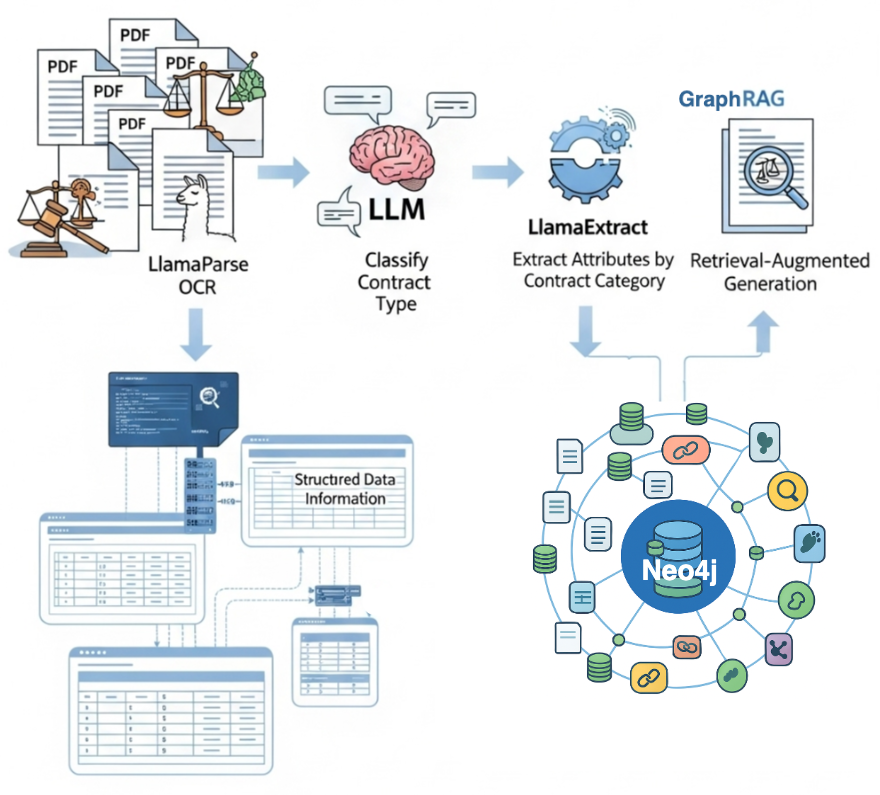
파이프라인 프로세스:
- LlamaParse를 사용해서 PDF 문서를 구문 분석하고 읽을 수 있는 텍스트를 추출해요.
- LLM을 사용해서 계약 유형을 분류하고 상황 인식 처리가 가능하게 만들어요.
- LlamaExtract를 활용해서 분류에 따라 각 특정 계약 범주에 맞는 다양한 관련 속성 세트를 추출해요.
- 구조화된 모든 정보를 Neo4j Knowledge Graph에 저장해서 법률 문서 내의 콘텐츠와 복잡한 관계를 모두 캡처하는 풍부하고 Query 가능한 표현을 만들어요.
코드는 LlamaIndex 요리책에서 확인할 수 있어요.
환경설정
이 코드를 실행하기 전에 LlamaCloud와 OpenAI에서 API 키를 설정해야 해요. Neo4j의 경우 가장 간단한 방법은 무료 Aura Database 인스턴스를 사용하는 거랍니다.
LlamaParse를 사용한 OCR
이 튜토리얼에서는 샘플 상업 계약을 분석할 건데요, 계약 이해 Atticus 데이터세트(CUAD)를 사용했어요.
이제 LlamaParse를 사용해서 계약 문서를 구문 분석하고 텍스트 콘텐츠를 추출하는 단계를 알아볼게요.
# Initialize parser with specified mode ```html# Initialize parser with specified mode
parser = LlamaParse(
api_key=llama_api_key,
parse_mode="parse_page_without_llm"
)
pdf_path = "CybergyHoldingsInc_Affliate Agreement.pdf"
results = await parser.aparse(pdf_path)코드는 LlamaParse 인스턴스를 생성하고 샘플 계약 PDF를 처리하는 내용이에요.
문서 분류
계약에서 관련 정보를 추출하기 전에 어떤 유형의 계약인지 알아야 해요. 계약 유형에 따라 조항 구조와 법적 정보가 다르기 때문에, 적절한 추출 스키마를 동적으로 선택하려면 계약 유형이 꼭 필요하죠.
openai_client = AsyncOpenAI(api_key=openai_api_key)

classification_prompt = """You are a legal document classification assistant.
Your task is to identify the most likely contract type based on the content of the first 10 pages of a contract.
Instructions:
Read the contract excerpt below.
Review the list of possible contract types.
Choose the single most appropriate contract type from the list.
Justify your classification briefly, based only on the information in the excerpt.

Contract Excerpt:
{contract_text}
Possible Contract Types:
{contract_type_list}

Output Format:
<Reason>brief_justification</Reason>
<ContractType>chosen_type_from_list</ContractType>
"""

async def classify_contract(contract_text: str, contract_types: list[str]) -> dict:
   prompt = classification_prompt.format(
       contract_text=file_content,
       contract_type_list=contract_types
   )
   history = [{"role": "user", "content": prompt}]
   response = await openai_client.responses.create(
       input=history,
       model="gpt-4o-mini",
       store=False,
   )
   return extract_reason_and_contract_type(response.output[0].content[0].text)
이 코드는 OpenAI 클라이언트를 설정하고, LLM에게 계약 분류 방법을 알려주는 프롬프트 템플릿과 실제 분류 프로세스를 처리하는 기능으로 구성된 분류 시스템을 만들어요.
이제 파싱된 계약 데이터를 사용해서 분류 프로세스를 실행해볼까요?
contract_types = ["Affiliate_Agreements", "Co_Branding", "Development"]
# Take only the first 10 pages for contract classification as input
file_content = " ".join([el.text for el in results.pages[:10]])

classification = await classify_contract(file_content, contract_types)
LlamaExtract를 사용한 추출
LlamaExtract는 AI 기반 스키마 기반 추출을 사용해서 비정형 문서를 정형 데이터로 변환해주는 클라우드 서비스예요.
스키마 정의
여기서는 두 가지 Pydantic 모델을 정의할 건데요. Location은 국가, 주, 주소에 대한 선택적 필드를 사용해서 구조화된 주소 정보를 캡처하고, Party는 필수 이름과 선택적 위치 세부 정보가 포함된 계약 당사자를 나타내요. 필드 설명은 각 필드에서 찾아야 할 정보를 LLM에 정확하게 알려줘서 추출 프로세스를 안내하는 데 도움이 된답니다.
class Location(BaseModel):
   """Location information with structured address components."""

   country: Optional[str] = Field(None, description="Country")
   state: Optional[str] = Field(None, description="State or province")
   address: Optional[str] = Field(None, description="Street address or city")


class Party(BaseModel):
   """Party information with name and location."""

   name: str = Field(description="Party name")
   location: Optional[Location] = Field(None, description="Party location details")
여러 계약 유형이 있기 때문에 각 유형에 대한 특정 추출 스키마를 정의하고, 분류 결과에 따라 적절한 스키마를 동적으로 선택하는 매핑 시스템을 만들어야 한다는 점을 기억하세요!
class BaseContract(BaseModel):
   """Base contract class with common fields."""
   parties: Optional[List[Party]] = Field(None, description="All contracting parties")
   agreement_date: Optional[str] = Field(None, description="Contract signing date. Use YYYY-MM-DD")
   effective_date: Optional[str] = Field(None, description="When contract becomes effective. Use YYYY-MM-DD")
   expiration_date: Optional[str] = Field(None, description="Contract expiration date. Use YYYY-MM-DD")
   governing_law: Optional[str] = Field(None, description="Governing jurisdiction")
   termination_for_convenience: Optional[bool] = Field(None, description="Can terminate without cause")
   anti_assignment: Optional[bool] = Field(None, description="Restricts assignment to third parties")
   cap_on_liability: Optional[str] = Field(None, description="Liability limit amount")

class AffiliateAgreement(BaseContract):
   """Affiliate Agreement extraction."""
   exclusivity: Optional[str] = Field(None, description="Exclusive territory or market rights")
   non_compete: Optional[str] = Field(None, description="Non-compete restrictions")
   revenue_profit_sharing: Optional[str] = Field(None, description="Commission or revenue split")
   minimum_commitment: Optional[str] = Field(None, description="Minimum sales targets")

class CoBrandingAgreement(BaseContract):
   """Co-Branding Agreement extraction."""
   exclusivity: Optional[str] = Field(None, description="Exclusive co-branding rights")
   ip_ownership_assignment: Optional[str] = Field(None, description="IP ownership allocation")
   license_grant: Optional[str] = Field(None, description="Brand/trademark licenses")
   revenue_profit_sharing: Optional[str] = Field(None, description="Revenue sharing terms")

mapping = {
   "Affiliate_Agreements": AffiliateAgreement,
   "Co_Branding": CoBrandingAgreement,
}
이 스키마 디자인에는 당사자 이름, 날짜, 부울 플래그 같은 구조화된 추출 필드뿐만 아니라 독점 조건, 수익 공유 계약, IP 소유권 세부 정보와 같은 복잡한 조항에 대한 요약과 비슷한 필드도 포함되어 있어요.
이제 구문 분석된 계약 텍스트와 정의된 스키마를 사용해서 구조화된 정보를 추출할 수 있어요. LlamaExtract는 전체 문서 콘텐츠를 분석하고 우리가 정의한 특정 필드를 가져오는 거죠.
extractor = LlamaExtract(api_key=llama_api_key)

agent = extractor.create_agent(
   name=f"extraction_workflow_import_{uuid.uuid4()}",
   data_schema=mapping[classification['contract_type']],
   config=ExtractConfig(
       extraction_mode=ExtractMode.BALANCED,
   ),
)

result = await agent.aextract(
   files=SourceText(
       text_content=" ".join([el.text for el in results.pages]),
       filename=pdf_path
   ),
)
Neo4j Knowledge Graph
마지막 단계는 추출된 구조화된 정보를 가져와 계약 엔터티 간의 관계를 나타내는 Knowledge Graph를 구축하는 거예요. Neo4j에서 계약 데이터를 Nodes와 Relationships로 구성하는 방법을 지정하는 그래프 모델을 정의해야 하죠.
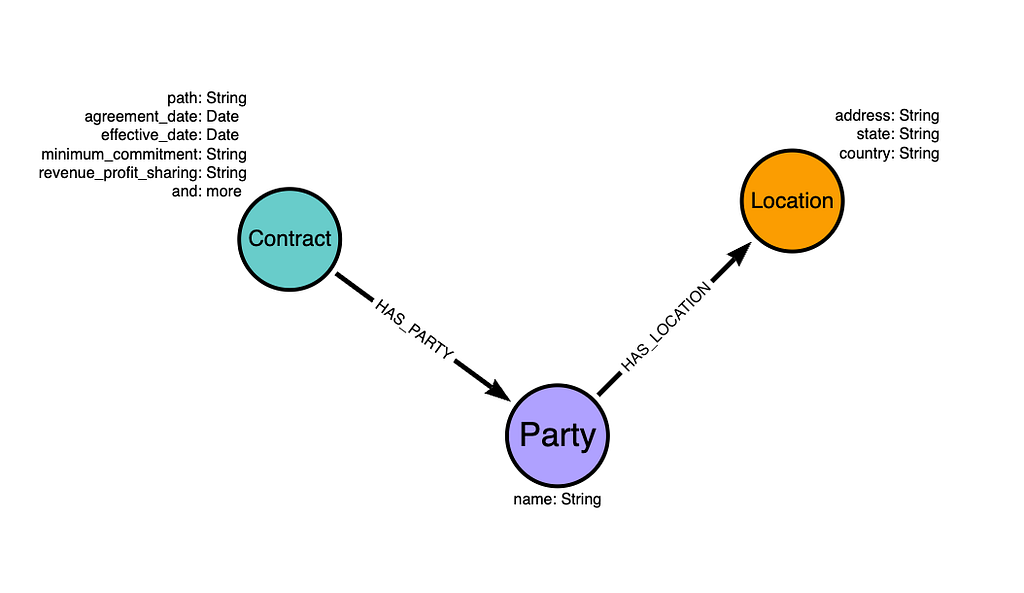
그래프 모델은 세 가지 주요 Node 유형으로 구성돼요.
- Node는 날짜, 조건, 법적 조항을 포함한 핵심 계약 정보를 저장해요.
- Node는 이름으로 계약 법인을 나타내죠.
- Node는 주소 구성 요소로 지리 정보를 캡처하고요.
이제 정의된 그래프 모델에 따라 추출된 계약 데이터를 Neo4j로 가져올 거예요.
import_query = """WITH $contract AS contract
MERGE (c:Contract {path: $path})
SET c += apoc.map.clean(contract, ["parties", "agreement_date", "effective_date", "expiration_date"], [])
// Cast to date
SET c.agreement_date = date(contract.agreement_date),
   c.effective_date = date(contract.effective_date),
   c.expiration_date = date(contract.expiration_date)
// Create parties with their locations
WITH c, contract
UNWIND coalesce(contract.parties, []) AS party
MERGE (p:Party {name: party.name})
MERGE (c)-[:HAS_PARTY]->(p)
// Create location nodes and link to parties
WITH p, party
WHERE party.location IS NOT NULL
MERGE (p)-[:HAS_LOCATION]->(l:Location)
SET l += party.location
"""

response = await neo4j_driver.execute_query(import_query, contract=result.data, path=pdf_path)
response.summary.counters
데이터를 가져온 후 Neo4j 그래프는 다음 이미지와 같을 거예요.

모든 것을 하나의 워크플로로 통합
마지막으로 이 모든 로직을 하나의 실행 가능한 에이전트 워크플로로 결합할 수 있어요. 단일 PDF를 승인하고 매번 Neo4j 그래프에 새 항목을 추가해서 워크플로가 실행되도록 만들어보죠.

이 워크플로를 생성하는 데 필요한 모든 코드는 해당 노트북에서 찾을 수 있어요. 코드 블록이 너무 길어서 이 게시물이 복잡해지지 않도록 코드는 그대로 두었어요.
워크플로는 단일 명령으로 모든 문서를 처리할 수 있도록 단순하게 설계되었답니다.
knowledge_graph_builder = KnowledgeGraphBuilder(
    parser=parser,
    affiliate_extract_agent=affiliage_extraction_agent,
    branding_extract_agent=cobranding_extraction_agent,
    classification_prompt=classification_prompt,
    timeout=None,
    verbose=True,
)

response = await knowledge_graph_builder.run(
    pdf_path="CybergyHoldingsInc_Affliate Agreement.pdf"
)
요약
기존의 Retrieval-Augmented Generation (RAG) 시스템은 문서 청크를 통한 Semantic Search에 의존하는데, 이 때문에 엔터티 간의 중요한 컨텍스트와 관계가 손실되는 경우가 많아요. 계약 데이터를 Knowledge Graph로 구성함으로써 계약, 당사자 및 위치가 어떻게 상호 연결되는지 이해하는 더욱 지능적인 검색 시스템을 만들 수 있죠. 구조화되지 않은 텍스트 조각을 검색하는 대신, Large Language Model (LLM)은 이제 정확한 엔터티 관계를 활용해서 "Cybergy Holdings와 계약한 모든 당사자의 위치는 어디인가?" 또는 "뉴욕에 있는 회사와 관련된 모든 제휴 계약을 보여줘."와 같은 복잡한 Query에 답할 수 있게 돼요.
코드는 LlamaIndex 요리책에서 확인할 수 있어요.
자원
- 개발자 가이드: Knowledge Graph 구축 방법
- Retrieval-Augmented Generation (RAG)이란 무엇인가?
- Knowledge Graph란 무엇인가?
- LlamaIndex 워크플로를 사용하여 Knowledge Graph 에이전트 구축
필수 GraphRAG
Knowledge Graph를 활용해서 RAG의 잠재력을 최대로 끌어올려 보세요! Manning에서 제공하는 가이드를 기간 한정으로 무료로 받을 수 있어요.
- GraphRAG
- LlamaIndex
- LlamaParse
에이치시스템즈의 LogTree는 Neo4j 기반 GraphRAG 플랫폼으로, 데이터를 자동으로 지식그래프화하고 자연어 질의로 즉시 답을 제공합니다.
'GraphRAG' 카테고리의 다른 글
| GenAI 그래프 수집 2.0: GraphRAG의 진화 (0) | 2026.05.02 |
|---|---|
| 클라우드에서 완성하는 풀 스택 그래프: Neo4j로 GraphRAG 마스터하기 (0) | 2026.05.01 |
| 그래프 기술로 사기 탐지: Neo4j와 GraphRAG 활용기 (0) | 2026.05.01 |
| Forrester Wave: GraphRAG, GenAI 정확도와 관련성을 뒤바꿀 게임 체인저 (0) | 2026.04.30 |
| 지식 그래프와 LLM: Fine-Tuning vs. Retrieval-Augmented Generation (GraphRAG) 완벽 비교 (1) | 2026.04.30 |