로컬 및 MCP 호스팅 도구를 에이전트에 통합하는 방법 알아보기
클라이언트와 협업하면서 자주 받는 질문 중 하나가 MCP 도구를 사용해서 에이전트를 설정하는 방법인데요. 이번 블로그에서는 간단하게 설명해 드릴게요. LangGraph를 사용하는 에이전트 예시인데, PyPI에 호스팅된 MCP 서버와 로컬에 정의된 도구를 Python으로 함께 사용해요. 이 예제는 Text2Cypher를 Neo4j Graph Database에 연결하도록 구축되었지만, 이 개념은 다른 에이전트나 MCP 서버에도 적용할 수 있어요.
바로 코드를 가져가고 싶다면 repo에서 시작해 보세요. 자세한 내용은 README에 에이전트를 로컬에 배포하는 방법이 안내되어 있어요. 아니면 여기서 좀 더 자세히 알아볼까요?
필요한 패키지는 나 pip를 사용해서 설치할 수 있는데, uv를 더 추천해요. 이 에이전트는 OpenAI LLM을 사용해서 만들어졌고, 그래서 OpenAI API key가 필요하지만, 원하는 LLM으로 바꾸는 것도 간단해요.
이 데모 에이전트를 실행하기 위해 여러분의 Neo4j 데이터베이스가 꼭 필요하지는 않아요. 제공된 연결 자격 증명은 공개적으로 접근 가능한 데모 영화 데이터베이스를 위한 것이거든요.
명령줄을 통해 에이전트를 실행하고 상호 작용할 수 있어요.
에이전트 아키텍처
에이전트는 LLM, prompt, tool이라는 세 가지 기본 구성 요소로 이루어져 있어요.
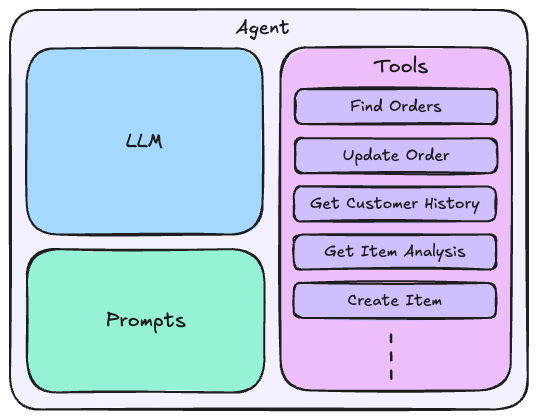
Tool은 MCP 서버에서 제공될 수도 있고, 코드 내에서 로컬로 정의될 수도 있어요. Tool이 잘 문서화되어 있다고 가정하면, 이러한 Tool을 효과적으로 사용하는 것은 prompt와 LLM의 책임이에요.
메시지는 에이전트가 어떻게 행동해야 하는지, 그리고 에이전트가 따라야 하는 구체적인 지침을 제공해야 해요.
LLM은 입력 질문에 답변하는 데 필요한 적절한 컨텍스트를 효과적으로 수집하기 위해 어떤 Tool을 실행할지 (필요한 경우 어떤 순서로) 지능적으로 결정할 수 있어야 하죠.
Neo4j Cypher MCP 서버
저희는 Neo4j Cypher MCP 서버를 일부 에이전트 Tool에 사용하고 있어요. Cypher는 Neo4j에서 사용하는 쿼리 언어예요. 이 서버는 다음 세 가지 Tool을 제공해요.
get_neo4j_schemaread_neo4j_cypherwrite_neo4j_cypher
저희 에이전트는 영화에 대한 사용자 질문을 해결하기 위해 Cypher 쿼리를 즉시 생성할 수 있어요. 데이터를 수정하는 데는 필요하지 않으므로 get_neo4j_schema와 read_neo4j_cypher 이 서버의 Tool을 사용하죠.
를 확인해서 이 MCP 서버에 대해 더 자세히 알아보세요.
대리인 코드
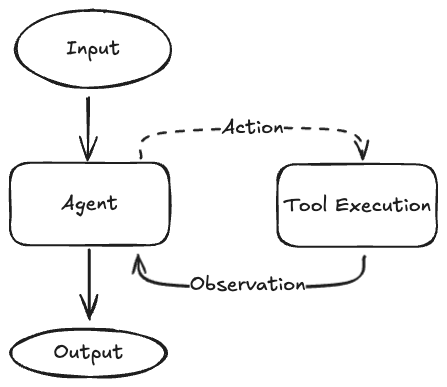
코드는 Agent.py 파일에 있어요. LangGraph를 사용해서 ReAct 에이전트를 구축하고, Neo4j Cypher MCP 서버의 Tool과 로컬로 정의된 다른 Tool을 사용해요. 에이전트는 새로운 Cypher 쿼리를 생성하거나 추천 검색 Tool을 사용해서 영화에 대한 사용자 질문에 답할 수 있어요. 명령줄을 통해 이 에이전트와 상호 작용할 수 있죠.
ReAct 에이전트는 간단한 프로세스를 따릅니다.
- 에이전트가 입력 질문을 받아요.
- 상담원은 질문에 답하기 위해 어떤 tool을 호출할지 결정해요.
- 상담사는 선택한 tool을 실행해요.
- tool 실행 결과는 context에 추가돼요.
- 에이전트는 업데이트된 context를 분석해요.
- 상담원이 질문에 답변할 적절한 context를 얻을 때까지 2~5단계를 반복해요.
- 사용자에게 최종 응답을 반환해요.
가져오기 및 설정
먼저 필요한 라이브러리를 가져와요. 주로 LangChain과 LangGraph를 우리 에이전트를 위해 사용할 거예요. MCP 구현은 MCP와 LangChain MCP 어댑터 라이브러리로 처리될 거예요.
import asyncio
import os
from typing import Any

from dotenv import load_dotenv
from langchain_core.messages import AnyMessage
from langchain_core.messages.utils import count_tokens_approximately, trim_messages
from langchain_core.tools import StructuredTool
from langchain_mcp_adapters.tools import load_mcp_tools
from langgraph.checkpoint.memory import InMemorySaver
from langgraph.prebuilt import create_react_agent
from langgraph.prebuilt.chat_agent_executor import AgentState

from mcp import ClientSession, StdioServerParameters
from mcp.client.stdio import stdio_client
from neo4j import GraphDatabase, RoutingControl
from pydantic import BaseModel, Field

if load_dotenv():
    print("Loaded .env file")
else:
    print("No .env file found")
로컬 tool 정의
다음 단계는 로컬 tool을 정의하는 거예요. 이건 우리 사용 사례에 맞는 영화 추천 검색 tool이에요. 이 tool 정의는 세 단계로 진행돼요.
먼저 tool이 선택되면 실행할 실제 기능을 정의해요. 이건 movie_title, min_user_rating, 그리고 limit를 인수로 사용하고 추천 정보가 포함된 Python 사전을 반환하는 간단한 Python 함수예요. 인수는 추천 영화를 식별하기 위해 그래프 순회를 사용하는 Cypher 쿼리에 매개변수로 삽입돼요.
def find_movie_recommendations(
    movie_title: str, min_user_rating: float = 4.0, limit: int = 10
) -> list[dict[str, Any]]:
    """
    Search the database movie recommendations based on movie title and rating criteria.
    """

    query = """
MATCH (target:Movie)
WHERE target.title = $movieTitle
MATCH (target)<-[r1:RATED]-(u:User)
WHERE r1.rating >= $minRating
MATCH (u)-[r2:RATED]->(similar:Movie)
WHERE similar <> target
  AND r2.rating >= $minRating
  AND similar.imdbRating IS NOT NULL
WITH similar, count(*) as supporters, avg(r2.rating) as avgRating
WHERE supporters >= 10
RETURN similar.title, similar.year, similar.imdbRating,
       supporters as people_who_loved_both,
       round(avgRating, 2) as avg_rating_by_target_lovers
ORDER BY supporters DESC, avgRating DESC
LIMIT $limit
    """

    driver = GraphDatabase.driver(
        os.getenv("NEO4J_URI"),
        auth=(os.getenv("NEO4J_USERNAME"), os.getenv("NEO4J_PASSWORD")),
    )

    results = driver.execute_query(
        query,
        parameters_={"movieTitle": movie_title, "minRating": min_user_rating, "limit": limit},
        database_=os.getenv("NEO4J_DATABASE"),
        routing_=RoutingControl.READ,
        result_transformer_=lambda r: r.data(),
    )
    return results
다음으로 우리는 Pydantic 객체를 사용해서 도구에 대한 입력 인수를 나타낼 거예요. 이렇게 하면 에이전트에 필요한 정보가 무엇인지 전달하고, 제공된 입력을 도구에 전달하기 전에 검증할 수 있죠.
예를 들어, min_user_rating 인수는 default, ge, 그리고 le 속성을 가지고 있어서 몇 가지 사항을 보장하는데요:
- 값을 제공하지 않으면 4.0이 사용돼요.
- 값은 0.5에서 5.0 사이여야 하고요.
class FindMovieRecommendationsInput(BaseModel):
    movie_title: str = Field(
        ...,
        description="The title of the movie to find recommendations for. If beginning with 'The', then will follow format of 'Title, The'.",
    )
    min_user_rating: float = Field(
        default=4.0,
        description="The minimum rating of the movie to find recommendations for. ",
        ge=0.5,
        le=5.0,
    )
    limit: int = Field(
        default=10,
        description="The maximum number of recommendations to return. ",
        ge=1,
    )
마지막으로 위의 정보를 결합해서 StructuredTool 객체를 생성하고, 이걸 에이전트에 노출할 거예요. 여기서는 func, args_schema, 그리고 return_direct만 사용하고 있어요.
이름 및 설명 인수는 find_movie_recommendations 함수에서 유추되고, 데모 목적으로 이 함수의 비동기 버전을 제공할 필요는 없어요 (코루틴 인수로 제공되거든요). return_direct는 원시 Cypher 결과를 사용자에게 직접 반환하고 싶지 않기 때문에 False로 설정할게요.
find_movie_recommendations_tool = StructuredTool.from_function(
    func=find_movie_recommendations,  #           -> The function that the tool calls when executed
    # name=...,                                   -> this is populated by the function name
    # description=...,                            -> this is populated by the function docstring
    args_schema=FindMovieRecommendationsInput,  # -> The input schema for the tool
    return_direct=False,  #                       -> Whether to return the raw result to the user
    # coroutine=...,                              -> An async version of the function
)
MCP 구현
여기서는 Neo4j Cypher MCP 서버를 사용해서 에이전트의 두 가지 도구, read_neo4j_cypher 와 get_neo4j_schema를 만들 거예요.
StdioServerParameters 객체를 사용해서 MCP 매개변수가 올바르게 구성되었는지 확인할 수 있어요. 에이전트가 액세스할 수 있도록 MCP 서버의 로컬 버전을 가동해야 하기 때문에 여기서는 stdio를 사용하고 있는 거고요.
여러 MCP 서버와 원격으로 호스팅되는 MCP 서버를 사용할 수도 있어요. 자세한 내용은 MCP 문서 와 LangChain MCP 어댑터 문서를 참고해주세요.
PyPI에서 호스팅되는 코드와 함께 MCP 서버를 사용하고 있으니까, uvx 명령을 사용해서 서버를 배포할 수 있어요. 이 명령은 uv 패키지 관리자가 제공하는 명령인데요, PyPI에서 서버 코드를 풀다운하고 백엔드에서 MCP 서버를 로컬로 호스팅해준답니다.
neo4j_cypher_mcp = StdioServerParameters(
    command="uvx",
    args=["mcp-neo4j-cypher@0.3.0", "--transport", "stdio"],
    env={
        "NEO4J_URI": os.getenv("NEO4J_URI"),
        "NEO4J_USERNAME": os.getenv("NEO4J_USERNAME"),
        "NEO4J_PASSWORD": os.getenv("NEO4J_PASSWORD"),
        "NEO4J_DATABASE": os.getenv("NEO4J_DATABASE"),
    },
)
기본 기능 내에는 MCP 서버를 로컬로 호스팅하고 액세스하기 위한 다음 코드가 있어요. 컨텍스트 관리자 내에서 MCP 도구에 액세스할 수 있고, 여기서는 사용하려는 두 가지 도구만 선택한 다음 로컬 find_movie_recommendations_tool을 도구 목록에 추가할 거예요:
async def main():
# start up the MCP server locally and run our agent
    async with stdio_client(neo4j_cypher_mcp) as (read, write):
        async with ClientSession(read, write) as session:
          # we can use the MCP server within this context manager

          # Initialize the connection
            await session.initialize()

            # Get tools
            mcp_tools = await load_mcp_tools(session)

            # We only need to get schema and execute read queries from the Cypher MCP server
            allowed_tools = [
                tool for tool in mcp_tools if tool.name in {"get_neo4j_schema", "read_neo4j_cypher"}
            ]

            # We can also add non-mcp tools for our agent to use
            allowed_tools.append(find_movie_recommendations_tool)

            # more code
            ...
최종 도구 목록에는 다음이 포함돼요.
get_neo4j_schemaread_neo4j_cypherfind_movie_recommendations
유틸리티 기능
에이전트에는 두 가지 유틸리티 기능이 있어요. 이 두 함수는 모두 LangGraph 문서를 기반으로 하며 아래 함수 독스트링에 있는 해당 페이지에서 더 자세히 살펴볼 수 있어요.
첫 번째는 pre_model_hook인데, 추론을 위해 LLM에 전달된 컨텍스트를 수정하는 데 사용돼요. 이 함수는 LLM이 호출될 때마다 실행되죠.
우리가 표시하는 것에 주목하세요 include_system 메시지 기록을 다듬을 때 True로 설정돼요. 이는 시스템 메시지에 LLM에게 작업 수행 방법을 지시하는 귀중한 정보가 포함되어 있기 때문이에요. 이 시스템 메시지를 포함하지 않으면 선언된 토큰 30,000개 창을 초과하여 컨텍스트가 커지면 결과가 감소할 수 있어요.
def pre_model_hook(state: AgentState) -> dict[str, list[AnyMessage]]:
    """
    This function will be called every time before the node that calls LLM.

    Documentation:
    https://langchain-ai.github.io/langgraph/how-tos/create-react-agent-manage-message-history/?h=create_react_agent

    Parameters
    ----------
    state : AgentState
        The state of the agent.

    Returns
    -------
    dict[str, list[AnyMessage]]
        The updated messages to pass to the LLM as context.
    """

    trimmed_messages = trim_messages(
        state["messages"],
        strategy="last",
        token_counter=count_tokens_approximately,
        max_tokens=30_000,
        start_on="human",
        end_on=("human", "tool"),
        include_system=True,  # -> We always want to include the system prompt in the context
    )
    # You can return updated messages either under:
    # `llm_input_messages` -> To keep the original message history unmodified in the graph state and pass the updated history only as the input to the LLM
    # `messages`           -> To overwrite the original message history in the graph state with the updated history
    return {"llm_input_messages": trimmed_messages}
두 번째는 print_astream인데, 대화 형식을 지정하고 명령줄에 인쇄하는 데 사용돼요.
async def print_astream(async_stream, output_messages_key: str = "llm_input_messages") -> None:
    """
    Print the stream of messages from the agent.

    Based on the documentation:
    https://langchain-ai.github.io/langgraph/how-tos/create-react-agent-manage-message-history/?h=create_react_agent#keep-the-original-message-history-unmodified

    Parameters
    ----------
    async_stream : AsyncGenerator[dict[str, dict[str, list[AnyMessage]]], None]
        The stream of messages from the agent.
    output_messages_key : str, optional
        The key to use for the output messages, by default "llm_input_messages".
    """

    async for chunk in async_stream:
        for node, update in chunk.items():
            print(f"Update from node: {node}")
            messages_key = output_messages_key if node == "pre_model_hook" else "messages"
            for message in update[messages_key]:
                if isinstance(message, tuple):
                    print(message)
                else:
                    message.pretty_print()

        print("\n\n")
에이전트 생성
위의 코드가 준비되면 ReAct 에이전트를 만드는 건 간단해요.
시스템 프롬프트에서는 Cypher 생성 오류를 처리하는 방법과 사용자에게 응답하는 방법에 대한 간략한 지침을 제공하고 있어요.
SYSTEM_PROMPT = """You are a Neo4j expert that knows how to write Cypher queries to address movie questions.
As a Cypher expert, when writing queries:
* You must always ensure you have the data model schema to inform your queries
* If an error is returned from the database, you may refactor your query or ask the user to provide additional information
* If an empty result is returned, use your best judgement to determine if the query is correct.

If using a tool that does NOT require writing a Cypher query, you do not need the database schema.

As a well respected movie expert:
* Ensure that you provide detailed responses with citations to the underlying data"""
LangGraph에 내장된 `create_react_agent` 함수를 사용해서 에이전트를 초기화할 수 있어요. 여기서는 OpenAI GPT-4.1을 사용하고 있지만, 원한다면 다른 LLM으로 교체할 수도 있고요. 이를 위해서는 공급자의 LangChain 인터페이스 라이브러리를 설치해야 할 수도 있어요.
async def main():
    # start up the MCP server locally and run our agent
    async with stdio_client(neo4j_cypher_mcp) as (read, write):
        async with ClientSession(read, write) as session:
            # hidden code
            ...

            # Create and run the agent
            agent = create_react_agent(
                "openai:gpt-4.1",  #              -> The model to use
                allowed_tools,  #                 -> The tools to use
                pre_model_hook=pre_model_hook,  # -> The function to call before the model is called
                checkpointer=InMemorySaver(),  #  -> The checkpoint to use
                prompt=SYSTEM_PROMPT,  #          -> The system prompt to use
            )
대화 루프
다음은 사용자가 에이전트에 텍스트 입력을 제공하고 대화 내용을 명령줄에 출력할 수 있게 해주는 코드예요. exit, quit, or q를 입력해서 채팅 세션을 종료할 수 있고요. thread_id에서 CONFIG 변수를 사용하면 에이전트가 `InMemorySaver` 검사 포인터를 사용해서 대화 상태를 유지할 수 있어요.
CONFIG = {"configurable": {"thread_id": "1"}}

async def main():
    # start up the MCP server locally and run our agent
    async with stdio_client(neo4j_cypher_mcp) as (read, write):
        async with ClientSession(read, write) as session:
            # hidden code
            ...

            # conversation loop
            print(
                "\n===================================== Chat =====================================\n"
            )

            while True:
                user_input = input("> ")
                if user_input.lower() in {"exit", "quit", "q"}:
                    break

                await print_astream(
                    agent.astream({"messages": user_input}, config=CONFIG, stream_mode="updates")
                )
에이전트 실행
마지막으로 에이전트를 실행할 수 있어요.
uv run python3 agent.py
# or
python3 agent.py
그러면 명령줄에서 채팅 세션이 시작될 거예요.
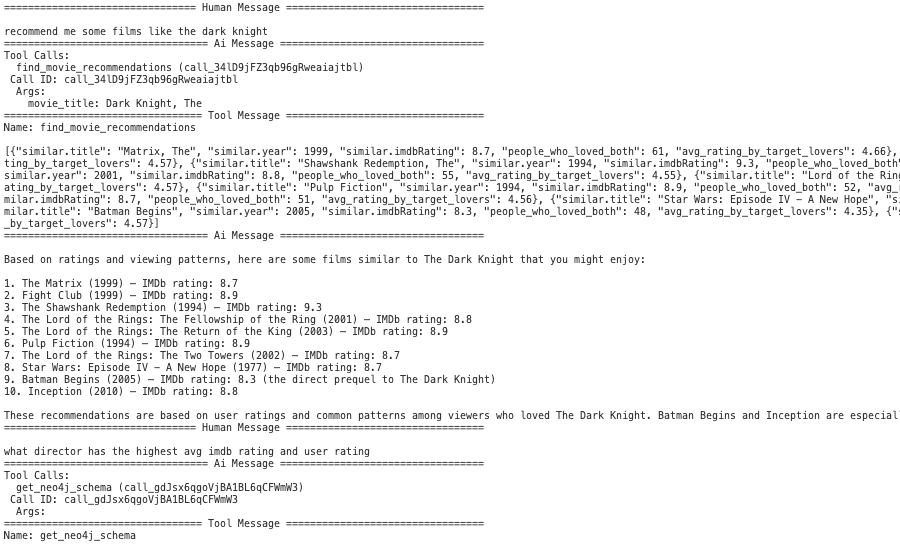
에이전트가 요청에 맞는 도구를 잘 선택하는지 확인해 보세요. 여기서는 추천을 찾아야 할 때 find_movie_recommendations 도구를 사용하네요.
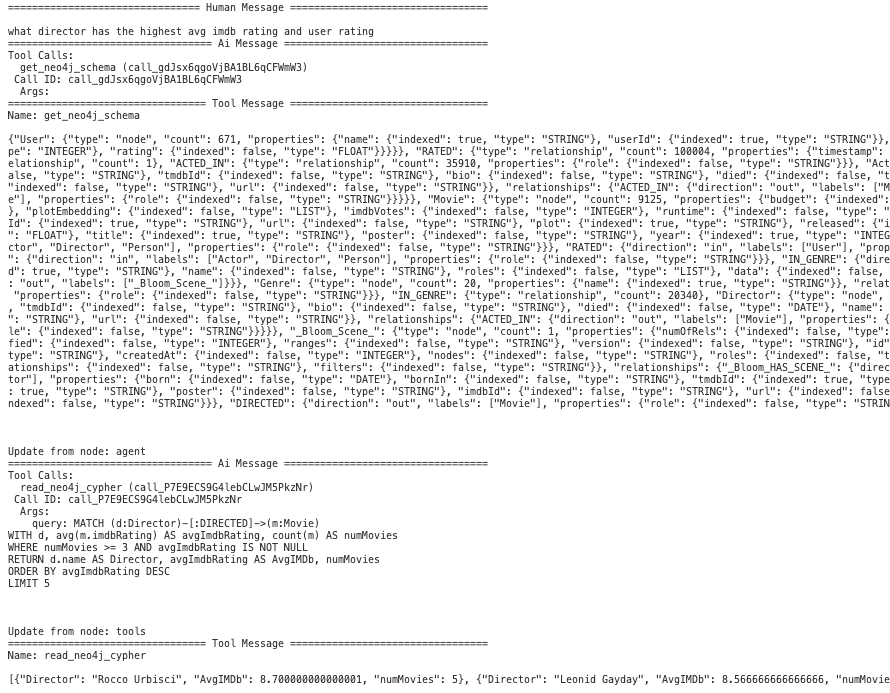
그리고 여기서는 get_neo4j_schema와 read_neo4j_cypher를 사용해서 데이터베이스를 쿼리하기 위한 새로운 Cypher를 생성해야 할 때네요. 쿼리를 생성하기 전에 먼저 그래프 스키마를 검색하는 것을 볼 수 있어요.
요약
This repo는 주로 LangGraph와 Neo4j Cypher MCP 서버를 사용해서 구현된 간단한 ReAct 에이전트를 제공해요. 사용하기 쉬운 채팅 인터페이스에서 PyPI 호스팅 MCP 서버 도구와 로컬 도구를 에이전트와 통합하는 방법을 보여주죠. 이 저장소는 쉽게 수정할 수 있도록 만들어졌고, 다른 에이전트 구현을 위한 템플릿이 될 수 있어요.
다른 Neo4j 데이터베이스에 대해 이 저장소를 수정하려면:
- .env 파일을 수정해서 Neo4j 연결 자격 증명을 설정하세요.
find_movie_recommendationstool을 제거하세요.- 시스템 프롬프트의 영화 전문가 섹션을 수정하세요.
다른 저장소를 위해 이 저장소를 수정하려면 (비 Neo4j 구현):
- .env 파일을 수정하세요.
- Neo4j Cypher MCP 서버 구성 및 도구를 교체하세요.
find_movie_recommendationstool을 제거하세요.- 시스템 프롬프트를 수정하세요.
필수 GraphRAG
Knowledge Graph를 통해 RAG의 잠재력을 최대한 활용하세요. 한정된 기간 동안 Manning으로부터 최종 가이드를 무료로 받아보세요.
리소스
- Neo4j Graph Database를 위한 MCP(Model Context Protocol) 통합
- Graph Database란 무엇일까요?
- Neo4j 데이터 모델링 MCP 서버 살펴보기
- Neo4j Cypher 쿼리 언어
- AI 에이전트
- LangGraph
- mcp 서버